(Created page with '__NOTOC__ Revamp the UX of connecting and disconnecting to sites, adding chrome-level knobs to give the user a consistent point to view and control sign-in status to the current…') |
(→TODO) |
||
| (19 intermediate revisions by 4 users not shown) | |||
| Line 1: | Line 1: | ||
__NOTOC__ | __NOTOC__ | ||
The Account Manager project aims to help users manage the (currently manual and tedious) process of signing up/in/out of sites by adding chrome-level status and knobs to give the user a consistent point to view and control of sign-in status to the current site. | |||
The project has two main deliverables: | |||
# A protocol definition that sites can use to define their account-and-session management features in a format a web browser can understand. (Check out [[Labs/Weave/Identity/Account_Manager/Spec/Latest|the latest draft]] of the specification, or [[Labs/Weave/Identity/Account_Manager/Spec|older versions]]). | |||
# An implementation of this protocol in Firefox. | |||
This project is a reboot of the [[Labs/Weave/Identity/Account_Manager|Account Manager]] Labs project, see that page for more background information. | This project is a reboot of the [[Labs/Weave/Identity/Account_Manager|Account Manager]] Labs project, see that page for more background information. | ||
| Line 7: | Line 11: | ||
= Drivers = | = Drivers = | ||
* [mailto:thunder@mozilla.com Dan Mills] | * [mailto:thunder@mozilla.com Dan Mills] | ||
* [mailto:faaborg@mozilla.com Alex Faaborg] | * [mailto:mardak@mozilla.com Ed Lee] | ||
* [mailto:faaborg@mozilla.com Alex Faaborg] | |||
* [mailto:thunder@mozilla.com?subject=I%20want%20to%20help! You!] | * [mailto:thunder@mozilla.com?subject=I%20want%20to%20help! You!] | ||
= Status = | = Status = | ||
;Overview | |||
<onlyinclude>See {{bug|571409}}</onlyinclude>. | |||
Account Manager is currently a patch to mozilla-central, and is being targeted at the first release post 4.0. | |||
Note that there is an add-on prototype (the result of the Labs exploration), but it is buggy and speaks an older version of the Account Manager protocol. It is not recommended for testing, use try-server builds instead. | |||
;Performance Impact | |||
Currently around 1.3% on average: | |||
linux: 1.7% | |||
lin64: 2.4% | |||
macos: 0.2% | |||
mac64: 2.0% | |||
winxp: 1.3% | |||
win 7: 0.5% | |||
;[[Firefox/Projects/AccountManager/SecurityReview|Security Review]] | |||
In progress on Sept 1 3pm | |||
= Helping Out = | |||
First, see [[Firefox/Projects/AccountManager/CodeOverview|here]] for a quick walk-through of the code. That will tell you what's what and help you get started. | |||
Then see the TODO section on this page for open items to work on. | |||
Thanks! | |||
= TODO = | |||
;User facing features | |||
* autoconnect [~2d] | |||
* multi-profile sign-in bubbles [~1d] | |||
* federated profile [~3d] | |||
* HTTP Auth profile | |||
* right click menu (fast user switching) | |||
* basic in-content registration [a few days' work] | |||
;Backend features | |||
* cookie-watching (refresh status on cookie changes) [~1day] | |||
* per-method static parameters (for forms that use a hidden param to determine action) | |||
* per-method dynamic parameters (for e.g. CSRF protection) | |||
;Password manager integration | |||
* {{bug|589362}} | |||
* use new password manager columns for account lookup/saving | |||
** migration (set account realm for existing saved logins) [~1 day] | |||
** also on password manager end (when saving new password) [~1 day (dolske?)] | |||
;Security fixes | |||
* shouldn't support http form auth transparently without more warning | |||
* explicitly only allow http/https realm uri (and not ftp, etc) | |||
* only allow https realms from https requests | |||
* login csrf: amcd enforces where it can be used on which sites | |||
* login csrf: link header URI needs to be restricted to the site | |||
* make sure Link header URI and host-meta URI aren't conflicting if header is missing ? | |||
* STS support - should Just Work, but test that requests get upgraded correctly | |||
* ensure that SSL cert errors are handled appropriately | |||
= | = Requirements = | ||
* | * Status display | ||
* | ** Unregistered, signed-out, and signed-in for supported sites [P1] | ||
* | ** Notifications of site requests for sign-in [P3] | ||
* | |||
* | * Sign-up support | ||
* | ** New id+secret pair negotiation [P1] | ||
** Automatic password generation [P1] | |||
** Optional feature to allow user-defined passwords [P1] | |||
** Remember preferred email and username(s) [P1] | |||
* Sign-in support | |||
** Request existing user credentials for new/unknown sites [P1] | |||
** Two-click sign-in [P1] | |||
** Optional automatic sign-in on next session [P2] | |||
** Support for multiple accounts [P1] | |||
* Sign-out support | |||
** Two-click sign-out [P1] | |||
* Password change | |||
** User-initiated password change [P2] | |||
*** To a new random password [P3] | |||
*** To a new user-defined password [P2] | |||
* Support for various authentication types | |||
** Form submission/cookie [P1] | |||
** HTTP Basic auth [P1] | |||
** HTTP Digest auth [P2] | |||
** Client certs [P3] | |||
* Supports sync if installed [P1] | |||
* Disables itself during private browsing mode [P1] | |||
= Non-Goals = | = Non-Goals = | ||
| Line 30: | Line 122: | ||
* Extensive hacking on Password Manager-like heuristics to make it only sort of work on more sites. | * Extensive hacking on Password Manager-like heuristics to make it only sort of work on more sites. | ||
= Dependencies = | = Dependencies = | ||
Generally speaking: | |||
* Password manager | |||
* Theme work, site button in particular | |||
* Notifications, to a lesser extent | |||
= Mockups = | |||
[[File:Account manager i2.png|200px|thumb|left|Iteration 2]] | |||
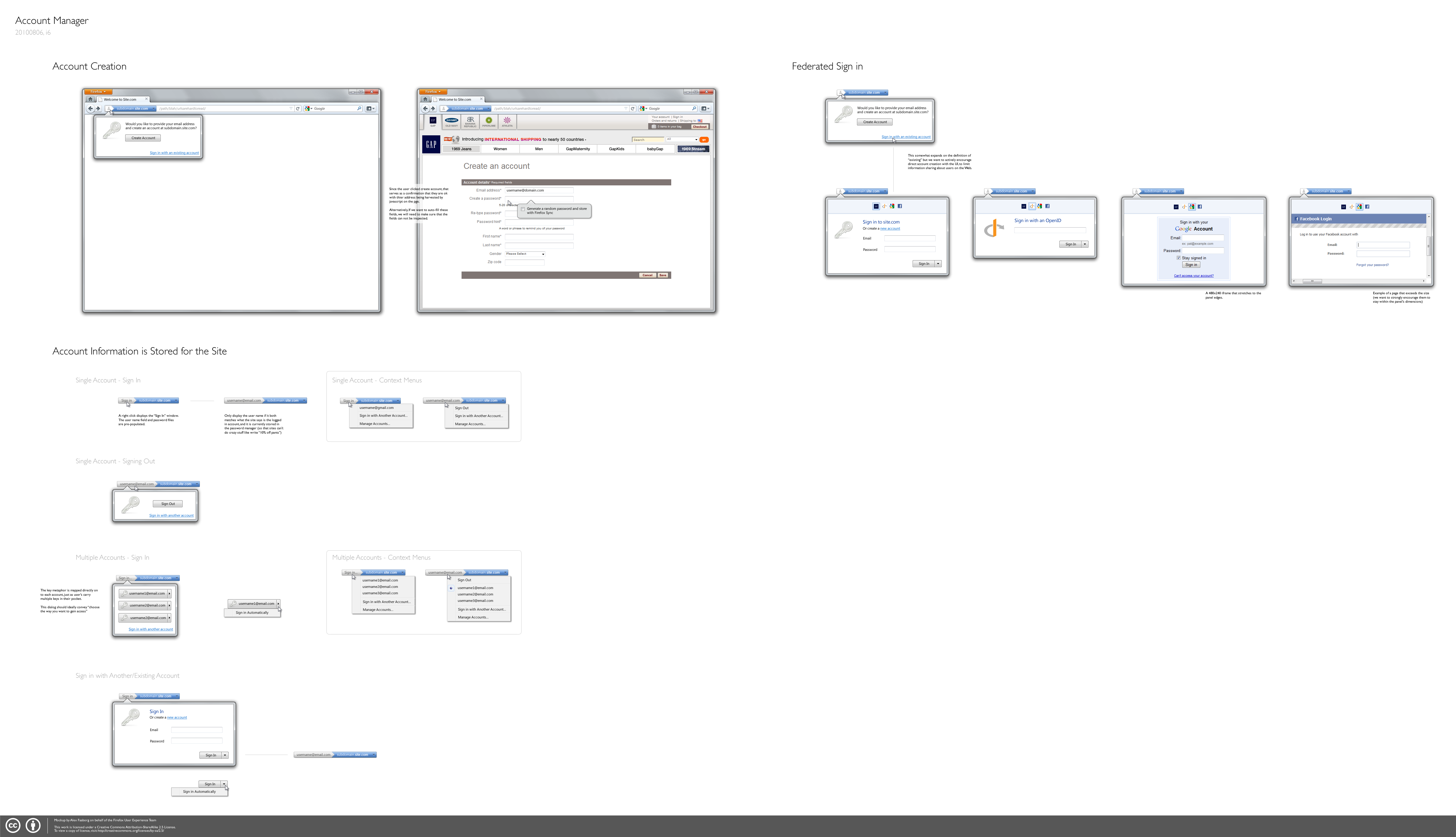
[https://wiki.mozilla.org/images/e/e2/Account_manager_i6.png Iteration 6] (direct link - doesn't thumbnail correctly). | |||
<br clear="all"/> | |||
= Related Projects / Other Links = | |||
* [[Firefox/Projects/SiteIdentity|Site Identity]] | |||
* [[Labs/Weave/Identity/Account_Manager|Account Manager Labs project]] | * [[Labs/Weave/Identity/Account_Manager|Account Manager Labs project]] | ||
* [https://groups.google.com/group/mozilla-labs-online-identity?pli=1 Google Group] | |||
We held an in-person meetup on May 21st, see: | |||
* [[Firefox/Projects/AccountManager/Meetup|The meetup page]] (with notes). | |||
* [[Firefox/Projects/AccountManager/Meetup/Analysis|Distilled analysis]] from discussions at the meetup. | |||
Latest revision as of 23:26, 8 September 2010
The Account Manager project aims to help users manage the (currently manual and tedious) process of signing up/in/out of sites by adding chrome-level status and knobs to give the user a consistent point to view and control of sign-in status to the current site.
The project has two main deliverables:
- A protocol definition that sites can use to define their account-and-session management features in a format a web browser can understand. (Check out the latest draft of the specification, or older versions).
- An implementation of this protocol in Firefox.
This project is a reboot of the Account Manager Labs project, see that page for more background information.
Drivers
Status
- Overview
See bug 571409.
Account Manager is currently a patch to mozilla-central, and is being targeted at the first release post 4.0.
Note that there is an add-on prototype (the result of the Labs exploration), but it is buggy and speaks an older version of the Account Manager protocol. It is not recommended for testing, use try-server builds instead.
- Performance Impact
Currently around 1.3% on average:
linux: 1.7%
lin64: 2.4%
macos: 0.2%
mac64: 2.0%
winxp: 1.3%
win 7: 0.5%
In progress on Sept 1 3pm
Helping Out
First, see here for a quick walk-through of the code. That will tell you what's what and help you get started.
Then see the TODO section on this page for open items to work on.
Thanks!
TODO
- User facing features
- autoconnect [~2d]
- multi-profile sign-in bubbles [~1d]
- federated profile [~3d]
- HTTP Auth profile
- right click menu (fast user switching)
- basic in-content registration [a few days' work]
- Backend features
- cookie-watching (refresh status on cookie changes) [~1day]
- per-method static parameters (for forms that use a hidden param to determine action)
- per-method dynamic parameters (for e.g. CSRF protection)
- Password manager integration
- bug 589362
- use new password manager columns for account lookup/saving
- migration (set account realm for existing saved logins) [~1 day]
- also on password manager end (when saving new password) [~1 day (dolske?)]
- Security fixes
- shouldn't support http form auth transparently without more warning
- explicitly only allow http/https realm uri (and not ftp, etc)
- only allow https realms from https requests
- login csrf: amcd enforces where it can be used on which sites
- login csrf: link header URI needs to be restricted to the site
- make sure Link header URI and host-meta URI aren't conflicting if header is missing ?
- STS support - should Just Work, but test that requests get upgraded correctly
- ensure that SSL cert errors are handled appropriately
Requirements
- Status display
- Unregistered, signed-out, and signed-in for supported sites [P1]
- Notifications of site requests for sign-in [P3]
- Sign-up support
- New id+secret pair negotiation [P1]
- Automatic password generation [P1]
- Optional feature to allow user-defined passwords [P1]
- Remember preferred email and username(s) [P1]
- Sign-in support
- Request existing user credentials for new/unknown sites [P1]
- Two-click sign-in [P1]
- Optional automatic sign-in on next session [P2]
- Support for multiple accounts [P1]
- Sign-out support
- Two-click sign-out [P1]
- Password change
- User-initiated password change [P2]
- To a new random password [P3]
- To a new user-defined password [P2]
- User-initiated password change [P2]
- Support for various authentication types
- Form submission/cookie [P1]
- HTTP Basic auth [P1]
- HTTP Digest auth [P2]
- Client certs [P3]
- Supports sync if installed [P1]
- Disables itself during private browsing mode [P1]
Non-Goals
- Greasemonkey-like hacks that work only on one site, except as needed only to demonstrate the potential for the feature.
- Creating new and interesting authentication/authorization schemes.
- Extensive hacking on Password Manager-like heuristics to make it only sort of work on more sites.
Dependencies
Generally speaking:
- Password manager
- Theme work, site button in particular
- Notifications, to a lesser extent
Mockups

Iteration 6 (direct link - doesn't thumbnail correctly).
Related Projects / Other Links
We held an in-person meetup on May 21st, see:
- The meetup page (with notes).
- Distilled analysis from discussions at the meetup.