Icons instead tags
Status
| Icons or text tags instead of color tags | |
| Stage | Feature Inbox |
| Status | ` |
| Release target | ` |
| Health | OK |
| Status note | ` |
{{#set:Feature name=Icons or text tags instead of color tags
|Feature stage=Feature Inbox |Feature status=` |Feature version=` |Feature health=OK |Feature status note=` }}
Team
| Product manager | ` |
| Directly Responsible Individual | ` |
| Lead engineer | ` |
| Security lead | ` |
| Privacy lead | ` |
| Localization lead | ` |
| Accessibility lead | ` |
| QA lead | ` |
| UX lead | ` |
| Product marketing lead | ` |
| Operations lead | ` |
| Additional members | ` |
{{#set:Feature product manager=`
|Feature feature manager=` |Feature lead engineer=` |Feature security lead=` |Feature privacy lead=` |Feature localization lead=` |Feature accessibility lead=` |Feature qa lead=` |Feature ux lead=` |Feature product marketing lead=` |Feature operations lead=` |Feature additional members=` }}
Open issues/risks
`
Stage 1: Definition
1. Feature overview
In my previous post I proposed to put colored numbers (representing the color tagged emails)after each folder from TB's left menu https://wiki.mozilla.org/Tagged_emails_name_and_count_after_the_foldernames This proposal would be an additional feature.
The problem: Color tags look simple but when you have multiple colors, than you don't remember the meaning for all of them. For example I remember that red tagged emails are important, and green ones financial emails, but I forgot what are the blue for.
The solution: Use icons instead of color tags OR use text tags.
For icon tags see the attached image:
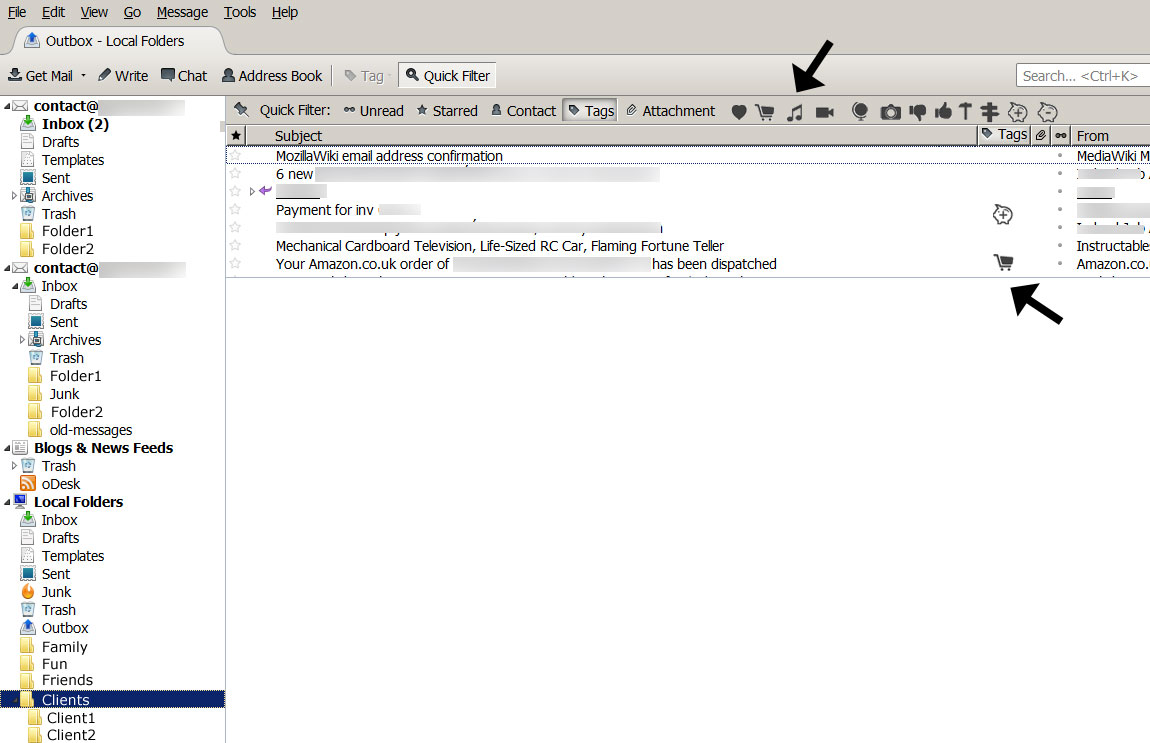
2. Users & use cases
For example when I make my tax, I have to check my emails to see when money came in and when went out. For this I would make 2 icons (see image with pig icon) or simply I would create two text tag "money in" "money out" Than I would tag all the important emails accordingly and when I would need than I can find it better.
Another example: When I have to make an invoice for a client I have to check the exact sum in my proposal. I always spend a lot of time finding these emails. In this case a text tag would be more useful, like "proposal"
Another example and feature proposal: some email have different level of importance, and some of them has to be resolved in 2 days, we could have an icon or text tag with "date awareness" and could appear near the folder name, and you can see, that you have 3 important emails to resolve/answer today.
3. Dependencies
`
4. Requirements
`
Non-goals
`
Stage 2: Design
5. Functional specification
`
6. User experience design
`
Stage 3: Planning
7. Implementation plan
`
8. Reviews
Security review
`
Privacy review
`
Localization review
`
Accessibility
`
Quality Assurance review
`
Operations review
`
Stage 4: Development
9. Implementation
`
Stage 5: Release
10. Landing criteria
` {{#set:Feature open issues and risks=` |Feature overview=In my previous post I proposed to put colored numbers (representing the color tagged emails)after each folder from TB's left menu https://wiki.mozilla.org/Tagged_emails_name_and_count_after_the_foldernames This proposal would be an additional feature.
The problem: Color tags look simple but when you have multiple colors, than you don't remember the meaning for all of them. For example I remember that red tagged emails are important, and green ones financial emails, but I forgot what are the blue for.
The solution: Use icons instead of color tags OR use text tags.
For icon tags see the attached image:
|Feature users and use cases=For example when I make my tax, I have to check my emails to see when money came in and when went out. For this I would make 2 icons (see image with pig icon) or simply I would create two text tag "money in" "money out" Than I would tag all the important emails accordingly and when I would need than I can find it better.
Another example: When I have to make an invoice for a client I have to check the exact sum in my proposal. I always spend a lot of time finding these emails. In this case a text tag would be more useful, like "proposal"
Another example and feature proposal: some email have different level of importance, and some of them has to be resolved in 2 days, we could have an icon or text tag with "date awareness" and could appear near the folder name, and you can see, that you have 3 important emails to resolve/answer today. |Feature dependencies=` |Feature requirements=` |Feature non-goals=` |Feature functional spec=` |Feature ux design=` |Feature implementation plan=` |Feature security review=` |Feature privacy review=` |Feature localization review=` |Feature accessibility review=` |Feature qa review=` |Feature operations review=` |Feature implementation notes=` |Feature landing criteria=` }}
Feature details
| Priority | P3 |
| Rank | 999 |
| Theme / Goal | ` |
| Roadmap | Thunderbird |
| Secondary roadmap | Add-ons |
| Feature list | Thunderbird |
| Project | ` |
| Engineering team | ` |
{{#set:Feature priority=P3
|Feature rank=999 |Feature theme=` |Feature roadmap=Thunderbird |Feature secondary roadmap=Add-ons |Feature list=Thunderbird |Feature project=` |Feature engineering team=` }}
Team status notes
| status | notes | |
| Products | ` | ` |
| Engineering | ` | ` |
| Security | ` | ` |
| Privacy | ` | ` |
| Localization | ` | ` |
| Accessibility | ` | ` |
| Quality assurance | ` | ` |
| User experience | ` | ` |
| Product marketing | ` | ` |
| Operations | ` | ` |
{{#set:Feature products status=`
|Feature products notes=` |Feature engineering status=` |Feature engineering notes=` |Feature security status=` |Feature security health=` |Feature security notes=` |Feature privacy status=` |Feature privacy notes=` |Feature localization status=` |Feature localization notes=` |Feature accessibility status=` |Feature accessibility notes=` |Feature qa status=` |Feature qa notes=` |Feature ux status=` |Feature ux notes=` |Feature product marketing status=` |Feature product marketing notes=` |Feature operations status=` |Feature operations notes=` }}