Tagged emails name and count after the foldernames
Status
| Tagged emails name and count after the foldernames | |
| Stage | Feature Inbox |
| Status | In progress |
| Release target | Firefox 17 |
| Health | OK |
| Status note | ` |
{{#set:Feature name=Tagged emails name and count after the foldernames
|Feature stage=Feature Inbox |Feature status=In progress |Feature version=Firefox 17 |Feature health=OK |Feature status note=` }}
Team
| Product manager | ` |
| Directly Responsible Individual | ` |
| Lead engineer | ` |
| Security lead | ` |
| Privacy lead | ` |
| Localization lead | ` |
| Accessibility lead | ` |
| QA lead | ` |
| UX lead | ` |
| Product marketing lead | ` |
| Operations lead | ` |
| Additional members | ` |
{{#set:Feature product manager=`
|Feature feature manager=` |Feature lead engineer=` |Feature security lead=` |Feature privacy lead=` |Feature localization lead=` |Feature accessibility lead=` |Feature qa lead=` |Feature ux lead=` |Feature product marketing lead=` |Feature operations lead=` |Feature additional members=` }}
Open issues/risks
`
Stage 1: Definition
1. Feature overview
How I use Thunderbird: When I got to many emails and don't have time to "resolve" (but I don't like to let them checked "unread") them so I tag them, than later, when I have time, I come back and start to resolve the most important ones (tagged red), than the less important ones(tagged orange) and so on..
The problem: I have more than 30 folders, and if I want to check if I have unresolved issues, than I have to go to every folder one by one, press quick filter, press tags and see if I have tagged emails.
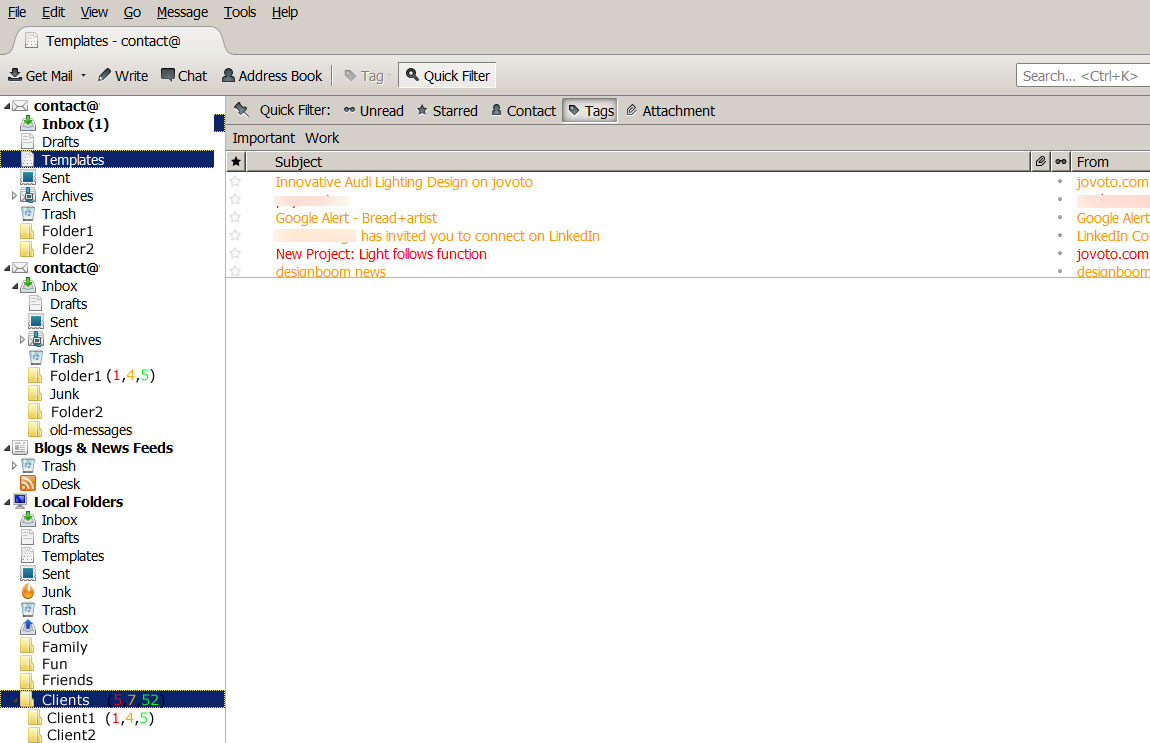
The solution (see image):
You could put colored numbers after each folder (representing color tagged emails), so when I open TB, than I can see, that I have 2 red email from client "X" (to resolve urgently). It would be very useful from time management and usability point of view to see without one click the situation and approximate the time necessary to resolve.
2. Users & use cases
`
3. Dependencies
`
4. Requirements
`
Non-goals
`
Stage 2: Design
5. Functional specification
`
6. User experience design
`
Stage 3: Planning
7. Implementation plan
`
8. Reviews
Security review
`
Privacy review
`
Localization review
`
Accessibility
`
Quality Assurance review
`
Operations review
`
Stage 4: Development
9. Implementation
`
Stage 5: Release
10. Landing criteria
` {{#set:Feature open issues and risks=` |Feature overview=How I use Thunderbird: When I got to many emails and don't have time to "resolve" (but I don't like to let them checked "unread") them so I tag them, than later, when I have time, I come back and start to resolve the most important ones (tagged red), than the less important ones(tagged orange) and so on..
The problem: I have more than 30 folders, and if I want to check if I have unresolved issues, than I have to go to every folder one by one, press quick filter, press tags and see if I have tagged emails.
The solution (see image):
You could put colored numbers after each folder (representing color tagged emails), so when I open TB, than I can see, that I have 2 red email from client "X" (to resolve urgently). It would be very useful from time management and usability point of view to see without one click the situation and approximate the time necessary to resolve.
|Feature users and use cases=`
|Feature dependencies=`
|Feature requirements=`
|Feature non-goals=`
|Feature functional spec=`
|Feature ux design=`
|Feature implementation plan=`
|Feature security review=`
|Feature privacy review=`
|Feature localization review=`
|Feature accessibility review=`
|Feature qa review=`
|Feature operations review=`
|Feature implementation notes=`
|Feature landing criteria=`
}}
Feature details
| Priority | P3 |
| Rank | 999 |
| Theme / Goal | ` |
| Roadmap | Thunderbird |
| Secondary roadmap | Add-ons |
| Feature list | Thunderbird |
| Project | ` |
| Engineering team | UX |
{{#set:Feature priority=P3
|Feature rank=999 |Feature theme=` |Feature roadmap=Thunderbird |Feature secondary roadmap=Add-ons |Feature list=Thunderbird |Feature project=` |Feature engineering team=UX }}
Team status notes
| status | notes | |
| Products | ` | ` |
| Engineering | ` | ` |
| Security | ` | ` |
| Privacy | ` | ` |
| Localization | ` | ` |
| Accessibility | ` | ` |
| Quality assurance | ` | ` |
| User experience | ` | ` |
| Product marketing | ` | ` |
| Operations | ` | ` |
{{#set:Feature products status=`
|Feature products notes=` |Feature engineering status=` |Feature engineering notes=` |Feature security status=` |Feature security health=` |Feature security notes=` |Feature privacy status=` |Feature privacy notes=` |Feature localization status=` |Feature localization notes=` |Feature accessibility status=` |Feature accessibility notes=` |Feature qa status=` |Feature qa notes=` |Feature ux status=` |Feature ux notes=` |Feature product marketing status=` |Feature product marketing notes=` |Feature operations status=` |Feature operations notes=` }}