Firefox/Projects/Doorhanger notifications: Difference between revisions
Jump to navigation
Jump to search
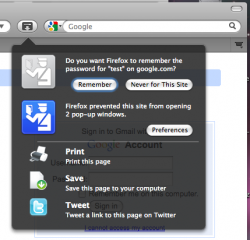
(→Design: added improved screenshot) |
m (replace broken image link) |
||
| Line 1: | Line 1: | ||
{{ | {{draft}} | ||
The goal is to redesign notifications to address various issues with them and provide a unified action/notification area for them. | The goal is to redesign notifications to address various issues with them and provide a unified action/notification area for them. | ||
| Line 13: | Line 13: | ||
== Design == | == Design == | ||
[[Image:Doorhanger_notifications_proto1.png|Prototype 1 with temporary artwork|right|250px]] | |||
A new actions button will provide access to all of the notifications. The notifications will drop down from it. Following the notifications, static actions will follow after a separator. | A new actions button will provide access to all of the notifications. The notifications will drop down from it. Following the notifications, static actions will follow after a separator. | ||
| Line 20: | Line 21: | ||
* a button for affirmative action | * a button for affirmative action | ||
Non-critical notifications will be dismissed (fade out) when focus is lost. If multiple notifications occur at once, they will overlap | Non-critical notifications will be dismissed (fade out) when focus is lost. If multiple notifications occur at once, they will overlap. | ||
== Notification Uses == | == Notification Uses == | ||
Revision as of 21:17, 3 June 2009


The goal is to redesign notifications to address various issues with them and provide a unified action/notification area for them.
Issues with current notification bars
- Pushes content down
- Hangs around on the same domain
- Visual distraction
- Once dismissed, they cannot reappear
- Cannot show multiple notifications at once
- Phishing is possible since notification bar appears within the content so it can be faked
- Action taken on a bar cannot easily be canceled/undone
Design

A new actions button will provide access to all of the notifications. The notifications will drop down from it. Following the notifications, static actions will follow after a separator.
Each notification will have:
- a large icon on the left
- a question
- a button for affirmative action
Non-critical notifications will be dismissed (fade out) when focus is lost. If multiple notifications occur at once, they will overlap.
Notification Uses
Examples taken from existing notification bars and dialogs:
- Password manager
- Popup blocker
- Offline storage
- Geolocation
- Firefox updates
- Extension updates
- ...
Static Actions
Possible static actions:
- Default Options
- Save
- Extension examples
- Share
- Tweet
- Inspect