Features/Mobile/webapps
| Feature | Status | ETA | Owner |
| Web Apps integration in Firefox for Android | Design and implementation - figuring out user interaction and implementing visual changes | 2011-09-01 | Thomas Arend
|
Summary
Webapps integration on mobile has (or can have) three principal components:
- The ability, within Firefox, for a user to designate a particular website or webapp as having "app status." In desktop Firefox, the analagous action results in the creation of an App Tab (though there are future plans to have the designation mean more than simply a pinned tab).
- Apps should be available for launch, at which point they come up in chromeless instance of Firefox. Two possibilities for where they are available are: 1. on the desktop, like other apps, or 2. within a Firefox Android desktop widget.
- The surfacing of launchpoints, within Firefox itself, in some visually distinct way of sites/apps the user has designated as apps.
Along side of this, there is the issue of handling apps that are installed (i.e. web apps with manifests, etc.) from the web or a webapp store.
Team
Who's working on this?
- Feature Manager: Mark Finkle
- Lead Developer: Fabrice Desre, Mark Finkle
- Product Manager: Thomas Arend
- QA: Tony Chung
- UX: Madhava Enros
- Accessibility: David Bolter
- Security:
- Privacy:
Release Requirements
See Bug 584767
Next Steps & Open Issues
- Implement the frontend pieces to expose webapps in Firefox for Android (find more mocks below):
- Complete UI design concept
- Implement and review UI design
- Sync with Appetizer team
- Feature implementation
- add an "Install web app" entry in the site menu when not in a web app
- handle a --webapp switch on the command line
- minimize the chrome when in web app mode. The icon is still clickable to show the site menu.
- new "Set Page as Web App" entry in the site menu
- "See all Web Apps" entry in the awesomscreen
- A list-oriented display of the web apps.- new "Set Page as Web App" entry in the site menu
- "See all Web Apps" entry in the awesomscreen
- A list-oriented display of the web apps.
- do not go fullscreen on maemo so the normal maemo application bar is used across the top
- completely hide the fennec URL bar
- no site menu at all
Related Bugs & Dependencies
See Bug 584767
Risks
Note that the awesomescreen is changing, very soon: https://wiki.mozilla.org/Mobile/Projects/AwesomeScreen2.0
Use Cases
- Frequent use of a certain site makes the user want to allow quick access to it (i.e. not through the browser)
- Frequent use of a certain site make the user want to switch back and forth to it using the system app switching mechanism
- User installs a webapp (i.e. one with a manifest) as an explicit action and then wants to launch and use that webapp
Designs
Case 1 - Enabling designation of an "app"
A user should be able to say "I would like to treat this site as an app", most likely from the Site button.
Prototype patches:
- screenshot of very rough site menu with "Install as app" item
- screenshot of confirmation / permissions granting dialog


Older designs
Case 2 - Launching apps on Android
Android Widget
The concept here is for an Android-native Firefox widget to be installed with Firefox. It would placed on the Android desktop and could house the icons for installed/designated webapps (as well as potentially other Firefox capabilities like awesomebar suggestions).
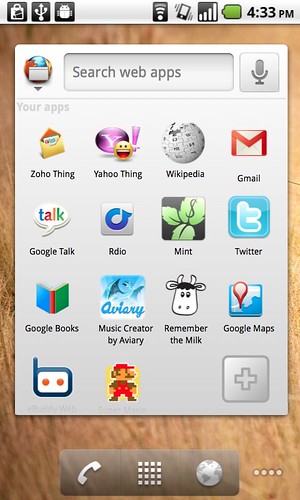
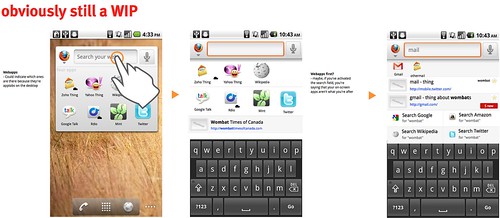
Open question: How much of awesomebar capability should be available through the widget?
More here: http://www.flickr.com/photos/madhava_work/sets/72157625893411005/
Direct launch from Android Desktop
The design, in this case, is clear -- icons based on high-res-as-available versions of the site favicon, directly on the desktop.
Case 3 - Apps available in the browser
Even if installed/designated apps are made available on the desktop or in a desktop widget, there is still value to them being synced and being findable in the browser itself. The awesomescreen and tab area are two possibilities. We're exploring the former more vigorously.
This could include:
- An icon to show which awesomebar results are designated as apps (like icons right now indicate which results are open in a tab or are bookmarks)
- An awesomescreen category of just apps
- Apps bubbling up in the pre-typing awesomescreen list, given higher scores as bookmarks get right now
older designs
These are old - do not implement!

Test Plans
- tbd
Goals
The high level goals for the feature is to expose web apps to users of Firefox for Android. Users should be able to access their apps, to discover new apps, and to have a seemless online apps experience across de
Non-Goals
Other Stuff
Legend (remove if you like)