Labs/Ubiquity/Locked-Down Feed Tutorial: Difference between revisions
(Linked to subscription successful image) |
(added another section) |
||
| Line 3: | Line 3: | ||
== Introduction == | == Introduction == | ||
Locked-Down Feeds are just one way to write functionality that can be used | Locked-Down Feeds, or LD Feeds, are just one way to write functionality that can be used from anywhere. The advantage of of this kind of feed is that all code is run in a very restricted sandbox that has minimal access to the outside environment—for instance, it can't access the network or the local filesystem. This means that subscribing to such feeds is worry-free: unlike regular command feeds, there's no [[Media:Warning.PNG|scary warning page]] to read. Instead, subscribing to a LD Feed results in the following unintrusive confirmation: | ||
from anywhere. The advantage of of this kind of feed is that all code is run | |||
in a very restricted sandbox that has minimal access to the outside environment—for instance, it can't access the network or the local filesystem. This means that subscribing to such feeds is worry-free: unlike regular command feeds, there's no [[Media:Warning.PNG|scary warning page]] to read. Instead, subscribing to a | |||
http://www.toolness.com/images/20090317100145.jpg | http://www.toolness.com/images/20090317100145.jpg | ||
The downside, of course, is that this safety comes at the cost of flexibility: put simply, you can't do nearly as much with | The downside, of course, is that this safety comes at the cost of flexibility: put simply, you can't do nearly as much with LD Feeds as you can with regular feeds, but it can still be used to make a variety of useful commands. | ||
== A Lot Like Regular Feeds == | |||
LD Feeds are best thought of as a strict subset of regular feeds. For instance, commands are created using <code>CmdUtils.CreateCommand()</code> and <code>displayMessage()</code> works too, so the code for our "Hello World" example is exactly the same as in our [[Labs/Ubiquity/Ubiquity_Source_Tip_Author_Tutorial#Using_CreateCommand|Author Tutorial]]: | |||
<pre> | |||
CmdUtils.CreateCommand({ | |||
name: "hello-world", | |||
execute: function() { | |||
displayMessage("Hello, World!"); | |||
} | |||
}); | |||
</pre> | |||
The only thing we really need to change is to tell Ubiquity that it should interpret the code as a LD Feed instead of a regular one. You can do this in Ubiquity's built-in command editor by specifying "locked-down-commands" in the feed type drop-down menu. When [[Labs/Ubiquity/Ubiquity_Source_Tip_Author_Tutorial#Sharing_it_with_the_World|sharing it with the world]], you use a value of <code>locked-down-commands</code> for the <code>rel</code> attribute in the <code>link</code> tag: | |||
<pre> | |||
<link rel="locked-down-commands" href="http://path-to-js" name="Title Goes Here" /> | |||
</pre> | |||
== External Resources == | == External Resources == | ||
Revision as of 17:23, 17 March 2009
Back to Labs/Ubiquity.
Introduction
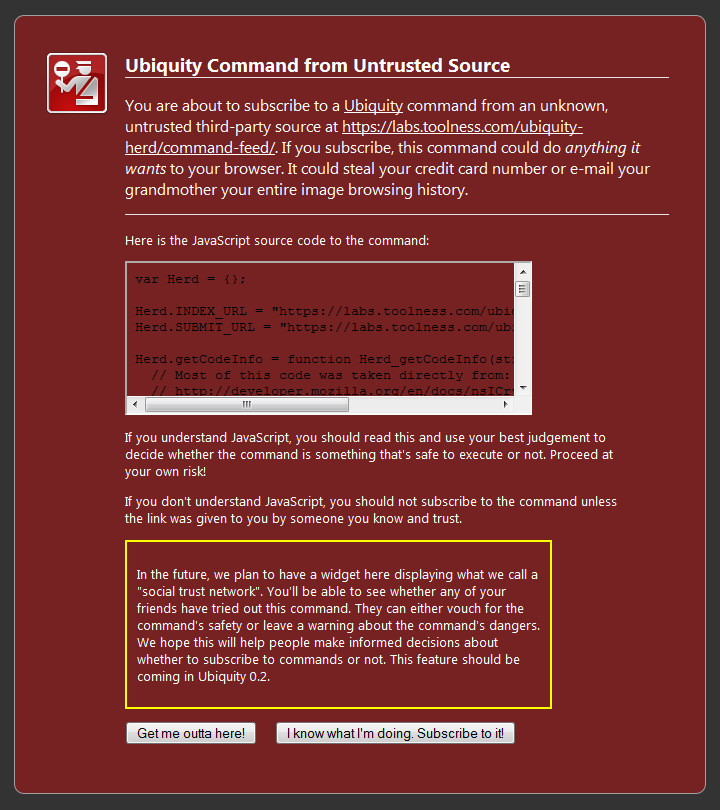
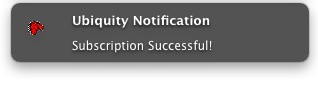
Locked-Down Feeds, or LD Feeds, are just one way to write functionality that can be used from anywhere. The advantage of of this kind of feed is that all code is run in a very restricted sandbox that has minimal access to the outside environment—for instance, it can't access the network or the local filesystem. This means that subscribing to such feeds is worry-free: unlike regular command feeds, there's no scary warning page to read. Instead, subscribing to a LD Feed results in the following unintrusive confirmation:
The downside, of course, is that this safety comes at the cost of flexibility: put simply, you can't do nearly as much with LD Feeds as you can with regular feeds, but it can still be used to make a variety of useful commands.
A Lot Like Regular Feeds
LD Feeds are best thought of as a strict subset of regular feeds. For instance, commands are created using CmdUtils.CreateCommand() and displayMessage() works too, so the code for our "Hello World" example is exactly the same as in our Author Tutorial:
CmdUtils.CreateCommand({
  name: "hello-world",
  execute: function() {
    displayMessage("Hello, World!");
  }
});
The only thing we really need to change is to tell Ubiquity that it should interpret the code as a LD Feed instead of a regular one. You can do this in Ubiquity's built-in command editor by specifying "locked-down-commands" in the feed type drop-down menu. When sharing it with the world, you use a value of locked-down-commands for the rel attribute in the link tag:
<link rel="locked-down-commands" href="http://path-to-js" name="Title Goes Here" />