Session Restore: Difference between revisions
(→Implementation: Data location added) |
(→Preferences: source pointing to Trunk, some prefs added) |
||
| Line 29: | Line 29: | ||
== Preferences == | == Preferences == | ||
See [http:// | See [http://mxr.mozilla.org/mozilla-central/source/browser/app/profile/firefox.js#750 the source] for currently available settings and their default values. | ||
* browser.sessionstore.enabled (bool) - Activate the service. Default is true. | * browser.sessionstore.enabled (bool) - Activate the service. Default is true. May not appear in about:config until changed. | ||
* browser.sessionstore.interval (integer) - minimal interval between saving operations in milliseconds. Default is 10000. | |||
* browser.sessionstore.max_resumed_crashes (integer) - Number of crashes that can occur before the about:sessionrestore page is displayed. Default is 1. So the user is asked after the second crash which pages he wants to restore. | |||
* browser.sessionstore.resume_from_crash (bool) - Resume sessions post-crash. Default is true. | * browser.sessionstore.resume_from_crash (bool) - Resume sessions post-crash. Default is true. | ||
* browser.sessionstore.resume_session_once (bool) - Resume session at the next application start, but not again. Default is false. This is used for restarting the browser after application updates and extension installation. | * browser.sessionstore.resume_session_once (bool) - Resume session at the next application start, but not again. Default is false. This is used for restarting the browser after application updates and extension installation. | ||
* browser.startup.page (int) - What is displayed when | * browser.startup.page (int) - What is displayed when Browser starts: 0 = blank page; 1 = homepage; 3 = previous session. Default is 1. (Note: Firefox exposes this preference in the Startup section of the Main pane of the Options/Preferences dialog.) | ||
= Technical Design = | = Technical Design = | ||
Revision as of 20:11, 10 August 2009
Please comment in the Talk page (use the Discussion tab above)
Goals & Objectives
After a forced restart, restore the user's workspace exactly as it was.
Overview
The state of various window, tab and user-data will be saved, and reloaded upon application start. The feature will be passive, reacting only to forced-restarts such as extension installation and crashes. This minimal implementation provides an unobtrusive user-experience while meeting the broadest use-cases. The API will provide a stable and intuitive base which power-user oriented extensions, or expanded features in future releases, can build upon.
Features
- Save data for each window and tab (P1)
- Automatically restore the session data upon restarting from a forced closure (P1)
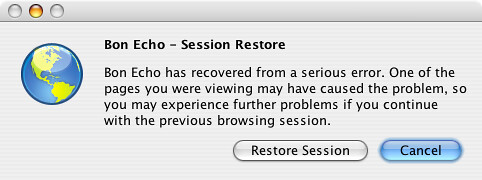
- If post-crash, allow the user to choose whether to restore (P1)
- Allow the user to "undo" closing a tab or window (P2)
UI
- Prompt for restore upon application start, post-crash.
Usage and Configuration
The default settings will restore the session after a crash and previous history will be restored to a certain point.
Preferences
See the source for currently available settings and their default values.
- browser.sessionstore.enabled (bool) - Activate the service. Default is true. May not appear in about:config until changed.
- browser.sessionstore.interval (integer) - minimal interval between saving operations in milliseconds. Default is 10000.
- browser.sessionstore.max_resumed_crashes (integer) - Number of crashes that can occur before the about:sessionrestore page is displayed. Default is 1. So the user is asked after the second crash which pages he wants to restore.
- browser.sessionstore.resume_from_crash (bool) - Resume sessions post-crash. Default is true.
- browser.sessionstore.resume_session_once (bool) - Resume session at the next application start, but not again. Default is false. This is used for restarting the browser after application updates and extension installation.
- browser.startup.page (int) - What is displayed when Browser starts: 0 = blank page; 1 = homepage; 3 = previous session. Default is 1. (Note: Firefox exposes this preference in the Startup section of the Main pane of the Options/Preferences dialog.)
Technical Design
Implementation
The feature is implemented as an XPCOM service. It registers for events such as windows and tab open/close, collects the current state of the browser, and periodically writes that state to disk.
- Code location: http://lxr.mozilla.org/seamonkey/source/browser/components/sessionstore/
- Data location: File sessionstore.js in profile directory, backup in sessionstore.bak
Data to be saved
- All open windows and tabs
- Width, height, and position of each window
- Scroll position within each scrollable area in each window
- Tab histories
- Cookies
- Text typed in forms
- Restart downloads
API
The API should allow session information to be easily accessed by extensions. An extension could store session info on a remote server, and allow users to restore the same session from multiple computers. This is currently a feature of the SessionSaver extension that doesn't really fit into the core browser.
The API details and discussion are at SessionRestoreAPI.
Privacy
Currently, the saved session data is cleared at shutdown, except in scenarios where the feature has been directed to intentionally save it, which are:
- The application crashed
- A forced restart, such as extension install or application update
- The user has chosen to always resume sessions
The saved session data is also cleared upon receiving the "browser:purge-session-history" notification.
The data is stored on disk as a serialized javascript data structure (though it's possible that it will be converted to JSON once that becomes natively supported by Gecko/Spidermonkey). An open question is to whether this should be encrypted in some manner. See the Discussion page for more ideas about this.
To-do
- Implement undo close window
- Implement user saving/loading of sessions
- Can we use FastBack data to speed up undo close tab/window?
Unresolved Questions
- Storing cookies: Is it okay to persist cookies that are supposed to expire when the session ends? What about SSL cookies?
- If we store cookies, should they also be stored when the user manually saves a session?
- GET URLs: Bad things can happen if we reload a URL with a GET request that has side-effects. This has definitely been a problem for Google Web Accelerator.
Do we ever want to store cached copies of the pages (i.e. for offline access) or do we just store the URLs and load them all? Loading from cache would be snappier. If any caching is done, should obey whatever caching directives.- Pages are currently pulled from the browser cache, if available.
Make sure that if the state of the current session crashes the browser, it doesn't reload at startup and crash over and over again. Look into how SessionSaver and Total Recall detect this.- If the previous session crashed, the user is prompted with a choice as to whether to reload it.
- If there are multiple windows open, how do we decide what was the last session? The last window closed, or the last group of windows?
- Should form state include saving checkbox and selectbox state as well as text input?
Misc
- [Ooops, this doesn't work, the softlink is deleted and replaced by the file.]
If you are unfortunate to be using one of the older Firefox 2.0 versions on Solaris, setting browser.sessionstore.enable to false may not work. A workaround is to cd to the directory containing your prefs.js, delete sessionstore.js, and then make a symbolic link named sessionstore.js that points to /dev/null. This fools Firefox into believing there are no saved sessions.
Relevant Bugs
Current implementation:
Older:
Relevant Extensions
- MultiZilla's Tab Session Manager
- Session-Saver
- Tab Mix Plus
- Crash Recovery / Session Manager
- Total Recall
Other Features
Some features that should be either P2, FF3 or left to extensions:
- Allow the user to �save�? a particular session at any time, and load saved sessions either by default at startup or from a menu
- Allow the user to choose which pages to restore, post-crash