Customizable Toolbar: Difference between revisions
Jump to navigation
Jump to search
mNo edit summary |
No edit summary |
||
| Line 1: | Line 1: | ||
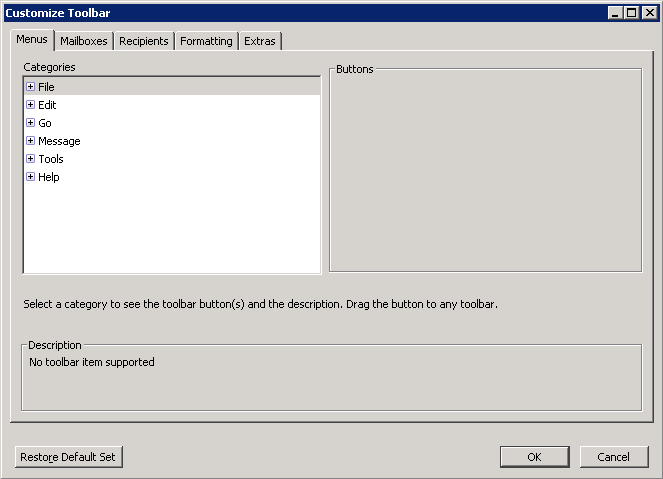
The Customize Toolbar window is organized into a series of tabbed categories to manage the vast number of buttons at your disposal. These buttons can be dragged to the toolbar and arranged in any order desired. | |||
[[File:Customize_toolbar_window.png|center]] | |||
== Tabs and Their Contents == | |||
* Menus | |||
:::Functions found in the menus. | |||
* Mailboxes | |||
:::Buttons to open mailboxes or transfer messages into them. See [[Mailbox_and_Transfer_menus_and_buttons| Mailbox and Transfer buttons]] for more information. | |||
* Recipients | |||
:::Add contacts from your Address Book(s) to the toolbar. | |||
* Formatting | |||
:::Buttons related to formatting the toolbar. | |||
* Extras | |||
:::Buttons that don't fit neatly into any of the previous categories. | |||
Revision as of 19:53, 15 September 2009
The Customize Toolbar window is organized into a series of tabbed categories to manage the vast number of buttons at your disposal. These buttons can be dragged to the toolbar and arranged in any order desired.

Tabs and Their Contents
- Menus
- Functions found in the menus.
- Mailboxes
- Buttons to open mailboxes or transfer messages into them. See Mailbox and Transfer buttons for more information.
- Recipients
- Add contacts from your Address Book(s) to the toolbar.
- Formatting
- Buttons related to formatting the toolbar.
- Extras
- Buttons that don't fit neatly into any of the previous categories.