Webmaker/pet website: Difference between revisions
< Webmaker
Jump to navigation
Jump to search
No edit summary |
No edit summary |
||
| Line 4: | Line 4: | ||
</div> | </div> | ||
<div style="width:80%;display:block;"> | <div style="width:80%;display:block;"> | ||
People aren't the only species that need to be conscious of their web presence, make your pet a webpage. | |||
'''Step 1:'''Dive into | '''Step 1:'''Dive into [https://www.scrollkit.com/s/6034 existing episode] and check out the examples by clicking the right arrow tab in the page. It works just like a slide show. | ||
'''Step 2:''' | '''Step 2:''' Once you reach the end of the examples, click the "+ add to the scroll" button. | ||
'''Step 3:''' | '''Step 3:''' Start editing | ||
* | *Upload pictures of your pet | ||
* | *Add GIFs | ||
* | *Bring their personality to the web | ||
'''Step 4:''' | '''Step 4:''' Publish | ||
'''Step 5:''' | '''Step 5:''' [http://take-a-screenshot.org/ Take a screenshot of your work]. Tweet your screenshot with the #scrollpet hashtag. | ||
</div> | </div> | ||
</div> | </div> | ||
Revision as of 20:37, 3 July 2012
Make Your Pet a Webpage
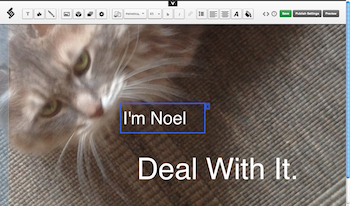
People aren't the only species that need to be conscious of their web presence, make your pet a webpage.
Step 1:Dive into existing episode and check out the examples by clicking the right arrow tab in the page. It works just like a slide show.
Step 2: Once you reach the end of the examples, click the "+ add to the scroll" button.
Step 3: Start editing
- Upload pictures of your pet
- Add GIFs
- Bring their personality to the web
Step 4: Publish
Step 5: Take a screenshot of your work. Tweet your screenshot with the #scrollpet hashtag.