Mozparty/Host/Hack Jam
Jump to navigation
Jump to search


Walk through a recommended agenda

Introducing Thimble:
    Thimble makes it ridiculously simple to create your own web pages.
    Write and edit HTML and CSS right in your browser.
    Instantly preview your work. Share your finished pages!
Learn HTML fast by making your own web page — 5min

- This starter project helps you play around with the most common HTML elements and tags using a simple side-by-side visual editor.
- Open the project.
- Read through the comments in the left-sided pane.
- Click on some of the HTML tags (marked between < >) to get oriented to the code.
- Try changing the words in between the h2 tags.
- Replace the link on line 47.
- You're ready for more advanced projects!
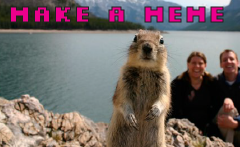
Make a meme — 10min

- You might be familiar with these funny memes? This project makes it easy for you to create your own memes by mashing up text and images.
- Open the project.
- Change the title of the page by editing the text on line 24.
- Search for a funny photo online. Copy the URL of the image.
- Replacing the link on line 32 with your new URL.
- Now edit the text between the h1 and the h2 tags to give your image a new caption.
- Change the color of the page on line 51.
- If you want, you can keep adjusting the page by editing the other attributes.
- Press "Publish" in the top left-hand corner. Share your work!
Awesome Animal Builder — 15min

- Create you own unique, weird and totally bizarre Awesome Animal.
- Open the project.
- Scroll down to see what animals exist already. Do you want to borrow parts from them?
- Change line 36 from "changeme" to "rainforest.
- Modify the links on line 41 by copying parts from the animals at the bottom of the page.
- For example, change unknown.png to solenodon-tail.png
- Edit the text starting on line 53 to describe the new animal.
- Press "Publish" in the top left-hand corner. Share your work!
More Thimble projects.
- There are many more projects for different skill-levels and interests. Keep hacking!
- Create your own project.
- Or schedule another kitchen table event to do more.
Other tools?
- What do you like to use?
- Anyone thinking of doing something different?
Questions & Troubleshooting
- Troubleshooting your issues and questions.
- How to get live support.
- If anyone wants to talk one-on-one, just email michelle - at - mozillafoundation - . - org.
Talk about next steps
- Best practices for sharing what you made.
- Getting participant feedback, including a survey about Thimble.
- Plan the next one!
Happy Hacking!
Blog posts from past kitchen table events
- Kitchen table betatesters
- Kitchen Table Beta with Adults
- Family Kitchen Table
- Kitchen Table Betatesting
- Kitchen Table Event in Bangalore
Hack Jam Host Training

What is a Hack Jam?
Make something! Team up to transform your ideas into real world solutions.
   10 - 50 participants
   1 - 2 days
   At a school, office or open space
- Define an interesting challenge or question to explore.
- Team up different skill-sets to brainstorm solutions.
- Collaboratively build a 'minimum viable prototype' to demonstrate your idea.
Introduction
- Who's on the call?
- Where are you from?
- Where are you planning to host your event?
What would you like to leave the call with today?
- Participant Responses.
Overview
- Welcome from Mozilla
- Update on Summer Code Party
- Goals of the campaign & individual parties
Guest speaker
- Discussion with a veteran Kitchen Table host from the community.
- Note: some calls may not have guest speakers.
- Hear about their experience, challenges and lessons learned.
- Questions?
- Walk through a recommended Hack Jam agenda.
- Troubleshooting your issues and questions.
- How to get live support.
- Discussion about crafting a design challenge.
- How to engage your participants before the event.
- Effective ways to team up and collaborate on hack jam projects.
- What is a "minimum viable prototype"?
- Try out some tools to help you make things on the web.
- Thimble
- Popcorn Maker
- Other tools? What do you like to use?
- Talk about next steps.
- Best practices for sharing what you made.
- How to get participant feedback about your event.
- Planning the next one.
Happy Hacking!
- Blog posts from past Hack Jams: