Auto-tools/Projects/Autophone/Autophone for developers
Introduction
Autophone is a test framework for Firefox for Android (Fennec) which runs tests on actual Android devices. Autophone is currently used to measure page and web application load performance and to test video playback in Fennec.
Autophone is unlike most test frameworks at mozilla. It runs on a small number of unreliable devices and only tests builds from mozilla-central, mozilla-inbound, fx-team and b2g-inbound. Due to these limitations, Autophone test results on Treeherder are hidden by default and test failures detected by Autophone will not be backed out by the sheriffs. In addition to reporting pass/fail results to Treeherder, Autophone reports performance measurements for page and web application loading to phonedash, a flot based web application, which displays performance graphs for each of the devices.
Autophone source is hosted on github.com.
Tests
Autophone currently runs:
| smoketest | A simple test to determine if we can install, start Fennec and detect Throbber messages |
| S1S2 | A test to measure the start up load times for a blank page and sample twitter page. |
| Webappstartup | A test to measure the start up and load times for a webapp. |
| Mochitest DOM Browser Element | Mochitests for dom/browser-element/mochitest/mochitest.ini |
| Mochitest DOM Media | Mochitests for dom/media/test/mochitest.ini |
| Mochitest Toolkit Widgets | Mochitests for toolkit/content/tests/widgets/mochitest.ini |
| Mochitest Skia | Mochitests for dom/canvas/test/mochitest.ini |
Smoke test
smoketest.py tests if the build can be installed, a profile created and initialized and whether the Throbber messages can be detected in the logcat output. The Smoke test results appear on Treeherder as A(s).
S1S2 Test
s1s2test.py measures the Throbber times for loading a blank web page and a saved version of a Twitter web page served from the device's sdcard. Originally, the tests included "remote" pages served from a web server however due to limitations with the wifi network in the lab where Autophone is hosted, the remote tests have been discontinued. The S1S2 Tests appear on Treeherder as A(t).
As Mark Finkle described in bug 1120511#c6:
"Throbber Start and Throbber Stop should map to the points where Gecko nsIWebProgressListener fires START|NETWORK and STOP|NETWORK notifications, respectively. In the UI we use those to control the visibility of the "page progress" indicator. It used to be a throbber(spinner) but is now a simple progress line.
"The time between Throbber Start and Throbber Stop is a combination of Gecko networking and page parsing & loading, and rendering. We also have some Java UI affects too.
"The tests use a Blank page and a Twitter page (both completely local, no internet)"
The logcat throbber messages used by Autophone are produced in ToolbarDisplayLayout.java and look like:
01-28 08:59:05.142 I/GeckoToolbarDisplayLayout( 2962): zerdatime 72143 - Throbber start
01-28 08:59:09.092 I/GeckoToolbarDisplayLayout( 2962): zerdatime 75820 - Throbber stop
where "zerdatime" is the value of SystemClock.uptimeMillis(). For those of you who are curious about the meaning of zerda, it refers to the scientific name for Fennec foxes, Vulpes Zerda.
We need to convert the Throbber start and stop times from values relative to the system up time to values relative to the time Firefox was started. Unfortunately there is not a definitive logcat message we can use to detect the start time nor do all Gecko messages provide a zerdatime.
Therefore, Autophone uses logcat with the "time" format which provides the device's system time with millisecond resolution at the beginning of each logcat message. Autophone uses that value instead of the reported zerdatime.
The system uptime of the first logcat message after starting Fennec which contains the string "Gecko" is used to determine the "fennec start" time. This choice is not perfect and is subject to considerable noise. The system uptime of the Throbber start and stop messages is determined similarly. The reported values of the Throbber start and stop times are the differences between the Throbber start and stop system uptimes and the fennec start time.
The blank.html and twitter.html pages contain JavaScript which invokes Jesse Ruderman's quitter.xpi extension to cleanly shut down the browser after the page completes loading. Shutting down the browser cleanly is important due to the side-effects of killing the browser which can negatively impact performace.
For each build to be tested, it is installed, then a test run consists of performing the following operations 8 times:
- Create a new profile containing the quitter extension.
- Initialize the profile by starting the browser loading initialize_profile.html. initialize_profile.html is an empty page which calls quitter to shutdown the browser.
- Measure the "First Run" (uncached) Throbber start and stop values by starting the browser loading the test page.
- Measure the "Second Run" (cached) Throbber start and stop values by starting the browser with the same profile loading the test page again.
The values for each iteration are posted to phonedash.mozilla.org where the average of the measurements can be displayed.
Webappstartup Test
webappstartup.py measures the time to start and complete loading a web application (webapp). The Webappstartup tests appear on Treeherder as A(w).
There are no Throbber start and stop messages for a webapp. Instead, the webappstartup test uses the browser chrome startup finished logcat message produced by BrowserApp.startup() as the equivalent of the Throbber start message. In place of the Throbber stop message, webappstartup uses the WEBAPP STARTUP COMPLETE message emitted by the webapp's index.html. As before, the initial system time of the first Gecko related message is used to determine the offset time.
The logcat messages look like:
02-14 05:03:13.646 D/GeckoBrowser(21693): zerdatime 1423918993657 - browser chrome startup finished.
02-14 05:03:14.387 I/GeckoConsole(21693): WEBAPP STARTUP COMPLETE
Unlike the S1S2 test, it is not possible to automatically quit a webapp. Instead of using quitter to shutdown the browser and webapp, they are killed instead. It is also not possible to control the profile being used by the webapp. For these, and possibily other, reasons the webappstartup test is noisier than the S1S2 test results.
The build to be tested is installed, then a test run consists of performing the following operations 8 times:
- Install the webapp.
- Measure the "First Run" (uncached) start and stop times by starting the webapp.
- Kill the webapp.
- Measure the "Second Run" (cached) start and stop times by starting the webapp.
- Kill the webapp.
- Uninstall the webapp.
Unit Tests
runtestsremote.py can run Reftest and Mochitest based tests though due to the time required to run each test and the limited number of devices, only the following tests are currently run:
| Test Name (symbol) | Test Manifest |
|---|---|
| Mochitest DOM Browser Element (Mdb) | dom/browser-element/mochitest/mochitest.ini |
| Mochitest DOM Media (Mdm) | dom/media/test/mochitest.ini |
| Mochitest Skia (Msk) | dom/canvas/test/mochitest.ini |
| Mochitest Toolkit Widgets (Mtw) | toolkit/content/tests/widgets/mochitest.ini |
Reviewing Autophone test results
Monitoring Autophone tests on Treeherder
Load https://treeherder.mozilla.org/, then select one of the mozilla-central, mozilla-inbound, fx-team or b2g-inbound repositories.
Click "Show/hide hidden jobs" in order to view Autophone results since they are hidden by default on Treeherder.
Autophone jobs appear with the group name A. To see only Autophone jobs, you can set the quick filter for "Platforms & jobs" to Autophone or use the "Filters" drop down to add a new filter based on "group name" Autophone.
For example, the following will show Autophone jobs on mozilla-central:

Note that if you change the repository, you will need to click "Show/hide hidden jobs" and filter for Autophone again.
Links to the logcat output, Autophone log and any available tombstone or ANR files are available in the Job Details panel which is opened by clicking on an Autophone test symbol. If the test is an S1S2 test or a Webappstartup test, the Job Details panel will contain a link to phonedash.mozilla.org which will display a graph of the performance measurements.
Note that job retriggers and cancels are not yet available for Autophone jobs. See bug 1133580 for more details.
Monitoring Autophone Performance tests on Phonedash
When you first load phonedash, it defaults to loading the Throbber start graph for the local blank page's first run. The graph is scaled to the window size at the time the graph is displayed. If you wish to change the size of the graph, resize the window and reload the page.
Changing the select controls at the top left of the page will automatically redraw the graph with the new selection. Most of the controls should be self explanatory with the exception of the "Exclude/Include rejected results".
In order to deal with the sometimes flaky behavior of the devices, Autophone will "reject" a set of measurements if the estimated standard error percentage exceeds a given threshold which is currently 15%. If a set of measurements is rejected, Autophone will re-run the test in the hope that the variability was temporary. Even though the measurements are "rejected", they are still stored and are available when "Include rejected results" is selected.
The graph consists of a data series for each device's measurements against builds from a repository. The X-axis is the build date for the build while the Y-axis is the measurement in milliseconds. The display of the data series can be toggled by clicking on the data series' legend at the bottom left of the page.
Performance improvements and regressions can be difficult to recognize due to the noisy behavior of the devices and the cluttered nature of the phonedash graph. It can be helpful to view a longer time range in order to determine if a change persists over time or if it is just the result of the random nature of the test on a device.
For example, in the following graph we see a regression in local blank, first run, throbber stop which appears to occur around Feb 3, but it is difficult to pin point the exact build and repository where it occured.
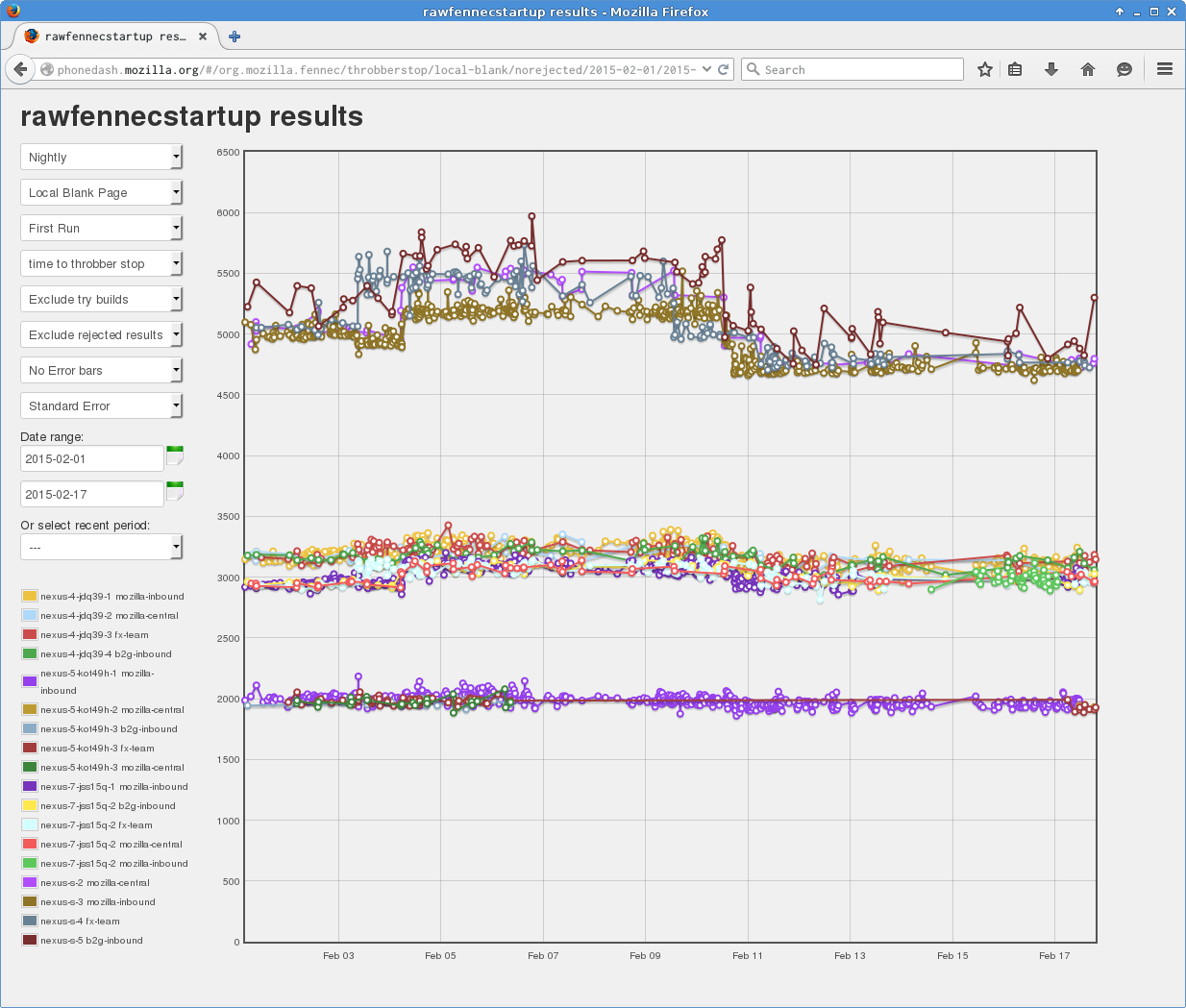
Hiding the different devices/repositories helps make it clear that the regression was first introduced on fx-team on Feb 3. The fact that the regression moves from one repository to another as the repositories are merged is a clear indicator that the regression is real. The regression is most apparent on the Nexus S and Nexus 7 devices; Nexus 4 may show the regression though it is not clear while Nexus 5 does not show any change.

Once you have determined that a change in performance persists, you can narrow the time range in order to determine the exact build where the regression occured. Clicking on the point just before the regression shows a tooltip which lists the values and revision for the build and gives the beginning of the regression range as http://hg.mozilla.org/integration/fx-team/rev/46ccf9bfde3f
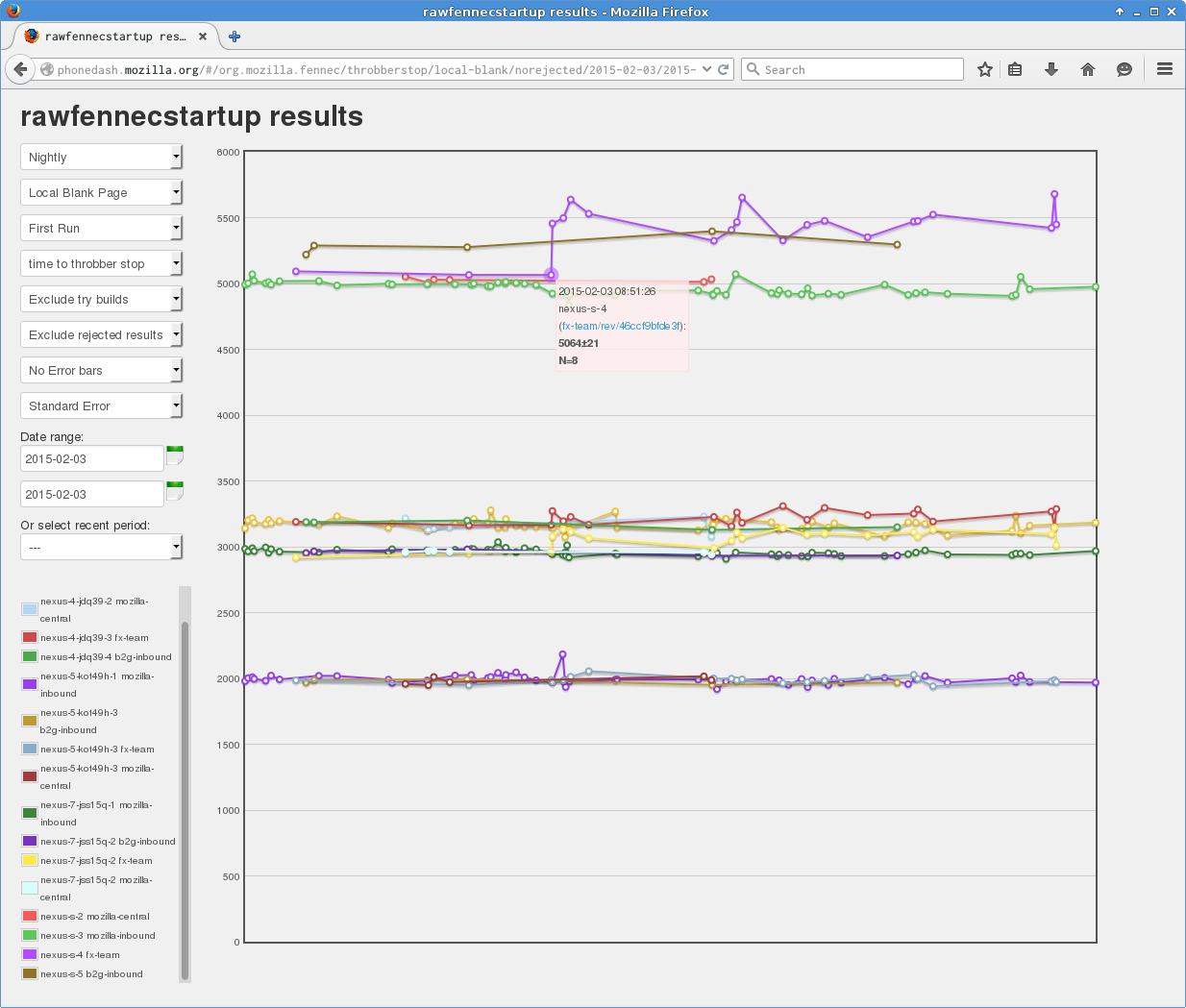
Clicking on the point of the regression also shows a tooltip which lists the values and the revision for the build after the regression and gives the end of the regression range as http://hg.mozilla.org/integration/fx-team/rev/da83b90c888e which gives https://hg.mozilla.org/integration/fx-team/pushloghtml?fromchange=46ccf9bfde3f&tochange=da83b90c888e as the regression range.

Submitting try builds to Autophone
Autophone will execute tests against try builds if the try build's commit message specifies Autophone explicitly. The best way to produce the appropriate try commit message is to use trychooser.
- Under Build Types, select Opt only since Autophone currently only tests opt builds.
- Under Platforms, select either one or both of android api 9-10 contrained (Android 2.3.3-2.3.7) or android api 11 (Android 3.0+).
- Under Android-Only Unittest Suites, select only the tests that you need to run. Please do not select Autophone-tests (all) unless you actually need to run all available Autophone tests against the build.
- Once you have submitted your build to try, you will be able to follow the execution of the tests on Treeherder using https://treeherder.mozilla.org/#/jobs?repo=try&author=<youremail>&exclusion_state=all&filter-searchStr=autophone where <youremail> is the email account registered with hg.mozilla.org.
- If your tests included the Autophone performance related tests, you can view the results on phonedash by selecting "Only try builds" and a date range which includes the buildid of your try build.
For example, the following will run the S1S2 tests on both Android api 9 and 11.
try: -b o -p android-api-9,android-api-11 -u autophone-s1s2 -t none
Note: Until bug 1126448 is fixed, phonedash will not visibly distinguish try builds submitted by different people. You will need to distinguish your builds from others using the build dates and revisions.
Devices
Autophone currently tests Nexus S, Nexus 4, Nexus 5 and Nexus 7 (2013) devices. The Nexus S devices are especially good at showing performance changes due to their slow speed and their single core processor. The other devices are faster and have multiple core processors and behave differently for multi-threaded code paths.
We will be adding additional Nexus 6 and Nexus 9 devices in the future.
The devices currently under test are:
| Device | Name | Android version |
|---|---|---|
| Nexus S | nexus-s-2 | 2.3.6 |
| Nexus S | nexus-s-3 | 2.3.4 |
| Nexus S | nexus-s-4 | 2.3.6 |
| Nexus S | nexus-s-5 | 2.3.6 |
| Nexus 4 | nexus-4-jdq39-1 | 4.2.2 |
| Nexus 4 | nexus-4-jdq39-2 | 4.2.2 |
| Nexus 4 | nexus-4-jdq39-3 | 4.2.2 |
| Nexus 4 | nexus-4-jdq39-4 | 4.2.2 |
| Nexus 5 | nexus-5-kot49h-1 | 4.4.2 |
| Nexus 5 | nexus-5-kot49h-2 | 4.4.2 |
| Nexus 5 | nexus-5-kot49h-3 | 4.4.2 |
| Nexus 5 | nexus-5-kot49h-4 | 4.4.2 |
| Nexus 7 | nexus-7-jss15q-1 | 4.3 |
| Nexus 7 | nexus-7-jss15q-2 | 4.3 |
Future Enhancements
- bug 967052 - Autophone - improve UI to handle large numbers of phones and repositories
- bug 1126448 - Autophone - improve phonedash graph UI for try builds
- bug 1133580 - Autophone - support job retriggers and cancel notifications from Treeherder