Sheriffing/How To/Backouts
When a patch is landed that causes build or test failures, it must be backed out to restore the tree to a passing or green state again.
How to perform backouts
There are a few things to check out which can indicate the necessity of a backout:
- there are ES (linting opt) failures: close the tree, backout, inform the developer
- Requested by the developer
- The push has many bustages
- The push has a high failure rate
- The failure occurs on multiple pushes
- The failure is not assigned to a bug
Before the backout, we should close the tree from which we’ll backout in order to avoid race pushing.
With unified repos, backouts are now easier to perform. Please follow the instructions for backing out from unified repos.
Steps:
- close the tree
cd mozilla-unified//access the mozilla-unified directoryhg pull <repo>//download repohg update <repo>//update repo- identify the revision we want to backout
hg oops -er <revision>//run the backout command, for a single changeset. If the backout impacts multiple changesets, usehg oops -esr <revision>::<revision>instead.If there are two changesets with other unrelated changesets inbetween, usehg oops -esr <revision>+<revision>- open the text editor to add the description of the backout “Backed out changeset <revision> (bug X) for <insert reason here>”. If the repo(s) are closed, then we also need to add “on a CLOSED TREE”. If the repo(s) are approval-only we need to add a=backout
hg push -r . inbound// push the changes
Example on how to backout a single revision
Note: The example below is for inbound, but the same steps should be followed for any repos
- close the tree
cd mozilla-unifiedhg pull inboundhg update inbound- identify the revision we want to backout (e.g. def0af88e262)
hg oops -er def0af88e262- open the text editor to add the description of the backout, e.g.: “Backed out changeset def0af88e262 (bug 1359017) for <insert reason here> CLOSED TREE”.
hg push -r . inbound
Example on how to backout multiple revisions
Note: The example below is for inbound, but the same steps should be followed for any repos
- close the tree
cd mozilla-unifiedhg pull inboundhg update inbound- identify the push we want to backout. E.g.: 478cffed4b5f, daea2bcda8cb, 9abaf5195566, 2f665a0a379f
hg oops -esr 2f665a0a379f::478cffed4b5f- open the text editor to add the description of the backout, e.g.: “Backed out X changesets (bug 1359017) for <insert reason here> CLOSED TREE”.
hg push -r . inbound
Best Practices and Communication
Based on Feedback from the Sheriff Survey, when you have to do a backout, here are some best practices:
- Ping the Developer in IRC if possible and when the developer is around, this gives the developer a chance to fix the problem and so avoid a backout. Some of the sheriffs use a 5 minute rule for the waiting of a response of the developer. Note: this is done as a courtesy to developers. You can and should backout patches if you feel it's being abused, e.g. the developer is not using the Try server
- Set the NEEDINFO flag in bugzilla. This is very important! Developers get a lot of bugmail and backout comments can be missed. Please make sure that you set a NEEDINFO to the developer in the bug when doing a backout.
- Make sure that the failures that lead to the backout are starred in Treeherder. This helps the next sheriff on duty.
How to test a backout on the Try server
If this uncertainity if backout will fix an issue, this can be tested on the Try server where changes are tested but never committed to production repositories.
- First backout the changeset(s)
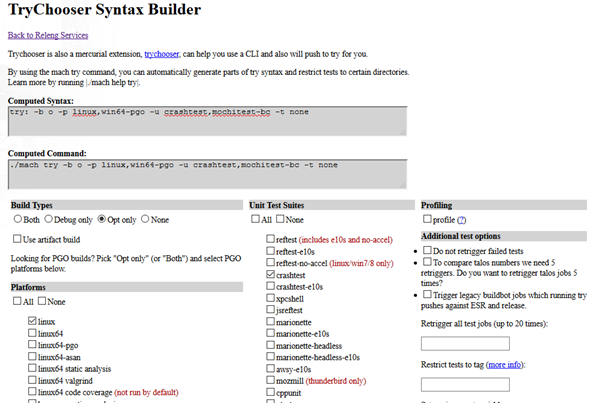
hg oops -erorhg oops -esr - At https://mozilla-releng.net/trychooser/ choose the build types, the platforms, test suites etc. that you need to test.
Example:
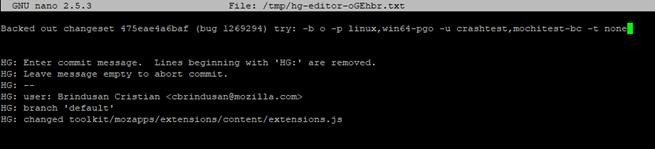
- For the backout’s commit message, we will use what is written in the Computed Syntax command field. Example:
- To push to try, use the following command:
hg push -f ssh://hg.mozilla.org/try - After the backout was pushed to Try, we need to drop the commit from history, for every single changeset that was tested:
Run hg histedit and replace pick with d.


Useful commands
If you want to find all changesets which landed for a bug number, e.g. in multiple commits:
hg log -k "bug number"
E.g.
hg log -k "1234567"