Release Management/Release Process Checklist Documentation: Difference between revisions
Diannasmith (talk | contribs) (Updating beta quality metrics process) |
|||
| (134 intermediate revisions by 4 users not shown) | |||
| Line 15: | Line 15: | ||
# Create a folder in the [https://drive.google.com/drive/folders/1ZD5tdhfgw1nxrNbeHqz74GEBYMBpKf_A Release Tracking] Google Drive for the release. | # Create a folder in the [https://drive.google.com/drive/folders/1ZD5tdhfgw1nxrNbeHqz74GEBYMBpKf_A Release Tracking] Google Drive for the release. | ||
#* Move the Release Checklist and Firefox Retrospective Notes to this folder. | #* Move the Release Checklist and Firefox Retrospective Notes to this folder. | ||
# Add a Release Tracking Sheet link to [https://wiki.mozilla.org/Release_Management/Release_owners Release Owners] wiki | |||
#* Add the link to the date in the Release Date column. | |||
# Ensure that Bugzilla is bumped to the Nightly version | |||
#* Note: This is performed on the Friday before Merge Day. | |||
## Update the Release Milestones in Bugzilla | |||
## Go to Bugzilla > Administration > [https://bugzilla.mozilla.org/admin/new_release New Firefox Release] | |||
##* The products and milesontes are automatically completed | |||
## Click [ Submit ] | |||
## Update the Release Tracking flags in Bugzilla | |||
## Go to Bugzilla > Administration > [https://bugzilla.mozilla.org/page.cgi?id=tracking_flags_admin_list.html Release Tracking Flags] | |||
## Add the cf_tracking_firefox and cf_status_firefox for the Nightly release | |||
##* Example: If 97 is becoming the Nightly, then add cf_tracking_firefox97 and cf_status_firefox97. | |||
## Deactivate the oldest cf_tracking_firefox and cf_status_firefox flag. | |||
##* Example: If 95 is going to Release, 96 is going to Beta, and 97 is becoming the Nightly, then deactivate cf_tracking_firefox94 and cf_status_firefox94. | |||
## Edit the current cf_tracking_firefox_relnote tracking flag to add the new release as a Value and deactivate the oldest release. | |||
##* Example: If 95 is going to Release, 96 is going to Beta, and 97 is becoming the Nightly, then edit cf_tracking_firefox_relnote to add a Value 97+ set to mozilla-next-drivers and deactivate the Value 94+ | |||
## Edit the current cf_tracking_firefox_esr tracking flag to add the new release as a Value and deactivate the oldest release. | |||
##* Example: If esr is based on 91, 95 is going to Release, 96 is going to Beta, and 97 is becoming the Nightly, then edit cf_tracking_firefox_esr91 to add a Value 97+ set to mozilla-next-drivers and deactivate the Value 94+ | |||
## Add the cf_tracking_thunderbird and cf_status_thunderbird for the Nightly release. | |||
##* Example: If 97 is becoming the Nightly, then add cf_tracking_thunderbird_97 and cf_status_thunderbird_97 | |||
## Deactivate the oldest cf_tracking_thunderbird and cf_status_thunderbird flag. | |||
##* Example: If 95 is going to Release, 96 is going to Beta, and 97 is becoming the Nightly, then deactivate cf_tracking_thunderbird_94 and cf_status_thunderbird_94. | |||
## Edit the current cf_tracking_thunderbird_esr tracking flag to add the new release as a Value and deactivate the oldest release. | |||
##* Example: If esr is based on 91, 95 is going to Release, 96 is going to Beta, and 97 is becoming the Nightly, then edit cf_tracking_firefox_esr91 to add a Value 97+ set to mozilla-next-drivers and deactivate the Value 94+. | |||
## Edit the cf_tracking_fxios tracking flag to add the new release as a Value and deactivate the oldest release. | |||
# Create a release notes skeleton in [https://nucleus.mozilla.org/ Nucleus]. | # Create a release notes skeleton in [https://nucleus.mozilla.org/ Nucleus]. | ||
## Click '''Admin Interface''' | ## Click '''Admin Interface''' | ||
| Line 26: | Line 51: | ||
##* Example: 99.0a1 | ##* Example: 99.0a1 | ||
## Set the Release Date to match when Central was bumped to Nightly | ## Set the Release Date to match when Central was bumped to Nightly | ||
## | ## Keep the nightly-only notes and remove the release notes from the previous release. | ||
## For additional information on the Release Notes process see [https://wiki.mozilla.org/Release_Management/Release_Notes The Firefox release notes process] wiki page. | ## For additional information on the Release Notes process see [https://wiki.mozilla.org/Release_Management/Release_Notes The Firefox release notes process] wiki page. | ||
# | # Update the bugs with [https://bugzilla.mozilla.org/buglist.cgi?f1=cf_tracking_firefox_relnote&o1=equals&v1=nightly%2B&list_id=17214018 nightly+] release note tracking. | ||
## Remove nightly+ from any bugs older than 3 releases. | |||
##* Add a comment as a reminder to add a release note request when the feature rides the train. | |||
## Remove nightly+ from any bugs that are riding the train. | |||
##* If the same bug is tracking the final release note then set the appropriate release in the relnote track | |||
##* If a different bug is tracking the final release note then add a comment mentioning which bug is tracking the release note. | |||
## See [https://wiki.mozilla.org/Release_Management/Release_Notes The Firefox release notes process] wiki page for additional information. | |||
## | |||
##* | |||
## | |||
##* | |||
##* | |||
## | |||
# Update the Google calendar [https://calendar.google.com/calendar/u/0/embed?src=bW96aWxsYS5jb21fZGJxODRhbnI5aTh0Y25taGFiYXRzdHY1Y29AZ3JvdXAuY2FsZW5kYXIuZ29vZ2xlLmNvbQ Releases Scheduling]. | # Update the Google calendar [https://calendar.google.com/calendar/u/0/embed?src=bW96aWxsYS5jb21fZGJxODRhbnI5aTh0Y25taGFiYXRzdHY1Y29AZ3JvdXAuY2FsZW5kYXIuZ29vZ2xlLmNvbQ Releases Scheduling]. | ||
## Open the following URL and change the version to the Nightly release. | ## Open the following URL and change the version to the Nightly release. | ||
##* https:// | ##* https://whattrainisitnow.com/calendar/release/schedule/?version=118. | ||
## Download the generated ical file. | ## Download the generated ical file. | ||
## Review locally on a calendar app of your choice | ## Review locally on a calendar app of your choice | ||
| Line 69: | Line 80: | ||
#* Ensure they are invited to the Weekly Regression Triage. | #* Ensure they are invited to the Weekly Regression Triage. | ||
# Ensure the Release Engineer on Release Duty is listed on Release Owners. | # Ensure the Release Engineer on Release Duty is listed on Release Owners. | ||
# | # Ensure the [https://wiki.mozilla.org/Release_Management/Release_owners Release Owners] wiki is up to date | ||
#* The REO and Release Engineer on Release Duty should be listed | |||
==At the start of the Nightly cycle, the following tasks need to be performed on Merge Day== | ==At the start of the Nightly cycle, the following tasks need to be performed on Merge Day== | ||
# Verify that Central was bumped to the Nightly version. | # Verify that Central was bumped to the Nightly version. | ||
#* Check [https://hg.mozilla.org/mozilla-central/file/tip/browser/config/version_display.txt version_display.txt] | #* Check [https://hg.mozilla.org/mozilla-central/file/tip/browser/config/version_display.txt version_display.txt] | ||
#* Please Note: This is performed on Merge Day of the release going to beta, if it is incorrect talk to the RelMan on duty for Beta cycle. | #* Please Note: This is performed on Merge Day of the release going to beta, if it is incorrect talk to the RelMan on duty for the Beta cycle. | ||
# Verify that the firefox-android version was updated. | |||
#* Chheck [https://hg.mozilla.org/mozilla-central/file/tip/mobile/android/version.txt version.txt] should be xxx.0a1, where xxx matches the nightly version of desktop. | |||
#* If the version was not updated, then sync with release engineering. | |||
# Make the release notes public in [https://nucleus.mozilla.org/ Nucleus] | # Make the release notes public in [https://nucleus.mozilla.org/ Nucleus] | ||
# Verify | # Verify the application services version was updated | ||
#* The version in [https://github.com/mozilla/application-services/blob/main/version.txt version.txt] should be xxx.0a1, where xxx matches the nightly version of desktop. | |||
#* The version in [https://github.com/mozilla | #* If the version was not updated then talk to the RelMan on duty for the Beta cycle. | ||
#* If the version was not updated | |||
# Verify the [https://product-details.mozilla.org/1.0/firefox_versions.json firefox_versions.json] is correct. | # Verify the [https://product-details.mozilla.org/1.0/firefox_versions.json firefox_versions.json] is correct. | ||
#* Please Note: Usually this json update is performed the day after merge day | #* Please Note: Usually this json update is performed the day after merge day | ||
#* Please Note: fx trains and various scripts in other tools use this data. | #* Please Note: fx trains and various scripts in other tools use this data. | ||
#* Verify the following are correct: | #* Verify the following are correct: | ||
#** FIREFOX_NIGHTLY, NEXT_MERGE_DATE | #** FIREFOX_NIGHTLY, NEXT_MERGE_DATE | ||
#* If these are incorrect, contact the RelEng on duty via the [https://matrix.to/#/#releaseduty:mozilla.org #release-duty] channel in Matrix. It is possible a PR was missed during the RelEng merge day steps. | #* If these are incorrect, contact the RelEng on duty via the [https://matrix.to/#/#releaseduty:mozilla.org #release-duty] channel in Matrix. It is possible a PR was missed during the RelEng merge day steps. | ||
#* Please Note: There are also date changes that are monitored by autonag. For example, if [https://wiki.mozilla.org/Template:NextReleaseDate Template:NextReleaseDate] was not updated an autonag email will be sent. | #* Please Note: There are also date changes that are monitored by autonag. For example, if [https://wiki.mozilla.org/Template:NextReleaseDate Template:NextReleaseDate] was not updated an autonag email will be sent. | ||
# Verify the [https://product-details.mozilla.org/1.0/mobile_versions.json mobile_versions.json] is correct | |||
#* Verify the following are correct: | |||
#** alpha_version, nightly_version | |||
#* If these are incorrect, contact the RelEng on duty via the [https://matrix.to/#/#releaseduty:mozilla.org #release-duty] channel in Matrix. | |||
==On a daily (or thereabouts) basis, the following items should be monitored during the Nightly cycle== | ==On a daily (or thereabouts) basis, the following items should be monitored during the Nightly cycle== | ||
| Line 100: | Line 113: | ||
#* [https://bugzilla.mozilla.org/buglist.cgi?query_format=advanced&o1=anywordssubstr&v1=%2B%2Cblocking&f3=resolution&o3=nowordssubstr&v3=INVALID%2CWORKSFORME%2CDUPLICATE&o2=nowordssubstr&v2=fixed%2Cwontfix%2Cdisabled%2Cverified&f1=cf_tracking_firefox93&f2=cf_status_firefox93&title=tracking%2B%20not%20fixed Example Filter] | #* [https://bugzilla.mozilla.org/buglist.cgi?query_format=advanced&o1=anywordssubstr&v1=%2B%2Cblocking&f3=resolution&o3=nowordssubstr&v3=INVALID%2CWORKSFORME%2CDUPLICATE&o2=nowordssubstr&v2=fixed%2Cwontfix%2Cdisabled%2Cverified&f1=cf_tracking_firefox93&f2=cf_status_firefox93&title=tracking%2B%20not%20fixed Example Filter] | ||
#* Ensure that the tickets are progressing, follow up as required. | #* Ensure that the tickets are progressing, follow up as required. | ||
# Review ''' | # Review '''incoming regression bugs''' | ||
#* [https:// | #* See the [https://bugdash.moz.tools/#tab.reo REO] section in the BugDash | ||
# | |||
#* Ensure that new tickets are prioritized. | #* Ensure that new tickets are prioritized. | ||
#* Ensure that carry-over tickets are still on the team’s radar. | #* Ensure that carry-over tickets are still on the team’s radar. | ||
#* Review with the REO in the weekly regression meeting. | #* Review with the REO in the weekly regression meeting. | ||
# Review stability rates and reported crash spikes | # Review stability rates and reported crash spikes | ||
#* Leverage information from the automated emails, monitor top crashes in [https://crash-stats.mozilla.org/ Crash Stats], and monitor [https:// | #* Leverage information from the automated emails, monitor top crashes in [https://crash-stats.mozilla.org/ Crash Stats], and monitor [https://mozilla.cloud.looker.com/dashboards/918?Channel=beta&OS+Name=&Ten+Percent+Sample=Yes Stability & Release Monitoring Looker Dashboard] | ||
#* Ensure that there are bugs tracking stability rates and crash spikes. | #* Ensure that there are bugs tracking stability rates and crash spikes. | ||
#* Ensure these tickets are tracked and prioritized. | #* Ensure these tickets are tracked and prioritized. | ||
#* Please Note: If ever there are stats/bugs that cannot be explained/identified, then reach out to the team for assistance on the [https://matrix.to/#/#stability:mozilla.org #stability] Matrix channel, it may be an issue with the tooling issue. | #* Please Note: If ever there are stats/bugs that cannot be explained/identified, then reach out to the team for assistance on the [https://matrix.to/#/#stability:mozilla.org #stability] Matrix channel, it may be an issue with the tooling issue. | ||
# Review the Release Notes requests for Nightly Tickets. | # Review the Release Notes requests for Nightly Tickets. | ||
#* [https:// | #* See [https://wiki.mozilla.org/Release_Management/Release_Notes#Daily_during_the_Nightly_cycle Release_Notes#Daily_during_the_Nightly_cycle] for details. | ||
# | |||
# | |||
==On a weekly (or thereabouts) basis, the following items should be monitored during the Nightly cycle== | ==On a weekly (or thereabouts) basis, the following items should be monitored during the Nightly cycle== | ||
# Review the tracking Mana page for the release. | # Review the tracking Mana page for the release. | ||
#* The tracking page can be found as a child of [https://mana.mozilla.org/wiki/pages/viewpage.action?pageId=150542950 Firefox Release Tracking] | #* The tracking page can be found as a child of [https://mana.mozilla.org/wiki/pages/viewpage.action?pageId=150542950 Firefox Release Tracking] | ||
#* Ensure that features targeting the release are on track, reach out as needed if any are slipping. | #* Ensure that features targeting the release are on track, reach out as needed if any are slipping. | ||
# Update the Weekly Release Tracking Digest document, as requested on [https://mozilla.slack.com/archives/C01TTHGPSKB #fx-weekly-digest]. | # Update the Weekly Release Tracking Digest document, as requested on [https://mozilla.slack.com/archives/C01TTHGPSKB #fx-weekly-digest]. | ||
#* Update the Release Milestones (Details) section to add Status (On Track, Delayed), Ship Date, and additional details depending on where the nightly is in the cycle | #* Update the Release Milestones (Details) section to add Status (On Track, Delayed), Ship Date, and additional details depending on where the nightly is in the cycle. | ||
#* Review the dates in the Release Milestones section and update the status. | #* Review the dates in the Release Milestones section and update the status. | ||
==As available, the following items should be monitored during the Nightly cycle== | ==As available, the following items should be monitored during the Nightly cycle== | ||
# Review and land mozilla-central repo-update HSTS HPKP remote-settings tld-suffixes patches. | |||
#* Every Monday and Thursday revisions are automatically created for review in Phabricator. | |||
#* Monitor email notifications sent by Phabricator: “No Bug, mozilla-central repo-update HSTS HPKP remote-settings tld-suffixes” | |||
#* Review and land the patch to autoland. | |||
# Review and land android nightly application-services version update bumps to main | |||
#* An automated nightly application-services build is triggered daily. The build will only run if commits merged to [https://github.com/mozilla/application-services main] since the previous nightly build. | |||
#* update-bot creates a patch to bump the version for android in mozilla-central, runs a Try build, and sets the release-mangers group as reviewer. | |||
#* Monitor email notifications sent by Phabricator: Update android nightly application-services version bump | |||
#* Review and land the patch to autoland. | |||
#* If the Try build failed: | |||
#** Check the failure. | |||
#** Check the possible commit in [https://github.com/mozilla/application-services application-services main] that corresponds to the failure. | |||
#** Start a thread on [https://mozilla.slack.com/archives/C0559DDDPQF #application-services-eng] for investigation. | |||
#* If the application-services bump no longer applies cleanly | |||
#** The patch sometimes fails because application-services was bumped on autoland but not yet merged to main, so your new PR becomes stale once main catches up and your patch no longer applies cleanly. | |||
#** You can re-run ./mach vendor .../moz.yaml to bump it to the latest. It regenerates dependent metadata, and commit a two-file change. | |||
#** example: https://github.com/mozilla-firefox/firefox/commit/642afeeca47f | |||
# Review the [https://bugzilla.mozilla.org/buglist.cgi?query_format=advanced&f1=cf_tracking_firefox_relnote&o1=equals&v1=%3F&f2=cf_status_firefox138&o2=anywords&v2=affected%2Cfixed%2Cverified%2Cfix-optional&f3=cf_status_firefox138&o3=notsubstring&v3=disabled&title=Release%20Note%20Requests Release Notes requests] for Nightly tickets | |||
#* These are nominated by setting the relnote flag to ? for a particular release | |||
# Review Test Plans for features targeting the release. QA shares test plans via email. For example: | # Review Test Plans for features targeting the release. QA shares test plans via email. For example: | ||
#* Become familiar with how the feature works. | #* Become familiar with how the feature works. | ||
| Line 140: | Line 163: | ||
==At the end of the Nightly cycle, the following tasks need to be performed prior to and during Merge Day== | ==At the end of the Nightly cycle, the following tasks need to be performed prior to and during Merge Day== | ||
# Prepare the Beta release notes in [https://nucleus.mozilla.org/ Nucleus] | # Prepare the Beta release notes in [https://nucleus.mozilla.org/ Nucleus] | ||
## Click '''Admin Interface''' | ## Click '''Admin Interface''' | ||
| Line 160: | Line 179: | ||
#* Sync on Friday before Merge Day | #* Sync on Friday before Merge Day | ||
#* Use the [https://matrix.to/#/#releaseduty:mozilla.org #releaseduty] channel on Matrix. | #* Use the [https://matrix.to/#/#releaseduty:mozilla.org #releaseduty] channel on Matrix. | ||
#* Align | #* Align they are available for support if needed. | ||
# Create checklist(s) for the new ESR cycle | |||
#* Create a checklist for the relevant ESR that corresponds to the Firefox mainline release | |||
#* See [https://whattrainisitnow.com/release/?version=esr ESR calendar] | |||
# | # Verify the automated mozilla-central->mozilla-beta no-op trial run | ||
#* | #* The job automatically runs every Friday and the link is shared on the [https://matrix.to/#/#releaseduty:mozilla.org #release-duty] channel in Matrix. | ||
#* See [https://moz-releng-docs.readthedocs.io/en/latest/how-to/releaseduty/merge-duty/merge_duty.html#do-migration-no-op-trial-runs #do-migration-no-op-trial-runs] for documentation. | |||
#* [https:// | |||
# | |||
#* | |||
#* | |||
# Create a Desktop Beta Checklist and Mobile Beta Checklist for beta 1 | # Create a Desktop Beta Checklist and Mobile Beta Checklist for beta 1 | ||
#* Use the b1 macro | |||
#* Use the | |||
= Beta Checklist = | = Beta Checklist = | ||
| Line 188: | Line 194: | ||
==The following tasks need to be performed on Merge Day at the start of the Beta cycle== | ==The following tasks need to be performed on Merge Day at the start of the Beta cycle== | ||
# | # Sync with the Sheriff team to confirm Central is in a good state so that the Merge Day activities can begin. | ||
#* Sync on Merge Day morning | |||
#* Use the [https://chat.mozilla.org/#/room/#sheriffs:mozilla.org #sheriffs] channel on Matrix. | |||
#* Check the Beta simulations document for the release, this document is emailed to Release Management at the start of the night cycle. | |||
#* Ensure that central does not currently have any known severe regressions or performance issues that would be carried into beta. | |||
# Submit a Main -> Beta [https://shipit.mozilla-releng.net/merge-automation/new?product=firefox merge automation] with Dry Run disabled in Ship-it | |||
#* [[File:Shipit-merge-day.png|600px|center|middle]] | |||
# Start the Main -> Beta merge automation | |||
# Verify the changesets are visible on the [https://github.com/mozilla-firefox/firefox/tree/beta beta branch] and [https://treeherder.mozilla.org/#/jobs?repo=mozilla-beta Treeherder] | |||
#* It may take up to 45m before the changeset are on Treeherder | |||
#* beta should get a [https://github.com/mozilla-firefox/firefox/commit/0e66ddd86b91e109b0f8926c370544d11eacfbf0 version bump] and [https://github.com/mozilla-firefox/firefox/commit/cf9bf13d36a36621d08c6c44d4043b5a08336de6 branding changes] | |||
#* There will be two new tags. One tag should be in the form FIREFOX_BETA_xxx_END - where xxx is the major Gecko version that Beta had prior to the merge. The other tag should be in the form FIREFOX_BETA_yyy_BASE - where yyy is the major Gecko version that Beta now has. | |||
# Submit a Bump main [https://shipit.mozilla-releng.net/merge-automation/new?product=firefox merge automation] with Dry Run disabled in Ship-it | |||
#* [[File:Shipit-main-bump.png|600px|center|middle]] | |||
# Start the Bump main merge automation | |||
# Verify the changesets are visible on the [https://github.com/mozilla-firefox/firefox firefox-main] branch and [https://treeherder.mozilla.org/#/jobs?repo=mozilla-central Treeherder] | |||
#* It may take up to 45m before the changeset are on Treeherder | |||
#* firefox-main should get a version bump and a new tag in the form FIREFOX_NIGHTLY_xxx_END - where xxx is the major Gecko version that firefox-main had prior to the version bump. | |||
# Perform the version bump steps in the ESR checklists | |||
# Update the wiki versions | |||
#* [[Template:Version/Gecko/release/next|NEXT_VERSION]], [[Template:Version/Gecko/central/current|CENTRAL_VERSION]], [[Template:Version/Gecko/beta/current|BETA_VERSION]], [[Template:Version/Gecko/release/current|RELEASE_VERSION]], and [[index.php?title=Template:NextReleaseDate|Next release date]] | |||
# Send the merge complete email to release-signoff and release-drivers | |||
#* [https://groups.google.com/a/mozilla.org/g/release-signoff/c/qlnvsv4Ky0E Example email] | |||
# application-services: Create an application-services release branch off of the [https://github.com/mozilla/application-services/tree/main main branch] named release-vXXX | |||
# application-services: The following steps can be performed by running [https://github.com/mozilla/Relman/blob/main/as-merge-day.py as-merge-day.py] in your fork of the [https://github.com/mozilla/application-services application-services] repo: | |||
#* application-services: Update version.txt and the CHANGELOG.md in the release-vXXX branch | |||
#** In [https://github.com/mozilla/application-services/blob/main/version.txt version.txt], update the version from XXX.0a1 to XXX.0. | |||
#** In [https://github.com/mozilla/application-services/blob/main/CHANGELOG.md CHANGELOG.md], change In progress to _YYYY-MM-DD_ to match the Merge Day date and add a URL to the release version change log | |||
#** Create a commit named 'Cut release vXXX.0` | |||
#** Create a pull request and merge to the release branch, see [https://github.com/mozilla/application-services/pull/5792 example PR] | |||
#* application-services: Update the application-services version from XXX to YYY and CHANGELOG.md in the [https://github.com/mozilla/application-services/tree/main main branch] | |||
#** In [https://github.com/mozilla/application-services/blob/main/version.txt version.txt], bump the version from XXX.0a1 to YYY.0a1 | |||
#** In [https://github.com/mozilla/application-services/blob/main/CHANGELOG.md CHANGELOG.md], bump the in progress version from XXX.0 to YYY.0, add a header for the previous release version, and add a URL to the previous release version change log | |||
#** Create a commit named 'Start release vYYY.0` | |||
#** Create a pull request and merge to the main branch, see [https://github.com/mozilla/application-services/pull/5793 example PR] | |||
# application-services: Create a new Application Services release in Ship-It | |||
# application-services: Start the Application Services build in Ship-It via Promote | |||
# application-services: Ship the Application Services build in Ship-It | |||
# application-services: Tag the release in the Application Services repo | |||
## See [https://github.com/mozilla/application-services/releases/tag/v132.0 example tag] | |||
# application-services: Notify the application-services dev team on [https://mozilla.enterprise.slack.com/archives/C0559DDDPQF #application-services-eng] that the release branch is ready, the version bumped was merged, and the release is ready | |||
# Switch to Application Services in Firefox Android to Release | |||
#* Change the Version and Channel in mobile/android/android-components/plugins/dependencies/src/main/java/ApplicationServices.kt | |||
#** See example [https://hg.mozilla.org/releases/mozilla-beta/rev/4c3f709451f8aa49beaf8d63fc2131c3ac85e82e commit] | |||
#* Push directly mozilla-beta | |||
# Review any pending uplifts that may be required before proceeding with beta 1 build 1 | |||
#* This should not be a common occurrence, however, an example would be a crash fix that may have landed in central post-merge. | #* This should not be a common occurrence, however, an example would be a crash fix that may have landed in central post-merge. | ||
# | # Create Desktop and DevEdition build 1 in Ship-It on the initial merge commit | ||
#* This build will not be shipped and is only to test the build pipeline after the merge | |||
## Connect to the VPN | ## Connect to the VPN | ||
## Log into [https://shipit.mozilla-releng.net/ Ship-It] | ## Log into [https://shipit.mozilla-releng.net/ Ship-It] | ||
## Click New | ## Click Releases dropdown | ||
##* [[File: | ## Click Firefox dropdown | ||
## Click New | |||
##* [[File:New shipit.png|600px|center|middle]] | |||
## For Desktop complete as follows and click Create Release: | ## For Desktop complete as follows and click Create Release: | ||
##* Please note: Revision should be the tip. The Partial updates field is automatic. | ##* Please note: Revision should be the tip. The Partial updates field is automatic. | ||
##* [[File:Screen Shot 2022-05-31 at 3.38.42 PM.png|600px|center|middle]] | ##* [[File:Screen Shot 2022-05-31 at 3.38.42 PM.png|600px|center|middle]] | ||
## For | ## For DevEdition complete as follows and click Create Release | ||
##* Please note: Revision should be the tip. The Partial updates field is automatic. | ##* Please note: Revision should be the tip. The Partial updates field is automatic. | ||
##* [[File:Screen Shot 2022-05-31 at 3.40.59 PM.png|600px|center|middle]] | ##* [[File:Screen Shot 2022-05-31 at 3.40.59 PM.png|600px|center|middle]] | ||
# Start the Desktop and | # Create Firefox Android (AC, Fenix, Focus) build 1 release in Ship-It | ||
#* This build will not be shipped and is only to test the build pipeline after the merge | |||
# Start the Desktop and DevEdition in Ship-it via the Promote Task | |||
## View the Pending Releases in [https://shipit.mozilla-releng.net/ Ship-It] | ## View the Pending Releases in [https://shipit.mozilla-releng.net/ Ship-It] | ||
## Click the Promote Task for Desktop and continue through the pop-ups | ## Click the Promote Task for Desktop and continue through the pop-ups | ||
## Click the Promote Task for DevEditon and continue through the pop-ups | ## Click the Promote Task for DevEditon and continue through the pop-ups | ||
# Confirm the builds have started | # Start Firefox Android (AC, Fenix, Focus) release in Ship-It via Promote | ||
#* Please note: you can only start a ship-it build on a revision that has a completed decision task | |||
# Confirm the Desktop and DevEdition builds have started | |||
#* Taskcluster email: “[desktop] Build of firefox xxx.0b1 build 1” | #* Taskcluster email: “[desktop] Build of firefox xxx.0b1 build 1” | ||
#* Taskcluster email: “[desktop] Build of devedition xxx.0b1 build 1” | #* Taskcluster email: “[desktop] Build of devedition xxx.0b1 build 1” | ||
# Confirm the notification | # Confirm the Firefox Android (AC, Fenix, Focus) builds have started | ||
#* | # Confirm notification sent when the Desktop and DevEdition builds finish | ||
#* | #* Taskcluster email: “firefox xxx.0b1 build1/mozilla-beta is in the candidates directory” | ||
# Schedule | #* Taskcluster email: “devedition xxx.0b1 build1/mozilla-beta is in the candidates directory” | ||
# Confirm notification sent when the Firefox Android (AC, Fenix, Focus) builds finish | |||
#* Taskcluster email: “firefox-android XXX.0b# build1/mozilla-beta is in the candidates directory" | |||
# Cancel Desktop and DevEdition build 1 in Ship-It | |||
# Cancel Firefox Android (AC, Fenix, Focus) build 1 in Ship-It | |||
==The following tasks need to be performed the day after Merge Day == | |||
# Review tracking-firefoxXXX+ bugs and approval requests | |||
# Create Desktop and DevEdition build 2 release in Ship-It | |||
# Create Firefox Android (AC, Fenix, Focus) build 2 release in Ship-It | |||
# Start Desktop and DevEdition builds in Ship-It via Promote Task | |||
# Start Firefox Android (AC, Fenix, Focus) build in Ship-It via Promote | |||
# Confirm the Desktop and DevEdition builds have started | |||
# Confirm the Firefox Android (AC, Fenix, Focus) builds have started | |||
# Confirm notification sent when the Firefox Android (AC, Fenix, Focus) builds finish | |||
# Push Firefox Android (AC, Fenix, Focus) release in Ship-It via Push | |||
# Confirm notification sent when the Firefox Android (AC, Fenix, Focus) push finishes | |||
#* Taskcluster email: “Focus/Fenix XXXb#-build2 has been pushed to the closed testing track on Google Play" | |||
# Ship Firefox Android (AC, Fenix, Focus) from Ship-It via Ship | |||
# Promote Fenix from Closed Testing to Production with a 99% rollout and submit for review | |||
# Promote Focus from Closed Testing to the Foxfooding track with a 99% rollout and submit for review | |||
# Confirm notification sent when the Desktop and DevEdition builds finish | |||
# Schedule push to Desktop and DevEdition CDN from Ship-It via Push | |||
## Click Push | ## Click Push | ||
##* [[File:Screen Shot 2022-05-31 at 3.42.21 PM.png|600px|center|middle]] | ##* [[File:Screen Shot 2022-05-31 at 3.42.21 PM.png|600px|center|middle]] | ||
## Click Schedule | ## Click Schedule | ||
##* [[File:Screen Shot 2022-05-31 at 3.44.18 PM.png|600px|center|middle]] | ##* [[File:Screen Shot 2022-05-31 at 3.44.18 PM.png|600px|center|middle]] | ||
# Confirm | # Confirm notification sent when the Desktop and DevEditon CDN push finishes | ||
#* | #* Taskcluster email: “firefox xxx.0b1 build1/mozilla-beta has been pushed to cdntest” | ||
#* | #* Taskcluster email: “devedition xxx.0b1 build1/mozilla-beta has been pushed to cdntest” | ||
# Confirm notification sent when the Desktop and DevEdition CDN push finishes | |||
# Ship Desktop and DevEdition to Beta from Ship-It via Ship | |||
# Activate automated Desktop, DevEdition, and Firefox Android betas in Ship-It | |||
# Confirm notification sent when the | |||
# Ship | |||
# | |||
## At the bottom of the page, click the red x beside Firefox Desktop: Beta | ## At the bottom of the page, click the red x beside Firefox Desktop: Beta | ||
##* [[File:Screen Shot 2022-05-31 at 3.51.31 PM.png|center|middle]] | ##* [[File:Screen Shot 2022-05-31 at 3.51.31 PM.png|center|middle]] | ||
## Click Enable | ## Click Enable | ||
##* [[File:Screen Shot 2022-06-01 at 9.47.26 AM.png|thumb|center|middle]] | ##* [[File:Screen Shot 2022-06-01 at 9.47.26 AM.png|thumb|center|middle]] | ||
## Perform the same actions for Firefox Developer Edition: Beta | ## Perform the same actions for Firefox Developer Edition: Beta and Firefox Android (Android-Components, Fenix, Focus): Beta | ||
#* Please Note: Automated Betas are built at | #* Please Note: Automated Betas are built at 13:00 UTC every Monday, Wednesday, and Friday as determined [https://hg.mozilla.org/releases/mozilla-beta/file/default/.cron.yml#l17 here]. | ||
# Make | # Make release notes live in Nucleus | ||
#* Enable the Is Public checkbox and save | #* Enable the Is Public checkbox and save | ||
#** [[File:Screen Shot 2022-06-01 at 9.49.18 AM.png|thumb|center]] | #** [[File:Screen Shot 2022-06-01 at 9.49.18 AM.png|thumb|center]] | ||
#* | # Verify that the Desktop and DevEdition Balrog rule changes are live and correctly set | ||
#** | #* View the [https://balrog.services.mozilla.com/rules?product=Firefox&channel=beta Balrog Rules for Firefox Beta] | ||
# | #** Verify that the Background rate for Firefox-xxx.0b1-build2 is 50 | ||
#* | #* View the [https://balrog.services.mozilla.com/rules?product=Firefox&channel=aurora Balrog Rules for Aurora (DevEdition)] | ||
#* | #** Verify that the Background rate for Devedition-xxx.0b1-build2 is 100 | ||
# | # Verify that FIREFOX_DEVEDITION & LATEST_FIREFOX_DEVEL_VERSION in firefox_versions.json are correct | ||
#* | #* If incorrect, contact the RelEng on duty via the [https://matrix.to/#/#releaseduty:mozilla.org #release-duty] channel in Matrix. | ||
# | # Verify the beta_version in [https://product-details.mozilla.org/1.0/mobile_versions.json mobile_versions.json] is correct | ||
#* See [https:// | #* If incorrect, contact the RelEng on duty via the [https://matrix.to/#/#releaseduty:mozilla.org #release-duty] channel in Matrix. | ||
# | # Update https://whattrainisitnow.com/release-notes to point to the latest release notes doc | ||
#* See [https:// | # Share a link to the Beta release notes and the release notes draft document in [https://mozilla.slack.com/archives/C9L102H6X #release-notes] Slack channel | ||
# Monitor for QA | #* See [https://mozilla.slack.com/archives/C9L102H6X/p1686065646980339 example] | ||
#* QA will post a message to the [https://mozilla.slack.com/archives/CAC9YSH3P #qa-coordination] channel in Slack when they complete | # Email release-notes with a link to the draft document and the submission deadline. | ||
#* See [https://groups.google.com/a/mozilla.com/g/release-notes/c/DC3HjL_GlEM example] | |||
==Monitor for QA sign-offs on beta 1 build 2 == | |||
QA sign-offs are usually provided the day after build 2 is ready | |||
# Monitor for QA update tests on Aurora & Beta | |||
#* QA will post a message to the [https://mozilla.slack.com/archives/CAC9YSH3P #qa-coordination] channel in Slack when they complete update testing. | |||
# Monitor for QA manual testing signoff for Desktop and DevEdition | |||
#* QA will post a message to the [https://mozilla.slack.com/archives/CAC9YSH3P #qa-coordination] channel in Slack when they complete functional testing. | |||
# Monitor for QA sign-off on Fenix/Focus build validation | |||
#* Fenix build validation testing is tracked [https://mozilla-hub.atlassian.net/wiki/spaces/MTE/pages/21561505 here] | |||
#* Focus build validation testing is tracked [https://mozilla-hub.atlassian.net/wiki/spaces/MTE/pages/21561496 here] | |||
#* Focus and Fenix QA sign-off are sent via [https://mozilla.slack.com/archives/CAC9YSH3P #qa-coordination] Slack Channel | |||
# Bump the Beta update rate to 100% in Balrog | |||
# Update the Fenix Production track rollout to 100% | |||
# Update the Focus Foxfooding track rollout to 100% | |||
==The following tasks need to be performed daily during the Beta cycle== | ==The following tasks need to be performed daily during the Beta cycle== | ||
# Monitor '''Uplift Requests''' | # Monitor '''Uplift Requests''' | ||
#* [https://bugzilla.mozilla.org/buglist.cgi?query_format=advanced&o1=substring&f1=flagtypes.name&v1=approval-mozilla-beta%3F&title=Uplift%20requests&list_id=15920014 Example Filter] | #* [https://bugzilla.mozilla.org/buglist.cgi?query_format=advanced&o1=substring&f1=flagtypes.name&v1=approval-mozilla-beta%3F&title=Uplift%20requests&list_id=15920014 Example Filter] and [https://phabricator.services.mozilla.com/dashboard/view/108/ Phabricator Dashboard] | ||
#* Accept or reject the beta uplift requests. | #* Accept or reject the beta uplift requests. | ||
#* See [https://wiki.mozilla.org/Release_Management/Uplift_rules Uplift Rules] for guidelines | #* See [https://wiki.mozilla.org/Release_Management/Uplift_rules Uplift Rules] for guidelines | ||
| Line 287: | Line 355: | ||
#* Ensure that the tickets are progressing, and follow up as required. | #* Ensure that the tickets are progressing, and follow up as required. | ||
# Monitor '''Newly-filed regression bugs''' | # Monitor '''Newly-filed regression bugs''' | ||
#* New regressions bugs can be found [https:// | #* New regressions bugs can be found [https://bugdash.moz.tools/#tab.reo here] | ||
#* Review with the REO - ensure that new tickets are prioritized and ensure that carry-over tickets are still on the team’s radar | #* Review with the REO - ensure that new tickets are prioritized and ensure that carry-over tickets are still on the team’s radar | ||
# Monitor '''stability rates and reported crash spikes''' | # Monitor '''stability rates and reported crash spikes''' | ||
#* Leverage the automated emails, monitor top crashes in [https://crash-stats.mozilla.org/ crash-stats], and monitor [https:// | #* Leverage the automated emails, monitor top crashes in [https://crash-stats.mozilla.org/ crash-stats], and monitor [https://mozilla.cloud.looker.com/dashboards/918?Channel=beta&OS+Name=&Ten+Percent+Sample=Yes Stability & Release Monitoring] | ||
#* Ensure that there are tickets tracking issues with stability rates and crash spikes | #* Ensure that there are tickets tracking issues with stability rates and crash spikes | ||
# Monitor the '''Release Notes requests''' for Beta Tickets. | # Monitor the '''Release Notes requests''' for Beta Tickets. | ||
| Line 296: | Line 364: | ||
#* Check through tickets in the release that are tagged for release notes. Review and add these notes to the Beta Release Notes in Nucleus. | #* Check through tickets in the release that are tagged for release notes. Review and add these notes to the Beta Release Notes in Nucleus. | ||
==The following tasks need to be performed for each | ==The following tasks need to be performed for each beta build (Monday, Wednesday, Friday) during the Beta cycle== | ||
Please Note: The Beta build pipeline is also monitored by the Sheriffs, if there is an intermittent test failure they will rerun the failed job. If there is a permanent failure or an issue in the build infrastructure, then it may require canceling the build. Discuss in the [https://chat.mozilla.org/#/room/#releaseduty:mozilla.org #releaseduty] Matrix channel. If the decision is made to cancel, then view the pending release in [https://shipit.mozilla-releng.net/ ship-it] and click cancel. To create a new build, follow the same steps as outlined in One Time - Start of Beta Cycle to produce build 2 of the current beta release. | Please Note: The Beta build pipeline is also monitored by the Sheriffs, if there is an intermittent test failure they will rerun the failed job. If there is a permanent failure or an issue in the build infrastructure, then it may require canceling the build. Discuss in the [https://chat.mozilla.org/#/room/#releaseduty:mozilla.org #releaseduty] Matrix channel. If the decision is made to cancel, then view the pending release in [https://shipit.mozilla-releng.net/ ship-it] and click cancel. To create a new build, follow the same steps as outlined in One Time - Start of Beta Cycle to produce build 2 of the current beta release. | ||
# Create a tab in the release tracking sheet “xxx.0bx” | # Create a tab in the release tracking sheet “xxx.0bx” | ||
#* Please note: After the | #* Use the relevant beta macro | ||
#* Please note: After all the beta steps are complete, the tab can be hidden in order to minimize clutter. | |||
# Review tracking-firefoxXX+ bugs and approval requests. | # Review tracking-firefoxXX+ bugs and approval requests. | ||
#* This step is performed as part of the daily activities, tracked in the checklist for confirmation. | #* This step is performed as part of the daily activities, tracked in the checklist for confirmation. | ||
# Confirm the Desktop and DevEdition builds have started. | |||
# Confirm the builds have started. | |||
#* Taskcluster email: “[desktop] Build of firefox xx.0bx build 1” | #* Taskcluster email: “[desktop] Build of firefox xx.0bx build 1” | ||
#* Taskcluster email: “[desktop] Build of devedition xx.0bx build 1” | #* Taskcluster email: “[desktop] Build of devedition xx.0bx build 1” | ||
#* Please Note: The automated beta builds schedule is determined [https://hg.mozilla.org/releases/mozilla-beta/file/default/.cron.yml#l17 here]. | #* Please Note: The automated beta builds schedule is determined [https://hg.mozilla.org/releases/mozilla-beta/file/default/.cron.yml#l17 here]. | ||
# Confirm the notification is sent when builds finish. | # Confirm the Firefox Android (AC, Fenix, Focus) builds have started | ||
#* Taskcluster email: “Build of firefox-android xx.0bx build 1" | |||
# Confirm notification sent when the Firefox Android (AC, Fenix, Focus) builds finish | |||
#* Taskcluster email: “firefox-android xx.0bx build1/mozilla-beta is in the candidates directory" | |||
# Confirm notification sent when the Firefox Android (AC, Fenix, Focus) push finishes | |||
#* Focus/Fenix XXXb#-build1 has been pushed to the closed testing track on Google Play | |||
# Promote Fenix from Closed Testing to Production with a 99% rollout and submit for review | |||
# Promote Focus from Closed Testing to the Foxfooding track with a 99% rollout and submit for review | |||
# Confirm notification sent when the Desktop and DevEdition builds finish. | |||
#* Taskcluster email: “firefox xx.0bx build1/mozilla-beta is in the candidates directory” | #* Taskcluster email: “firefox xx.0bx build1/mozilla-beta is in the candidates directory” | ||
#* Taskcluster email: “devedition xx.0bx build1/mozilla-beta is in the candidates directory” | #* Taskcluster email: “devedition xx.0bx build1/mozilla-beta is in the candidates directory” | ||
# Confirm | # Confirm notification sent when the Desktop and DevEditon CDN push finishes. | ||
#* Taskcluster email: “firefox xx.0bx build1/mozilla-beta has been pushed to cdntest” | #* Taskcluster email: “firefox xx.0bx build1/mozilla-beta has been pushed to cdntest” | ||
#* Taskcluster email: “devedition xx.0bx build1/mozilla-beta has been pushed to cdntest” | #* Taskcluster email: “devedition xx.0bx build1/mozilla-beta has been pushed to cdntest” | ||
# Verify that the Balrog rule changes are live and correctly set. | # Verify that the Desktop and DevEdition Balrog rule changes are live and correctly set. | ||
#* View the [https://balrog.services.mozilla.com/rules?product=Firefox&channel=beta Balrog Rules for Firefox Beta] | #* View the [https://balrog.services.mozilla.com/rules?product=Firefox&channel=beta Balrog Rules for Firefox Beta] | ||
#** Verify that the Background rate for Firefox-xx.0bx-build1 is | #** Verify that the Background rate for Firefox-xx.0bx-build1 is 100% | ||
#* View the [https://balrog.services.mozilla.com/rules?product=Firefox&channel=aurora Balrog Rules for Aurora (DevEdition)] | #* View the [https://balrog.services.mozilla.com/rules?product=Firefox&channel=aurora Balrog Rules for Aurora (DevEdition)] | ||
#** Verify that the Background rate for Devedition-xx.0b1-buildx is 100. | #** Verify that the Background rate for Devedition-xx.0b1-buildx is 100. | ||
# Monitor for QA sign-off on Desktop and DevEdition build validation for both update/functional testing. | |||
# Monitor for QA sign-off on build validation for both update/functional testing. | |||
#* QA will post a message to the [https://mozilla.slack.com/archives/CAC9YSH3P #qa-coordination] channel in Slack when they complete update testing and another message when they complete functional testing. | #* QA will post a message to the [https://mozilla.slack.com/archives/CAC9YSH3P #qa-coordination] channel in Slack when they complete update testing and another message when they complete functional testing. | ||
#* Build validation testing is tracked | #* Build validation testing is tracked [https://mozilla-hub.atlassian.net/wiki/spaces/FDPDT/pages/10617980 here] | ||
# Monitor for QA sign-off on Fenix/Focus build validation before proceeding with bumping the Fenix/Focus rollout. | |||
#* Focus and Fenix QA sign-off are sent via [https://mozilla.slack.com/archives/CAC9YSH3P #qa-coordination] Slack Channel. | |||
#* Please Note: Build Validation sign-off is usually provided the day after Fenix/Focus builds are produced. If the sign-off is yellow/red, then follow-up on the [https://mozilla.slack.com/archives/C016PEDKY90 #mobile-android-team] Slack channel. Ensure a plan is in place or a decision is made to block/proceed with the release. | |||
#* Once QA has signed off, roll out Fenix to the production track in Google Play to 100%. | |||
#** Reply to the QA sign-off Slack message and include the rollout percentage. | |||
#* Once QA has signed off, roll out Focus to the Closed testing - Foxfooding track in Google Play to 100%. | |||
#** Reply to the QA sign-off Slack message and include the rollout percentage. | |||
# Monitor for QA sign-off on Fenix/Focus build validation before proceeding with | |||
#* Focus and Fenix QA sign-off are sent via | |||
#* Please Note: Build Validation sign-off is usually provided the day after Fenix/Focus builds are produced. If the sign-off is yellow/red, then follow-up on the | |||
# Once QA has signed off, roll out Fenix to the production track in Google Play to 100%. | |||
#* Reply to the QA sign-off | |||
# Once QA has signed off, roll out Focus to the Closed testing - Foxfooding track in Google Play to 100%. | |||
#* Reply to the QA sign-off | |||
==As available, the following items should be monitored during the Beta cycle== | ==As available, the following items should be monitored during the Beta cycle== | ||
| Line 392: | Line 415: | ||
# Phabricator patches for remote-settings updates are generated automatically. Typically this is every Monday and Thursday. These patches must be included in the beta uplifts. | # Phabricator patches for remote-settings updates are generated automatically. Typically this is every Monday and Thursday. These patches must be included in the beta uplifts. | ||
#* Monitor email notifications sent by Phabricator: “No Bug, mozilla-beta repo-update HSTS HPKP remote-settings tld-suffixes” | #* Monitor email notifications sent by Phabricator: “No Bug, mozilla-beta repo-update HSTS HPKP remote-settings tld-suffixes” | ||
#* Review the patch. | #* Review the and land patch. | ||
# | # Use the [https://bugdash.moz.tools/#tab.beta Bugdash] to review the Beta Quality Metrics. | ||
#* The counts of these queries should decline as the cycle advances. (See Triage guidelines in the tool tip "?") | |||
#* Take a look at the metric/charts over time to ensure the value is stable. | |||
#* The data is presented at the Thursday channel meeting. | |||
#* | |||
#* | |||
#* | |||
# Update the Weekly Digest document, as requested on the [https://mozilla.slack.com/archives/C01TTHGPSKB #fx-weekly-digest] Slack channel. | # Update the Weekly Digest document, as requested on the [https://mozilla.slack.com/archives/C01TTHGPSKB #fx-weekly-digest] Slack channel. | ||
#* Update the Release Milestones (Details) section to add Status (On Track, Delayed), Ship Date, information on the current beta release for both Desktop/DeveEdition and Fenix/Focus, information on where we are in the Beta cycle for example when coming up to end of early beta. | #* Update the Release Milestones (Details) section to add Status (On Track, Delayed), Ship Date, information on the current beta release for both Desktop/DeveEdition and Fenix/Focus, information on where we are in the Beta cycle for example when coming up to end of early beta. | ||
| Line 408: | Line 426: | ||
==The following needs to be performed at the End of Early Beta== | ==The following needs to be performed at the End of Early Beta== | ||
Please Note: This is performed on the Friday at the | Please Note: This is performed on the Friday at the midway point of the beta cycle. This is typically after beta 5 has been released. This should be done before pushing any other uplifts to beta after beta 5. | ||
# | # Submit a Early -> late beta merge automation with Dry Run disabled in Ship-it | ||
# | # Start the Early -> late beta merge automation | ||
After the job runs, verify that the commit was pushed to the mozilla-beta repo, see [https://hg.mozilla.org/releases/mozilla-beta/rev/29e6215562511ffef7bfa73bed97093ec3d8cdd4 example]. | |||
==The following needs to be performed at the end of the Beta Cycle== | ==The following needs to be performed at the end of the Beta Cycle== | ||
# Disable automated beta builds in Ship-it | # Verfiy the automated mozilla-beta->mozilla-release migration no-op trial run | ||
#* The job automatically runs every Friday and the link is shared on the [https://matrix.to/#/#releaseduty:mozilla.org #release-duty] channel in Matrix. | |||
#* See [https://moz-releng-docs.readthedocs.io/en/latest/how-to/releaseduty/merge-duty/merge_duty.html#mozilla-beta-mozilla-release-migration-no-op-trial-run #do-migration-no-op-trial-runs] for documentation. | |||
# Disable automated beta builds in Ship-it. | |||
# Please Note: Monitor beta/release uplift requests between the final beta build and the beta to release merge. It is possible that a late uplift request may come in for a regression/stability fix, evaluate if this is a blocker for the RC and if it should be uplifted to beta before the beta to release merge and RC build. | # Please Note: Monitor beta/release uplift requests between the final beta build and the beta to release merge. It is possible that a late uplift request may come in for a regression/stability fix, evaluate if this is a blocker for the RC and if it should be uplifted to beta before the beta to release merge and RC build. | ||
=iOS XXX.0 Checklist= | |||
iOS XXX.0 preparation begins on the Friday before RC Week. | |||
# Check if there are any open PRs targettimg main for string imports or updates for effective_tld_names, initial experiments, AS, or Glean | |||
#* Ideally, check the day before branching. If there are any pending PRs reach out on [https://mozilla.enterprise.slack.com/archives/C05C9RET70F #firefox-ios-dev] in Slack. | |||
#* This [https://github.com/mozilla-mobile/firefox-ios/pulls?q=is%3Apr+is%3Aopen+in%3Atitle+%22string%22+OR+in%3Atitle+%22effective_tld_names%22+OR+in%3Atitle+%22AS+flow%22+OR+in%3Atitle+%22glean%22+ query] will help | |||
# The following steps can be performed by running [https://github.com/mozilla/Relman/blob/main/ios-merge-day.py ios-merge-day.py] in your checkout of the [https://github.com/mozilla-mobile/firefox-ios firefox-ios] repo: | |||
## Create a firefox-ios release branch with the format release/vxxx off of the main branch | |||
##* Create a branch name with the format release/vxxx off of the main branch through the GitHub UI | |||
## Update the version in [https://github.com/mozilla-mobile/firefox-ios/blob/main/version.txt version.txt] from XXX.0 to XXX.1 in the [https://github.com/mozilla-mobile/firefox-ios/tree/main main branch] | |||
##* Edit version.txt directly in GitHub and commit as "Bump - Set version to XXX.1" | |||
# Notify the firefox-ios dev team on [https://mozilla.enterprise.slack.com/archives/C03PKCHHSSD #firefox-ios-releases] that the release branch is ready and the version bumped was merged | |||
# Create a Firefox iOS release in ship-it | |||
#* Select Product: Firefox iOS, Repository: Firefox iOS, Branch: release/vXXX.0, and the latest revision | |||
# Start the Firefox iOS build in Ship-It via Promote | |||
# Push the Firefox iOS release in Ship-It via Push | |||
#* This step pushes the Firefox iOS build to Testflight | |||
# Ensure the firefox-ios build is available in Testflight | |||
#* [https://appstoreconnect.apple.com/apps/1073219424/testflight Firefox Beta TestFlight] | |||
# Create a Focus iOS release in ship-it | |||
#* Note: Focus iOS XXX.0 may not ship; the purpose is to at least verify the Focus iOS pipeline once per cycle | |||
#* Select Product: Focus iOS, Repository: Focus iOS, Branch: release/vXXX.0, and the latest revision | |||
# Start the Focus iOS build in Ship-It via Promote | |||
# Push the Focus iOS release in Ship-It via Push | |||
#* This step pushes the Focus iOS build to Testflight | |||
# Ensure the focus-ios build is available in Testflight | |||
# Monitor for QA sign-off on Firefox iOS build validation | |||
#* Build validation testing is tracked [https://mozilla-hub.atlassian.net/wiki/spaces/MTE/pages/21561470 here] | |||
#* Preliminary sign-off is due to be sent by Monday EOD, which is sufficient for pushing to External Testers in TestFlight | |||
# Once QA has signed off, add the External Beta Testers group to the Firefox iOS TestFlight Build | |||
#* Reply to the QA sign-off Slack message. | |||
# QA will aim to send a full manual testing report by EOD Tuesday so there is time to address any blocking issues identified. | |||
# Check if there are any pending backport PRs targeting the XXX.0 release branch | |||
#* Example query https://github.com/mozilla-mobile/firefox-ios/pulls?q=is%3Apr+base%3Arelease%2Fv144.0+is%3Aopen+ | |||
#* After the branch was created iOS Engineers may have created backport PRs. Review the uplift request comment on the PR and merge when appropriate. | |||
# If an XXX.0 RC2 build is required, then cancel the previous RC build in Ship-It and repeat steps 3 to 6 and 11 to 12 | |||
# Check if there are any pending backport PRs targeting the XXX.0 release branch | |||
#* Example query https://github.com/mozilla-mobile/firefox-ios/pulls?q=is%3Apr+base%3Arelease%2Fv144.0+is%3Aopen+ | |||
#* After the XXX.0 RC2 was built iOS Engineers may have created backport PRs. Review the uplift request comment on the PR to determine if an XXX.0 RC3 build is required, or if the PR can wait for XXX.1 | |||
# If an XXX.0 RC3 build is required, then cancel the previous RC build in Ship-It and repeat steps 3 to 6 and 11 to 12 | |||
# Check if there are release notes | |||
#* The deadline for release notes is Tuesday during the stabilization week. Product will provide release notes and let the Release Management team know. | |||
#* If there are no release notes provided, then use the generic release notes | |||
# Submit Firefox iOS in the AppStore for review | |||
#* Select a phased rollout when submitting. | |||
#* Select to automatically release after App Store Review on Sunday night Eastern 10PM (Monday 2AM GMT) prior to go-live (i.e. go-live date -2) | |||
#** Note: If the Monday of go-live week is a Canadian public holiday, then set the automatic release date to Monday night Eastern instead. | |||
# Ship Firefox iOS from Ship-It via Ship | |||
#* Wait until the Friday of RC week to avoid shipping if another RC is needed | |||
# Verify that Firefox iOS rolled out | |||
# Send Slack message to #firefox-ios-releases to notify the release is live | |||
=RC Checklist= | =RC Checklist= | ||
| Line 424: | Line 497: | ||
Once a release moves to the Release cycle, preparations for the release candidates begin. Until go-live, the daily tasks are similar to the beta cycle in terms of monitoring and if needed create a new release candidate. | Once a release moves to the Release cycle, preparations for the release candidates begin. Until go-live, the daily tasks are similar to the beta cycle in terms of monitoring and if needed create a new release candidate. | ||
==The following tasks need to be performed at the start of RC week (week before go-live)== | ==The following tasks need to be performed at the start of RC week (week before go-live) for Desktop/Android == | ||
# Review tracking-firefoxXXX+ bugs and approval requests | # Review tracking-firefoxXXX+ bugs and approval requests | ||
#* Verify that all approved uplift requests were uplifted to beta | #* Verify that all approved uplift requests were uplifted to beta | ||
# | # Submit a Beta -> release merge automation with Dry Run disabled in Ship-it | ||
# Start the Beta -> release merge automation | |||
# | # Verify the changesets are visible on the [https://github.com/mozilla-firefox/firefox/tree/release release branch] and [https://treeherder.mozilla.org/#/jobs?repo=mozilla-release Treeherder] | ||
# | #* It may take up to 45m before the changesets are on Treeherder | ||
# | #* release should get a [https://github.com/mozilla-firefox/firefox/commit/85d8d9fc02f728106caedec0cfade4da890b60a4 version bump] and [https://github.com/mozilla-firefox/firefox/commit/f24c5e188d5e97dd59d3a99b8a67c652098ce84e callsign] changes | ||
#* There will be two new tags. One tag should be in the form FIREFOX_BETA_xxx_END - FIREFOX_RELEASE_xxx_END - where the xxx is the major Gecko version that Release had prior to the merge. The other tag should be in the form FIREFOX_RELEASE_yyy_BASE - where the yyy is the major Gecko version that Release now has. | |||
# Send the merge complete email to release-drivers | |||
# [https://groups.google.com/a/mozilla.org/g/release-signoff/c/xXhHFz8Ko6Q Example email] | |||
# Once the merge is complete, verify that the [https://treeherder.mozilla.org/jobs?repo=mozilla-release Treeherder] tests green/starred | # Once the merge is complete, verify that the [https://treeherder.mozilla.org/jobs?repo=mozilla-release Treeherder] tests green/starred | ||
# Set up Desktop build in [https://shipit.mozilla-releng.net/ Ship-It]. | # Set up Desktop build in [https://shipit.mozilla-releng.net/ Ship-It]. | ||
## Connect to the VPN. | ## Connect to the VPN. | ||
## Log into [https://shipit.mozilla-releng.net/ Ship-It]. | ## Log into [https://shipit.mozilla-releng.net/ Ship-It]. | ||
## Click New | ## Click Releases > Firefox > New. | ||
##* [[File: | ##* [[File:Screenshot 2025-10-07 at 1.22.06 PM.png|600px|thumb|center|NewReleaseShipit]] | ||
## Complete as follows and click Create Release: | ## Complete as follows and click Create Release: | ||
##* [[File:Screen Shot 2022-06-07 at 9.26.10 AM.png|thumb|center]] | ##* [[File:Screen Shot 2022-06-07 at 9.26.10 AM.png|thumb|center]] | ||
| Line 443: | Line 519: | ||
## Click Submit. | ## Click Submit. | ||
##* [[File:Screen Shot 2022-06-07 at 9.27.24 AM.png|thumb|center]] | ##* [[File:Screen Shot 2022-06-07 at 9.27.24 AM.png|thumb|center]] | ||
# Set up Firefox Android (AC, Fenix, Focus) release in Ship-It. | |||
#* Follow the same steps as creating a beta build. | |||
# Start the Desktop build from [https://shipit.mozilla-releng.net/ Ship-It] via Promote RC. | # Start the Desktop build from [https://shipit.mozilla-releng.net/ Ship-It] via Promote RC. | ||
#* [[File:Screenshot 2022-06-07 at 09-28-44 RelMan Activities Overview.png|thumb|center]] | #* [[File:Screenshot 2022-06-07 at 09-28-44 RelMan Activities Overview.png|thumb|center]] | ||
#* Click the Schedule button. | #* Click the Schedule button. | ||
#** [[File:Screenshot 2022-06-07 at 09-31-56 RelMan Activities Overview.png|thumb|center]] | #** [[File:Screenshot 2022-06-07 at 09-31-56 RelMan Activities Overview.png|thumb|center]] | ||
# Start Firefox Android (AC, Fenix, Focus) release in Ship-It via Promote. | |||
# Confirm Desktop build has started. | # Confirm Desktop build has started. | ||
#* Taskcluster email: “[desktop] Build of firefox xx.0 build 1” | #* Taskcluster email: “[desktop] Build of firefox xx.0 build 1” | ||
# | # Confirm the Firefox Android (AC, Fenix, Focus) builds have started | ||
# Confirm notification sent when Firefox Android builds finish. | # Confirm notification sent when Firefox Android builds finish. | ||
# Push Firefox Android (AC, Focus) release in Ship-It via Push. | # Push Firefox Android (AC, Fenix, Focus) release in Ship-It via Push. | ||
# Confirm | # Confirm notification sent when the Firefox Android (AC, Fenix, Focus) push finishes. | ||
# | # Turn on managed publishing in the Play Console for Fenix/Focus/Klar. | ||
# | # Manually create a Fenix/Focus/Klar release on the Production track with a 5% rollout. | ||
# | # Submit the Fenix/Focus/Klar release for Play Store review. | ||
# | # Submit the Fenix/Focus release for Samsung Store review with a 5% rollout. | ||
#* | #* Please Note: The submission is automatically created as part of the push. | ||
# | #* Delete the N-2 version so that only the previous release and RC packages remain. | ||
#* [[File:Screenshot | #* Set to publish manually, the review should complete during RC week. | ||
#* | # Submit the Fenix release for Huawei AppGallery Open Testing to release immediately (only needed if you need to send it to QA or users) | ||
#** [[File:Screenshot | #* Please Note: The submission is separate from the release track | ||
# | #* Create a new release (also considered an update) in Huawei App Gallery Connect | ||
# | #* Make sure to select "Yes" for open testing. | ||
#* In the packages section, Upload the arm64-v8a apk (Huawei only allows one build per submission). | |||
# | #* [[File:Screenshot 2025-10-07 at 1.42.15 PM.png|600px|center]] | ||
# | #* Set to release immediately (only option when selecting open-testing) | ||
# Submit the Fenix release for Huawei AppGallery on the Release track review with a 5% rollout. | |||
#* Make sure to select "No" for open testing | |||
# | #* [[File:Screenshot 2025-10-07 at 1.42.02 PM.png|600px|center]] | ||
#* All other information should be copied over from the previous submission. | |||
#* Set to at 5% with the end date being the Wednesday after the release date, this is when it will rollout to 100% automatically | |||
#** [[File:Screenshot 2025-10-07 at 1.42.31 PM.png|600px|center]] | |||
# Confirm notification sent when Desktop builds finish | |||
# Cancel pending Microsoft Store certification | |||
#* Please Note: The submission is automatically created as part of the RC build pipeline. | #* Please Note: The submission is automatically created as part of the RC build pipeline. | ||
#* Verify that correct package was uploaded, the version displayed in the submission matches the release version | # Verify the Microsoft Store package version and enable manual update checks | ||
# | #* Verify that correct package was uploaded, the version displayed in the submission matches the release version | ||
#* Manual update checks allow users to choose to update | |||
# Re-submit the pending submission for Microsoft Store certification | |||
#* Please Note: The Microsoft Store review can take several days, it’s recommended to submit for review at the end of RC week. If there is a blocker found later, you can always resubmit. | #* Please Note: The Microsoft Store review can take several days, it’s recommended to submit for review at the end of RC week. If there is a blocker found later, you can always resubmit. | ||
## Navigate to the [https://partner.microsoft.com/en-us/dashboard/home Microsoft Partner Center] | ## Navigate to the [https://partner.microsoft.com/en-us/dashboard/home Microsoft Partner Center] | ||
| Line 506: | Line 569: | ||
#* Please see [https://docs.microsoft.com/en-us/windows/uwp/publish/app-submissions App submissions] documentation for additional information on the Microsoft Store submission process. | #* Please see [https://docs.microsoft.com/en-us/windows/uwp/publish/app-submissions App submissions] documentation for additional information on the Microsoft Store submission process. | ||
==As available, the following should be monitored/performed during RC week== | ==As available, the following should be monitored/performed during RC week for Desktop/Android== | ||
# Phabricator patches for remote-settings updates are generated automatically. Typically this is every Monday and Thursday. These patches must be included in release/esr uplifts. | # Phabricator patches for remote-settings updates are generated automatically. Typically this is every Monday and Thursday. These patches must be included in release/esr uplifts. | ||
#* Monitor email notifications sent by Phabricator: “No Bug, mozilla-release repo-update HSTS HPKP remote-settings tld-suffixes”/“No Bug, mozilla-esr91 repo-update HSTS HPKP remote-settings tld-suffixes” | #* Monitor email notifications sent by Phabricator: “No Bug, mozilla-release repo-update HSTS HPKP remote-settings tld-suffixes”/“No Bug, mozilla-esr91 repo-update HSTS HPKP remote-settings tld-suffixes” | ||
#* Review the patch | #* Review and land the patch. | ||
# Update the Weekly Digest document, as requested on [https://mozilla.slack.com/archives/C01TTHGPSKB #fx-weekly-digest]. | # Update the Weekly Digest document, as requested on [https://mozilla.slack.com/archives/C01TTHGPSKB #fx-weekly-digest]. | ||
#* Update the Release Milestones (Details) section to add Status (On Track, Delayed), Ship Date. | #* Update the Release Milestones (Details) section to add Status (On Track, Delayed), Ship Date. | ||
| Line 519: | Line 579: | ||
#* QA will post a message to the [https://mozilla.slack.com/archives/CAC9YSH3P #qa-coordination] Slack channel when they complete update testing and another message when they complete functional testing. | #* QA will post a message to the [https://mozilla.slack.com/archives/CAC9YSH3P #qa-coordination] Slack channel when they complete update testing and another message when they complete functional testing. | ||
#* Build validation testing is tracked [https://mana.mozilla.org/wiki/pages/viewpage.action?pageId=162277457 here] | #* Build validation testing is tracked [https://mana.mozilla.org/wiki/pages/viewpage.action?pageId=162277457 here] | ||
# Verify that QA have signed off update tests on Beta | # Verify that QA have signed off update tests on Beta. | ||
#* QA will post a message to the [https://mozilla.slack.com/archives/CAC9YSH3P #qa-coordination] Slack channel when they complete update testing and another message when they complete functional testing. | #* QA will post a message to the [https://mozilla.slack.com/archives/CAC9YSH3P #qa-coordination] Slack channel when they complete update testing and another message when they complete functional testing. | ||
# Verify that QA have signed off update tests on release-localtest | # Verify that QA have signed off update tests on release-localtest | ||
#* QA will post a message to the [https://mozilla.slack.com/archives/CAC9YSH3P #qa-coordination] Slack channel when they complete update testing and another message when they complete functional testing. | #* QA will post a message to the [https://mozilla.slack.com/archives/CAC9YSH3P #qa-coordination] Slack channel when they complete update testing and another message when they complete functional testing. | ||
# Monitor for QA sign-off on Fenix/Focus build validation before proceeding with Steps 7 to 10. | |||
# Monitor for QA sign-off on Fenix/Focus build validation before proceeding with Steps | |||
#* Please Note: Build Validation sign-off is usually provided the day after Fenix/Focus builds are produced. | #* Please Note: Build Validation sign-off is usually provided the day after Fenix/Focus builds are produced. | ||
#* Focus and Fenix QA sign-off are sent via | #* Focus and Fenix QA sign-off are sent via [https://mozilla.slack.com/archives/CAC9YSH3P #qa-coordination] Slack Channel. | ||
# Turn off managed publishing in the Play Console for Fenix to allow it to roll out to 5% once the app is reviewed | |||
# | |||
#* See [https://play.google.com/console/u/0/developers/7083182635971239206/app/4972519468758466290/app-dashboard?timespan=thirtyDays Firefox Fast & Private Browser] | #* See [https://play.google.com/console/u/0/developers/7083182635971239206/app/4972519468758466290/app-dashboard?timespan=thirtyDays Firefox Fast & Private Browser] | ||
#* Reply to the QA sign-off | #* Reply to the QA sign-off slack message | ||
#** “Thanks, | #** “Thanks, pushed to Production at 5% rollout.” | ||
# | # Turn off managed publishing in the Play Console to allow it to roll out to 5% once the app is reviewed and push it to the Open Testing track at 100% | ||
#* See [https://play.google.com/console/u/0/developers/7083182635971239206/app/4972436558672701695/app-dashboard?timespan=thirtyDays Firefox Focus: No Fuss Browser] and [https://play.google.com/console/u/0/developers/7083182635971239206/app/4974004938716340515/app-dashboard?timespan=thirtyDays Firefox Klar Browser] | #* See [https://play.google.com/console/u/0/developers/7083182635971239206/app/4972436558672701695/app-dashboard?timespan=thirtyDays Firefox Focus: No Fuss Browser] and [https://play.google.com/console/u/0/developers/7083182635971239206/app/4974004938716340515/app-dashboard?timespan=thirtyDays Firefox Klar Browser] | ||
#* Reply to the QA sign-off | #* Reply to the QA sign-off slack message | ||
#** “Thanks, | #** “Thanks, pushed to Production at 5% rolled out. | ||
# | # Publish Fenix/Focus on the Samsung Store. | ||
#* Please note: It can take up to 2 days for review, so it might still be pending. | |||
# Publish Fenix to the Huawei App Gallery. | |||
#* You can edit the percentage or release to all users | |||
#* Please note: It can take up to 2 days for review. | |||
# | |||
#* | |||
=RC Uplifts= | =RC Uplifts= | ||
| Line 566: | Line 617: | ||
##* Please Note: The RC build will fail if trying to create an MSIX submission when there is already a pending submission | ##* Please Note: The RC build will fail if trying to create an MSIX submission when there is already a pending submission | ||
##* To cancel and delete the pending submission you may first need to change it from publishing automatically to publishing manually | ##* To cancel and delete the pending submission you may first need to change it from publishing automatically to publishing manually | ||
# Determine if a new RC build impacts Android | # Determine if a new RC build impacts Android. | ||
#* If a new Android | #* If a new Android build is not required, then there is no impact on the Fenix/Focus builds and no action is required. | ||
#* If a new Android | #* If a new Android build is required, then repeat the RC steps with the following exceptions: | ||
#** Cancel the previous Firefox Android (AC, Focus) build in Ship-It. | #** Cancel the previous Firefox Android (AC, Focus) build in Ship-It. | ||
#** Cancel the previous Fenix build in Ship-It. | #** Cancel the previous Fenix build in Ship-It. | ||
| Line 580: | Line 630: | ||
==The following tasks need to be performed prior to go-live== | ==The following tasks need to be performed prior to go-live== | ||
# Ensure that feedback for release notes was gathered | # Ensure that feedback for release notes was gathered. | ||
#* Monitor the [https://mozilla.slack.com/archives/C9L102H6X #release-notes] Slack channel | #* Monitor the [https://mozilla.slack.com/archives/C9L102H6X #release-notes] Slack channel | ||
#* For more information on the | #* For more information on the release notes doc process see [https://wiki.mozilla.org/Release_Management/Release_Notes here] | ||
# Run the new-contributor.py script and add to the release notes | |||
#* For more information on the release notes doc process see [https://wiki.mozilla.org/Release_Management/Release_Notes here] | |||
# Release notes RelMan peer review. | |||
#* For more information on the release notes doc process see [https://wiki.mozilla.org/Release_Management/Release_Notes here] | |||
# Incorporate feedback into draft release notes. | # Incorporate feedback into draft release notes. | ||
#* Add a release in Nucleus for [https://nucleus.mozilla.org/admin/rna/release/1013/change/ Firefox], [https://nucleus.mozilla.org/admin/rna/release/1012/change/ Firefox for Android], [https://nucleus.mozilla.org/admin/rna/release/1011/change/ Firefox for iOS] | #* Add a release in Nucleus for [https://nucleus.mozilla.org/admin/rna/release/1013/change/ Firefox], [https://nucleus.mozilla.org/admin/rna/release/1012/change/ Firefox for Android], [https://nucleus.mozilla.org/admin/rna/release/1011/change/ Firefox for iOS] | ||
| Line 608: | Line 662: | ||
# Ensure that the security advisories are ready | # Ensure that the security advisories are ready | ||
#* Check with the security team on the [https://mozilla.slack.com/archives/C495VS94P #security] Slack channel | #* Check with the security team on the [https://mozilla.slack.com/archives/C495VS94P #security] Slack channel | ||
# Verify that the RC build candidate is available in the [https://launchpad.net/~mozilla-snaps/firefox/+snap/firefox-snap-stable Ubuntu Snap Store] | |||
==The following tasks need to be performed on go-live day== | ==The following tasks need to be performed on go-live day== | ||
# Make release notes live in [https://nucleus.mozilla.org/ Nucleus] | |||
#* Please Note: There is a [https://www.mozilla.org/healthz-cron/ 15-30min] lag between making the change in Nucleus and the live website picking up this change, so plan to do this 15-30min prior to go-live. | |||
# Schedule push to release at 25% from [https://shipit.mozilla-releng.net/ Ship-It] | # Schedule push to release at 25% from [https://shipit.mozilla-releng.net/ Ship-It] | ||
# Bump Fenix rollout rate in the play store to 25% | # Bump Fenix rollout rate in the play store to 25% | ||
| Line 617: | Line 674: | ||
# Bump Fenix rollout rate in the [https://seller.samsungapps.com/application/main.as?contentId=000002975732&platform=&readOnly=Y#/cert/info Samsung Store] to 25% | # Bump Fenix rollout rate in the [https://seller.samsungapps.com/application/main.as?contentId=000002975732&platform=&readOnly=Y#/cert/info Samsung Store] to 25% | ||
# Bump Focus rollout rate in the [https://seller.samsungapps.com/application/main.as?contentId=000003397900&platform=&readOnly=Y#/cert/info Samsung Store] to 25% | # Bump Focus rollout rate in the [https://seller.samsungapps.com/application/main.as?contentId=000003397900&platform=&readOnly=Y#/cert/info Samsung Store] to 25% | ||
# | # Ship Firefox Android (AC, Fenix, Focus) from Ship-It via Ship | ||
# Upload security advisories to GitHub | # Upload security advisories to GitHub | ||
# Signoff on scheduled rule change in [https://balrog.services.mozilla.com/rules?product=Firefox&channel=release Balrog] | # Signoff on scheduled rule change in [https://balrog.services.mozilla.com/rules?product=Firefox&channel=release Balrog] | ||
#* Set the rollout percentage to 25% | #* Set the rollout percentage to 25% | ||
#* Sync with release | #* Sync with release management for another team member to signoff on the rule change. | ||
# Verify that the new release is live on [https://www.mozilla.org/firefox/all/ mozilla.org] | # Verify that the new release is live on [https://www.mozilla.org/firefox/all/ mozilla.org] | ||
# Verify that the release notes are live [https://www.mozilla.org/en-US/firefox/releases/ here] | # Verify that the release notes are live [https://www.mozilla.org/en-US/firefox/releases/ here] | ||
# Verify that security advisories are live [https://www.mozilla.org/en-US/security/advisories/ here] | # Verify that security advisories are live [https://www.mozilla.org/en-US/security/advisories/ here] | ||
# Ship new Desktop release in Ubuntu Snap Store | # Verify that the [https://partner.microsoft.com/en-us/dashboard/products/9NZVDKPMR9RD/overview Microsoft Store] is published at 25% rollout | ||
# Ship new Desktop release in Ubuntu Snap Store with a phased rollout starting a 25% | |||
#* See [https://github.com/mozilla-releng/releasewarrior-2.0/blob/master/docs/release-promotion/desktop/ubuntu-snap.md#promote-a-snap-to-the-stable-channel Promote a snap to the stable channel] for more information | #* See [https://github.com/mozilla-releng/releasewarrior-2.0/blob/master/docs/release-promotion/desktop/ubuntu-snap.md#promote-a-snap-to-the-stable-channel Promote a snap to the stable channel] for more information | ||
# Send Slack message to [https://mozilla.slack.com/archives/C6HD6P4TF #release-coordination] to notify of the release | |||
#* For example “Firefox Desktop 115.0, ESR 115.0.0, Fenix/Focus/Klar Android 115.0, and Firefox/Focus/Klar iOS 115.0 are live” | |||
#* Include links to the release notes. | |||
# Verify LATEST_FIREFOX_VERSION in [https://product-details.mozilla.org/1.0/firefox_versions.json firefox_versions.json] | |||
# Verify that the release is live on Flathub | |||
#* The `release-flatpak-push-firefox` job runs as part of the ship graph and the publication is handled by Flathub. | |||
#* https://flathub.org/api/v1/apps/org.mozilla.firefox contains the current release available on Flathub. | |||
#* It can take up to 120 minutes for the release to publish on Flathub. If the release is not updated then reach out in the [https://matrix.to/#/#flatpaks:mozilla.org #flatpaks] Matrix channel. | |||
# Email release-drivers & release-signoff that updates are live at 25% | # Email release-drivers & release-signoff that updates are live at 25% | ||
#* [https://groups.google.com/a/mozilla.org/g/release-drivers/c/BfKEJYATbDc Example Email] | #* [https://groups.google.com/a/mozilla.org/g/release-drivers/c/BfKEJYATbDc Example Email] | ||
| Line 641: | Line 702: | ||
# Schedule Desktop update rate to 0% in [https://balrog.services.mozilla.com/rules?product=Firefox&channel=release Balrog] after 24 hours. | # Schedule Desktop update rate to 0% in [https://balrog.services.mozilla.com/rules?product=Firefox&channel=release Balrog] after 24 hours. | ||
# Signoff on scheduled rule change in Balrog. | # Signoff on scheduled rule change in Balrog. | ||
#* Sync with release | #* Sync with release management for another team member to signoff on the rule change. | ||
==The following tasks need to be performed 24 hours after go-live== | ==The following tasks need to be performed 24 hours after go-live== | ||
| Line 653: | Line 714: | ||
# Bump Desktop update rate to 100% in [https://balrog.services.mozilla.com/rules?product=Firefox&channel=release Balrog]. | # Bump Desktop update rate to 100% in [https://balrog.services.mozilla.com/rules?product=Firefox&channel=release Balrog]. | ||
# Signoff on scheduled rule change in Balrog. | # Signoff on scheduled rule change in Balrog. | ||
#* Sync with release | #* Sync with release management for another team member to signoff on the rule change. | ||
# Bump the [https://partner.microsoft.com/en-us/dashboard/products/9NZVDKPMR9RD/overview Microsoft Store] rollout to 100%. | # Bump the [https://partner.microsoft.com/en-us/dashboard/products/9NZVDKPMR9RD/overview Microsoft Store] rollout to 100%. | ||
#* Click Finalize package rollout | #* Click Finalize package rollout | ||
# End the phased rollout in the Ubuntu Snap Store | |||
#* Only if it has not already rolled out to 100%. | |||
# Currently not supported via the web UI, but can be done via the snapcraft cli. See [https://documentation.ubuntu.com/snapcraft/latest/how-to/publishing/manage-revisions-and-releases/#close-the-release close the release] for more information. | |||
# Review fenix/focus release crash rates, incoming bugs for new blockers, and spike/trend in negative play store reviews. | |||
#* Check to see if there is anything concerning that would prevent completing the rollout. | |||
# Bump [https://play.google.com/console/u/0/developers/7083182635971239206/app/4972519468758466290/app-dashboard?timespan=thirtyDays fenix]/[https://play.google.com/console/u/0/developers/7083182635971239206/app/4972436558672701695/app-dashboard?timespan=thirtyDays focus]/[https://play.google.com/console/u/0/developers/7083182635971239206/app/4974004938716340515/app-dashboard?timespan=thirtyDays klar] rollout rate in the play store to 100%. | # Bump [https://play.google.com/console/u/0/developers/7083182635971239206/app/4972519468758466290/app-dashboard?timespan=thirtyDays fenix]/[https://play.google.com/console/u/0/developers/7083182635971239206/app/4972436558672701695/app-dashboard?timespan=thirtyDays focus]/[https://play.google.com/console/u/0/developers/7083182635971239206/app/4974004938716340515/app-dashboard?timespan=thirtyDays klar] rollout rate in the play store to 100%. | ||
# Bump [https://seller.samsungapps.com/application/main.as?contentId=000002975732&platform=&readOnly=Y&forSale=Y#/detail/info fenix]/[https://seller.samsungapps.com/application/main.as?contentId=000003397900&platform=&readOnly=Y&forSale=Y#/detail/info focus] rollout rate in the Samsung Store to 100%. | # Bump [https://seller.samsungapps.com/application/main.as?contentId=000002975732&platform=&readOnly=Y&forSale=Y#/detail/info fenix]/[https://seller.samsungapps.com/application/main.as?contentId=000003397900&platform=&readOnly=Y&forSale=Y#/detail/info focus] rollout rate in the Samsung Store to 100%. | ||
| Line 669: | Line 735: | ||
# Update the Weekly Digest document, as requested on [https://mozilla.slack.com/archives/C01TTHGPSKB #fx-weekly-digest]. | # Update the Weekly Digest document, as requested on [https://mozilla.slack.com/archives/C01TTHGPSKB #fx-weekly-digest]. | ||
#* Update the Release Milestones (Details) section to add status on the release, dot release, etc. | #* Update the Release Milestones (Details) section to add status on the release, dot release, etc. | ||
=iOS XXX.1 - XXX.3 Checklist= | |||
Perform the same steps as [https://wiki.mozilla.org/Release_Management/Release_Process_Checklist_Documentation#iOS_XXX.0_Checklist iOS XXX.0 Checklist] but with the following exceptions: | |||
* Do not build Focus iOS | |||
* If the QA sign-off is still yellow/red by Thursday during the version stabilization week, then that version will not ship. | |||
** We will "burn" the version number and proceed with the next version branch on Friday as scheduled. | |||
| Line 687: | Line 761: | ||
* Is the patch uplifted to release? | * Is the patch uplifted to release? | ||
* Does the bug need a release note? | * Does the bug need a release note? | ||
* Is the patch for a security bug? | |||
* Any additional notes | * Any additional notes | ||
** For example, outline why the bug is being taken in a dot release. | ** For example, outline why the bug is being taken in a dot release. | ||
| Line 697: | Line 772: | ||
==The following tasks need to be performed at the start of preparing a dot release== | ==The following tasks need to be performed at the start of preparing a dot release== | ||
'''Desktop''' | |||
# Duplicate the Desktop Dot Release Checklist tab and name it appropriately. | # Duplicate the Desktop Dot Release Checklist tab and name it appropriately. | ||
#* Example: Desktop 101.0.1 | #* Example: Desktop 101.0.1 | ||
# Email release-drivers group to inform them a dot release is being created. #* Include information on the driver, if there will be an Android release, and a link to the sheet used to track the uplifts. | # Email release-drivers group to inform them a dot release is being created. | ||
#* Include information on the driver, if there will be an Android release, and a link to the sheet used to track the uplifts. | |||
#* [https://groups.google.com/a/mozilla.org/g/release-drivers/c/pt_yKRur89I/m/-zTFEiq9AAAJ Example Email] | #* [https://groups.google.com/a/mozilla.org/g/release-drivers/c/pt_yKRur89I/m/-zTFEiq9AAAJ Example Email] | ||
# Review any pending release uplift requests | # Review any pending release uplift requests | ||
| Line 705: | Line 782: | ||
#* If they are low risk consider including them in the dot release | #* If they are low risk consider including them in the dot release | ||
# Uplift patches to release. | # Uplift patches to release. | ||
# Create a release in Nucleus to add release notes | # If there are security bugs uplifted then sync with the security team member on [https://docs.google.com/spreadsheets/d/1RbryXhVp2fWeukXixgqSdVQckd7A3YwEubQWgMacEO0/edit?gid=0#gid=0 rotation] | ||
#* The security team member on point is whoever is on rotation for the next release version to ship. | |||
#* The security team member on will assign the CVEs and prepare the advisories. This also covers any Android advisories. | |||
# Create a release in Nucleus to add release notes. | |||
#* Add a release note with a link to the major release for reference. | #* Add a release note with a link to the major release for reference. | ||
#* For bugs that have been identified as needing a release note: | #* For bugs that have been identified as needing a release note: | ||
#** If a release note is required and the release note text is clear from the bug content then create it directly in Nucleus. | #** If a release note is required and the release note text is clear from the bug content then create it directly in Nucleus. | ||
#** Otherwise, request wording before adding the release note. | #** Otherwise, request wording before adding the release note. | ||
# Follow the same process as creating an RC build | # Follow the same process as creating an RC build. | ||
#* If any uplifts impact | #* If any uplifts impact Android then duplicate the Android Dot Release Checklist tab and name it appropriately. | ||
# | # Follow the same process as monitoring when an RC build has QA sign-off | ||
#* | |||
# | '''Android''' | ||
# | # Duplicate the Android Dot Release Checklist tab and name it appropriately. | ||
#** [https:// | #* Example: Android 101.0.1 | ||
# Follow the same process as | # Follow the same process as creating an RC build with the following exceptions: | ||
## Turn on [https://support.google.com/googleplay/android-developer/answer/9859654?hl=en managed publishing] in the Play Console. | |||
##* This allows you to submit an app for review but control when it is published. | |||
## Manually create a Fenix/Focus/Klar release on the Production track with a 25% rollout. | |||
##* If an app is still pending review on a closed track then you cannot promote it to a production track. | |||
##* See [https://support.google.com/googleplay/android-developer/answer/9859348?hl=en Prepare and roll out a release] for more information. | |||
## Submit the Fenix/Focus/Klar release for Play Store review. | |||
##* Keep the same release notes as the major release. Add any new notes at the top prefixed by the dot release version. | |||
##* With managed publishing turned on, the app will not automatically release after the store review. | |||
## Submit the Fenix/Focus release for Samsung Store review with a 25% rollout and set to publish automatically | |||
##* This allows the review to go through slightly faster | |||
##* Set the publish time to later in the go-live day. This gives enough time to react if the build fails QA | |||
# Follow the same process as monitoring when an RC build has QA sign-off with the following exceptions: | |||
## Turn off [https://support.google.com/googleplay/android-developer/answer/9859654?hl=en managed publishing] in the Play Console. | |||
##* With managed publishing turned off, the app will be automatically released after store review. | |||
==The following tasks need to be performed during go-live of a dot release== | ==The following tasks need to be performed during go-live of a dot release== | ||
Latest revision as of 19:21, 18 February 2026
The goal of this page is to document the Release Process Checklist being used by Firefox Release Managers to track each release throughout the cycle. Any changes to this documentation or the checklist should be reflected in both documents.
Nightly Checklist
Given the nature of how nightly builds are created and shipped, the role of the release manager during this phase of the cycle skews much more heavily to the monitoring aspect rather than release mechanics.
Prior to the start of the Nightly cycle, the following tasks need to be performed before Merge Day
- Create a Release Checklist before the cycle starts.
- Use the template from Google Drive.
- Create the Milestones Document for the Release Checklist.
- Use the sheet linked in the Release Checklist.
- Create a Firefox Retrospective Notes document.
- Use the template from Google drive.
- It is useful to document during the release cycle.
- Create a folder in the Release Tracking Google Drive for the release.
- Move the Release Checklist and Firefox Retrospective Notes to this folder.
- Add a Release Tracking Sheet link to Release Owners wiki
- Add the link to the date in the Release Date column.
- Ensure that Bugzilla is bumped to the Nightly version
- Note: This is performed on the Friday before Merge Day.
- Update the Release Milestones in Bugzilla
- Go to Bugzilla > Administration > New Firefox Release
- The products and milesontes are automatically completed
- Click [ Submit ]
- Update the Release Tracking flags in Bugzilla
- Go to Bugzilla > Administration > Release Tracking Flags
- Add the cf_tracking_firefox and cf_status_firefox for the Nightly release
- Example: If 97 is becoming the Nightly, then add cf_tracking_firefox97 and cf_status_firefox97.
- Deactivate the oldest cf_tracking_firefox and cf_status_firefox flag.
- Example: If 95 is going to Release, 96 is going to Beta, and 97 is becoming the Nightly, then deactivate cf_tracking_firefox94 and cf_status_firefox94.
- Edit the current cf_tracking_firefox_relnote tracking flag to add the new release as a Value and deactivate the oldest release.
- Example: If 95 is going to Release, 96 is going to Beta, and 97 is becoming the Nightly, then edit cf_tracking_firefox_relnote to add a Value 97+ set to mozilla-next-drivers and deactivate the Value 94+
- Edit the current cf_tracking_firefox_esr tracking flag to add the new release as a Value and deactivate the oldest release.
- Example: If esr is based on 91, 95 is going to Release, 96 is going to Beta, and 97 is becoming the Nightly, then edit cf_tracking_firefox_esr91 to add a Value 97+ set to mozilla-next-drivers and deactivate the Value 94+
- Add the cf_tracking_thunderbird and cf_status_thunderbird for the Nightly release.
- Example: If 97 is becoming the Nightly, then add cf_tracking_thunderbird_97 and cf_status_thunderbird_97
- Deactivate the oldest cf_tracking_thunderbird and cf_status_thunderbird flag.
- Example: If 95 is going to Release, 96 is going to Beta, and 97 is becoming the Nightly, then deactivate cf_tracking_thunderbird_94 and cf_status_thunderbird_94.
- Edit the current cf_tracking_thunderbird_esr tracking flag to add the new release as a Value and deactivate the oldest release.
- Example: If esr is based on 91, 95 is going to Release, 96 is going to Beta, and 97 is becoming the Nightly, then edit cf_tracking_firefox_esr91 to add a Value 97+ set to mozilla-next-drivers and deactivate the Value 94+.
- Edit the cf_tracking_fxios tracking flag to add the new release as a Value and deactivate the oldest release.
- Create a release notes skeleton in Nucleus.
- Click Admin Interface
- Click the Releases.
- Select the previous Nightly release notes (enable the checkbox beside the release).
- At the top of the page, expand the Action dropdown
- Select Copy releases.
- Click Go.
- Select the copy.
- In the Version text box edit the version to the current Nightly version.
- Example: 99.0a1
- Set the Release Date to match when Central was bumped to Nightly
- Keep the nightly-only notes and remove the release notes from the previous release.
- For additional information on the Release Notes process see The Firefox release notes process wiki page.
- Update the bugs with nightly+ release note tracking.
- Remove nightly+ from any bugs older than 3 releases.
- Add a comment as a reminder to add a release note request when the feature rides the train.
- Remove nightly+ from any bugs that are riding the train.
- If the same bug is tracking the final release note then set the appropriate release in the relnote track
- If a different bug is tracking the final release note then add a comment mentioning which bug is tracking the release note.
- See The Firefox release notes process wiki page for additional information.
- Remove nightly+ from any bugs older than 3 releases.
- Update the Google calendar Releases Scheduling.
- Open the following URL and change the version to the Nightly release.
- Download the generated ical file.
- Review locally on a calendar app of your choice
- Open Google Calendar.
- Click + beside Other Calendars.
- Select Import.
- Select the ical file previously downloaded.
- Select the Releases Scheduling calendar.
- Click Import.
- Please Note: Importing the ical to Google Calendar is a one-shot operation. If you notice incorrect info or dates after importing, correct them directly in Google Calendar. Importing the ical file again will cause duplication.
- Ensure the REO (Regression Engineering Owner) is listed on Release Owners.
- If required check the Google Sheet REO Rotation by Director.
- Update the wiki with information from the spreadsheet.
- Ensure that the REO and RelEng owners are listed.
- Ensure the dates are accurate.
- If required reach out to the Director to find out who the REO is.
- Ensure they are invited to the Weekly Regression Triage.
- Ensure the Release Engineer on Release Duty is listed on Release Owners.
- Ensure the Release Owners wiki is up to date
- The REO and Release Engineer on Release Duty should be listed
At the start of the Nightly cycle, the following tasks need to be performed on Merge Day
- Verify that Central was bumped to the Nightly version.
- Check version_display.txt
- Please Note: This is performed on Merge Day of the release going to beta, if it is incorrect talk to the RelMan on duty for the Beta cycle.
- Verify that the firefox-android version was updated.
- Chheck version.txt should be xxx.0a1, where xxx matches the nightly version of desktop.
- If the version was not updated, then sync with release engineering.
- Make the release notes public in Nucleus
- Verify the application services version was updated
- The version in version.txt should be xxx.0a1, where xxx matches the nightly version of desktop.
- If the version was not updated then talk to the RelMan on duty for the Beta cycle.
- Verify the firefox_versions.json is correct.
- Please Note: Usually this json update is performed the day after merge day
- Please Note: fx trains and various scripts in other tools use this data.
- Verify the following are correct:
- FIREFOX_NIGHTLY, NEXT_MERGE_DATE
- If these are incorrect, contact the RelEng on duty via the #release-duty channel in Matrix. It is possible a PR was missed during the RelEng merge day steps.
- Please Note: There are also date changes that are monitored by autonag. For example, if Template:NextReleaseDate was not updated an autonag email will be sent.
- Verify the mobile_versions.json is correct
- Verify the following are correct:
- alpha_version, nightly_version
- If these are incorrect, contact the RelEng on duty via the #release-duty channel in Matrix.
- Verify the following are correct:
On a daily (or thereabouts) basis, the following items should be monitored during the Nightly cycle
- Review Pending tracking-firefoxXX requests
- Example Filter
- Ensure that the tickets are progressing, follow up as required.
- Review Open tracking-firefoxXX+ and blocking bugs
- Example Filter
- Ensure that the tickets are progressing, follow up as required.
- Review incoming regression bugs
- See the REO section in the BugDash
- Ensure that new tickets are prioritized.
- Ensure that carry-over tickets are still on the team’s radar.
- Review with the REO in the weekly regression meeting.
- Review stability rates and reported crash spikes
- Leverage information from the automated emails, monitor top crashes in Crash Stats, and monitor Stability & Release Monitoring Looker Dashboard
- Ensure that there are bugs tracking stability rates and crash spikes.
- Ensure these tickets are tracked and prioritized.
- Please Note: If ever there are stats/bugs that cannot be explained/identified, then reach out to the team for assistance on the #stability Matrix channel, it may be an issue with the tooling issue.
- Review the Release Notes requests for Nightly Tickets.
- See Release_Notes#Daily_during_the_Nightly_cycle for details.
On a weekly (or thereabouts) basis, the following items should be monitored during the Nightly cycle
- Review the tracking Mana page for the release.
- The tracking page can be found as a child of Firefox Release Tracking
- Ensure that features targeting the release are on track, reach out as needed if any are slipping.
- Update the Weekly Release Tracking Digest document, as requested on #fx-weekly-digest.
- Update the Release Milestones (Details) section to add Status (On Track, Delayed), Ship Date, and additional details depending on where the nightly is in the cycle.
- Review the dates in the Release Milestones section and update the status.
As available, the following items should be monitored during the Nightly cycle
- Review and land mozilla-central repo-update HSTS HPKP remote-settings tld-suffixes patches.
- Every Monday and Thursday revisions are automatically created for review in Phabricator.
- Monitor email notifications sent by Phabricator: “No Bug, mozilla-central repo-update HSTS HPKP remote-settings tld-suffixes”
- Review and land the patch to autoland.
- Review and land android nightly application-services version update bumps to main
- An automated nightly application-services build is triggered daily. The build will only run if commits merged to main since the previous nightly build.
- update-bot creates a patch to bump the version for android in mozilla-central, runs a Try build, and sets the release-mangers group as reviewer.
- Monitor email notifications sent by Phabricator: Update android nightly application-services version bump
- Review and land the patch to autoland.
- If the Try build failed:
- Check the failure.
- Check the possible commit in application-services main that corresponds to the failure.
- Start a thread on #application-services-eng for investigation.
- If the application-services bump no longer applies cleanly
- The patch sometimes fails because application-services was bumped on autoland but not yet merged to main, so your new PR becomes stale once main catches up and your patch no longer applies cleanly.
- You can re-run ./mach vendor .../moz.yaml to bump it to the latest. It regenerates dependent metadata, and commit a two-file change.
- example: https://github.com/mozilla-firefox/firefox/commit/642afeeca47f
- Review the Release Notes requests for Nightly tickets
- These are nominated by setting the relnote flag to ? for a particular release
- Review Test Plans for features targeting the release. QA shares test plans via email. For example:
- Become familiar with how the feature works.
- Understand how the team ensures it is of sufficient quality to ship in that release.
- Provide feedback on the risk analysis and mitigations put in place.
- Review mid-Nightly and pre-Beta testing reports QA shares mid-Nightly and pre-Beta testing reports via email. For example:
- If there are any red or yellow reports review the recommendations/plan and the bugs mentioned in the report.
- If QA flagged that the feature is behind a pref verify that this is expected.
At the end of the Nightly cycle, the following tasks need to be performed prior to and during Merge Day
- Prepare the Beta release notes in Nucleus
- Click Admin Interface
- Click the Releases
- Select the Nightly release notes (enable the checkbox beside the release)
- At the top of the page, expand the Action dropdown
- Select Copy release
- Click Go
- In the Channel dropdown select Beta
- In the Version text box edit the version to the Beta version
- Example: 96.0beta
- Replace the content in the Text box with content from a previous beta release
- Set the Release Date to the date when the first Beta is released
- Ensure to remove any notes that are only applicable to nightly
- Sync with RelEng to confirm the RelEng on duty for the Central to Beta merge.
- Sync on Friday before Merge Day
- Use the #releaseduty channel on Matrix.
- Align they are available for support if needed.
- Create checklist(s) for the new ESR cycle
- Create a checklist for the relevant ESR that corresponds to the Firefox mainline release
- See ESR calendar
- Verify the automated mozilla-central->mozilla-beta no-op trial run
- The job automatically runs every Friday and the link is shared on the #release-duty channel in Matrix.
- See #do-migration-no-op-trial-runs for documentation.
- Create a Desktop Beta Checklist and Mobile Beta Checklist for beta 1
- Use the b1 macro
Beta Checklist
Once a release moves to the Beta cycle, the daily tasks performed during the Nightly cycle will continue to be carried out as new bug reports come in from a wider audience and new features move through the QA cycle towards shipping. There is also an added triage step during Beta - monitoring the “missed uplifts” email or queries to find issues fixed in Nightly that still affect Beta.
The following tasks need to be performed on Merge Day at the start of the Beta cycle
- Sync with the Sheriff team to confirm Central is in a good state so that the Merge Day activities can begin.
- Sync on Merge Day morning
- Use the #sheriffs channel on Matrix.
- Check the Beta simulations document for the release, this document is emailed to Release Management at the start of the night cycle.
- Ensure that central does not currently have any known severe regressions or performance issues that would be carried into beta.
- Submit a Main -> Beta merge automation with Dry Run disabled in Ship-it
- Start the Main -> Beta merge automation
- Verify the changesets are visible on the beta branch and Treeherder
- It may take up to 45m before the changeset are on Treeherder
- beta should get a version bump and branding changes
- There will be two new tags. One tag should be in the form FIREFOX_BETA_xxx_END - where xxx is the major Gecko version that Beta had prior to the merge. The other tag should be in the form FIREFOX_BETA_yyy_BASE - where yyy is the major Gecko version that Beta now has.
- Submit a Bump main merge automation with Dry Run disabled in Ship-it
- Start the Bump main merge automation
- Verify the changesets are visible on the firefox-main branch and Treeherder
- It may take up to 45m before the changeset are on Treeherder
- firefox-main should get a version bump and a new tag in the form FIREFOX_NIGHTLY_xxx_END - where xxx is the major Gecko version that firefox-main had prior to the version bump.
- Perform the version bump steps in the ESR checklists
- Update the wiki versions
- Send the merge complete email to release-signoff and release-drivers
- application-services: Create an application-services release branch off of the main branch named release-vXXX
- application-services: The following steps can be performed by running as-merge-day.py in your fork of the application-services repo:
- application-services: Update version.txt and the CHANGELOG.md in the release-vXXX branch
- In version.txt, update the version from XXX.0a1 to XXX.0.
- In CHANGELOG.md, change In progress to _YYYY-MM-DD_ to match the Merge Day date and add a URL to the release version change log
- Create a commit named 'Cut release vXXX.0`
- Create a pull request and merge to the release branch, see example PR
- application-services: Update the application-services version from XXX to YYY and CHANGELOG.md in the main branch
- In version.txt, bump the version from XXX.0a1 to YYY.0a1
- In CHANGELOG.md, bump the in progress version from XXX.0 to YYY.0, add a header for the previous release version, and add a URL to the previous release version change log
- Create a commit named 'Start release vYYY.0`
- Create a pull request and merge to the main branch, see example PR
- application-services: Update version.txt and the CHANGELOG.md in the release-vXXX branch
- application-services: Create a new Application Services release in Ship-It
- application-services: Start the Application Services build in Ship-It via Promote
- application-services: Ship the Application Services build in Ship-It
- application-services: Tag the release in the Application Services repo
- See example tag
- application-services: Notify the application-services dev team on #application-services-eng that the release branch is ready, the version bumped was merged, and the release is ready
- Switch to Application Services in Firefox Android to Release
- Change the Version and Channel in mobile/android/android-components/plugins/dependencies/src/main/java/ApplicationServices.kt
- See example commit
- Push directly mozilla-beta
- Change the Version and Channel in mobile/android/android-components/plugins/dependencies/src/main/java/ApplicationServices.kt
- Review any pending uplifts that may be required before proceeding with beta 1 build 1
- This should not be a common occurrence, however, an example would be a crash fix that may have landed in central post-merge.
- Create Desktop and DevEdition build 1 in Ship-It on the initial merge commit
- This build will not be shipped and is only to test the build pipeline after the merge
- Connect to the VPN
- Log into Ship-It
- Click Releases dropdown
- Click Firefox dropdown
- Click New
- For Desktop complete as follows and click Create Release:
- Please note: Revision should be the tip. The Partial updates field is automatic.
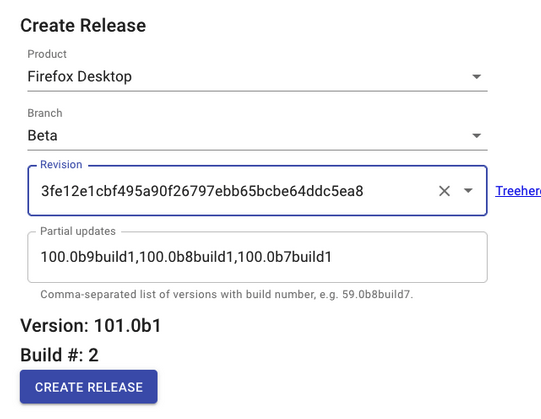
- For DevEdition complete as follows and click Create Release
- Please note: Revision should be the tip. The Partial updates field is automatic.
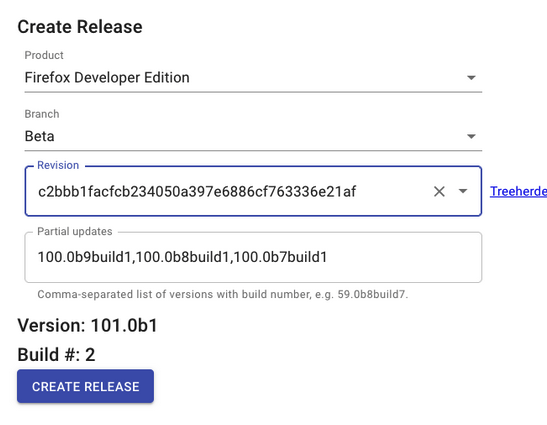
- Create Firefox Android (AC, Fenix, Focus) build 1 release in Ship-It
- This build will not be shipped and is only to test the build pipeline after the merge
- Start the Desktop and DevEdition in Ship-it via the Promote Task
- View the Pending Releases in Ship-It
- Click the Promote Task for Desktop and continue through the pop-ups
- Click the Promote Task for DevEditon and continue through the pop-ups
- Start Firefox Android (AC, Fenix, Focus) release in Ship-It via Promote
- Please note: you can only start a ship-it build on a revision that has a completed decision task
- Confirm the Desktop and DevEdition builds have started
- Taskcluster email: “[desktop] Build of firefox xxx.0b1 build 1”
- Taskcluster email: “[desktop] Build of devedition xxx.0b1 build 1”
- Confirm the Firefox Android (AC, Fenix, Focus) builds have started
- Confirm notification sent when the Desktop and DevEdition builds finish
- Taskcluster email: “firefox xxx.0b1 build1/mozilla-beta is in the candidates directory”
- Taskcluster email: “devedition xxx.0b1 build1/mozilla-beta is in the candidates directory”
- Confirm notification sent when the Firefox Android (AC, Fenix, Focus) builds finish
- Taskcluster email: “firefox-android XXX.0b# build1/mozilla-beta is in the candidates directory"
- Cancel Desktop and DevEdition build 1 in Ship-It
- Cancel Firefox Android (AC, Fenix, Focus) build 1 in Ship-It


The following tasks need to be performed the day after Merge Day
- Review tracking-firefoxXXX+ bugs and approval requests
- Create Desktop and DevEdition build 2 release in Ship-It
- Create Firefox Android (AC, Fenix, Focus) build 2 release in Ship-It
- Start Desktop and DevEdition builds in Ship-It via Promote Task
- Start Firefox Android (AC, Fenix, Focus) build in Ship-It via Promote
- Confirm the Desktop and DevEdition builds have started
- Confirm the Firefox Android (AC, Fenix, Focus) builds have started
- Confirm notification sent when the Firefox Android (AC, Fenix, Focus) builds finish
- Push Firefox Android (AC, Fenix, Focus) release in Ship-It via Push
- Confirm notification sent when the Firefox Android (AC, Fenix, Focus) push finishes
- Taskcluster email: “Focus/Fenix XXXb#-build2 has been pushed to the closed testing track on Google Play"
- Ship Firefox Android (AC, Fenix, Focus) from Ship-It via Ship
- Promote Fenix from Closed Testing to Production with a 99% rollout and submit for review
- Promote Focus from Closed Testing to the Foxfooding track with a 99% rollout and submit for review
- Confirm notification sent when the Desktop and DevEdition builds finish
- Schedule push to Desktop and DevEdition CDN from Ship-It via Push
- Click Push
- Click Schedule
- Click Push
- Confirm notification sent when the Desktop and DevEditon CDN push finishes
- Taskcluster email: “firefox xxx.0b1 build1/mozilla-beta has been pushed to cdntest”
- Taskcluster email: “devedition xxx.0b1 build1/mozilla-beta has been pushed to cdntest”
- Confirm notification sent when the Desktop and DevEdition CDN push finishes
- Ship Desktop and DevEdition to Beta from Ship-It via Ship
- Activate automated Desktop, DevEdition, and Firefox Android betas in Ship-It
- At the bottom of the page, click the red x beside Firefox Desktop: Beta
- Click Enable
- Perform the same actions for Firefox Developer Edition: Beta and Firefox Android (Android-Components, Fenix, Focus): Beta
- Please Note: Automated Betas are built at 13:00 UTC every Monday, Wednesday, and Friday as determined here.
- At the bottom of the page, click the red x beside Firefox Desktop: Beta
- Make release notes live in Nucleus
- Enable the Is Public checkbox and save
- Enable the Is Public checkbox and save
- Verify that the Desktop and DevEdition Balrog rule changes are live and correctly set
- View the Balrog Rules for Firefox Beta
- Verify that the Background rate for Firefox-xxx.0b1-build2 is 50
- View the Balrog Rules for Aurora (DevEdition)
- Verify that the Background rate for Devedition-xxx.0b1-build2 is 100
- View the Balrog Rules for Firefox Beta
- Verify that FIREFOX_DEVEDITION & LATEST_FIREFOX_DEVEL_VERSION in firefox_versions.json are correct
- If incorrect, contact the RelEng on duty via the #release-duty channel in Matrix.
- Verify the beta_version in mobile_versions.json is correct
- If incorrect, contact the RelEng on duty via the #release-duty channel in Matrix.
- Update https://whattrainisitnow.com/release-notes to point to the latest release notes doc
- Share a link to the Beta release notes and the release notes draft document in #release-notes Slack channel
- See example
- Email release-notes with a link to the draft document and the submission deadline.
- See example


Monitor for QA sign-offs on beta 1 build 2
QA sign-offs are usually provided the day after build 2 is ready
- Monitor for QA update tests on Aurora & Beta
- QA will post a message to the #qa-coordination channel in Slack when they complete update testing.
- Monitor for QA manual testing signoff for Desktop and DevEdition
- QA will post a message to the #qa-coordination channel in Slack when they complete functional testing.
- Monitor for QA sign-off on Fenix/Focus build validation
- Fenix build validation testing is tracked here
- Focus build validation testing is tracked here
- Focus and Fenix QA sign-off are sent via #qa-coordination Slack Channel
- Bump the Beta update rate to 100% in Balrog
- Update the Fenix Production track rollout to 100%
- Update the Focus Foxfooding track rollout to 100%
The following tasks need to be performed daily during the Beta cycle
- Monitor Uplift Requests
- Example Filter and Phabricator Dashboard
- Accept or reject the beta uplift requests.
- See Uplift Rules for guidelines
- Please Note: During the RC week, also monitor release uplift requests.
- Please Note: When pushing uplifts be conscious of timing around the automated beta builds. Pushing an uplift will trigger CI, the automated beta build will not trigger until the CI completes.
- Please Note: If an uplift contains string changes, then l10n approval is required and the commit message must end with l10n=approver_name. Add a ni on the bug for approval before taking the uplift.
- Monitor Pending tracking-firefoxXX requests
- Example Filter
- Ensure that the tickets are progressing, and follow up as required.
- Monitor Open tracking-firefoxXX+ and blocking bugs
- Example Filter
- Ensure that the tickets are progressing, and follow up as required.
- Monitor Newly-filed regression bugs
- New regressions bugs can be found here
- Review with the REO - ensure that new tickets are prioritized and ensure that carry-over tickets are still on the team’s radar
- Monitor stability rates and reported crash spikes
- Leverage the automated emails, monitor top crashes in crash-stats, and monitor Stability & Release Monitoring
- Ensure that there are tickets tracking issues with stability rates and crash spikes
- Monitor the Release Notes requests for Beta Tickets.
- Example Filter
- Check through tickets in the release that are tagged for release notes. Review and add these notes to the Beta Release Notes in Nucleus.
The following tasks need to be performed for each beta build (Monday, Wednesday, Friday) during the Beta cycle
Please Note: The Beta build pipeline is also monitored by the Sheriffs, if there is an intermittent test failure they will rerun the failed job. If there is a permanent failure or an issue in the build infrastructure, then it may require canceling the build. Discuss in the #releaseduty Matrix channel. If the decision is made to cancel, then view the pending release in ship-it and click cancel. To create a new build, follow the same steps as outlined in One Time - Start of Beta Cycle to produce build 2 of the current beta release.
- Create a tab in the release tracking sheet “xxx.0bx”
- Use the relevant beta macro
- Please note: After all the beta steps are complete, the tab can be hidden in order to minimize clutter.
- Review tracking-firefoxXX+ bugs and approval requests.
- This step is performed as part of the daily activities, tracked in the checklist for confirmation.
- Confirm the Desktop and DevEdition builds have started.
- Taskcluster email: “[desktop] Build of firefox xx.0bx build 1”
- Taskcluster email: “[desktop] Build of devedition xx.0bx build 1”
- Please Note: The automated beta builds schedule is determined here.
- Confirm the Firefox Android (AC, Fenix, Focus) builds have started
- Taskcluster email: “Build of firefox-android xx.0bx build 1"
- Confirm notification sent when the Firefox Android (AC, Fenix, Focus) builds finish
- Taskcluster email: “firefox-android xx.0bx build1/mozilla-beta is in the candidates directory"
- Confirm notification sent when the Firefox Android (AC, Fenix, Focus) push finishes
- Focus/Fenix XXXb#-build1 has been pushed to the closed testing track on Google Play
- Promote Fenix from Closed Testing to Production with a 99% rollout and submit for review
- Promote Focus from Closed Testing to the Foxfooding track with a 99% rollout and submit for review
- Confirm notification sent when the Desktop and DevEdition builds finish.
- Taskcluster email: “firefox xx.0bx build1/mozilla-beta is in the candidates directory”
- Taskcluster email: “devedition xx.0bx build1/mozilla-beta is in the candidates directory”
- Confirm notification sent when the Desktop and DevEditon CDN push finishes.
- Taskcluster email: “firefox xx.0bx build1/mozilla-beta has been pushed to cdntest”
- Taskcluster email: “devedition xx.0bx build1/mozilla-beta has been pushed to cdntest”
- Verify that the Desktop and DevEdition Balrog rule changes are live and correctly set.
- View the Balrog Rules for Firefox Beta
- Verify that the Background rate for Firefox-xx.0bx-build1 is 100%
- View the Balrog Rules for Aurora (DevEdition)
- Verify that the Background rate for Devedition-xx.0b1-buildx is 100.
- View the Balrog Rules for Firefox Beta
- Monitor for QA sign-off on Desktop and DevEdition build validation for both update/functional testing.
- QA will post a message to the #qa-coordination channel in Slack when they complete update testing and another message when they complete functional testing.
- Build validation testing is tracked here
- Monitor for QA sign-off on Fenix/Focus build validation before proceeding with bumping the Fenix/Focus rollout.
- Focus and Fenix QA sign-off are sent via #qa-coordination Slack Channel.
- Please Note: Build Validation sign-off is usually provided the day after Fenix/Focus builds are produced. If the sign-off is yellow/red, then follow-up on the #mobile-android-team Slack channel. Ensure a plan is in place or a decision is made to block/proceed with the release.
- Once QA has signed off, roll out Fenix to the production track in Google Play to 100%.
- Reply to the QA sign-off Slack message and include the rollout percentage.
- Once QA has signed off, roll out Focus to the Closed testing - Foxfooding track in Google Play to 100%.
- Reply to the QA sign-off Slack message and include the rollout percentage.
As available, the following items should be monitored during the Beta cycle
- QA shares beta testing and pre-release testing reports via email. Review the test reports for the release. For example:
- If there are any red or yellow reports, review the recommendations/plan and the bugs mentioned in the report. For example:
- Track the bug reported as blockers.
- If there is no clear plan to address the report, follow up to ensure that engineering is reviewing.
- If QA mentions the feature is behind a pref verify that this is expected.
- If there are any red or yellow reports, review the recommendations/plan and the bugs mentioned in the report. For example:
- Phabricator patches for remote-settings updates are generated automatically. Typically this is every Monday and Thursday. These patches must be included in the beta uplifts.
- Monitor email notifications sent by Phabricator: “No Bug, mozilla-beta repo-update HSTS HPKP remote-settings tld-suffixes”
- Review the and land patch.
- Use the Bugdash to review the Beta Quality Metrics.
- The counts of these queries should decline as the cycle advances. (See Triage guidelines in the tool tip "?")
- Take a look at the metric/charts over time to ensure the value is stable.
- The data is presented at the Thursday channel meeting.
- Update the Weekly Digest document, as requested on the #fx-weekly-digest Slack channel.
- Update the Release Milestones (Details) section to add Status (On Track, Delayed), Ship Date, information on the current beta release for both Desktop/DeveEdition and Fenix/Focus, information on where we are in the Beta cycle for example when coming up to end of early beta.
- Review the Release Milestones section dates and update the status.
- Update the Quality Metrics section to add information on the number of outstanding regressions, if there are any release blockers, and an overview on the trend of the Beta Quality Metrics metrics.
The following needs to be performed at the End of Early Beta
Please Note: This is performed on the Friday at the midway point of the beta cycle. This is typically after beta 5 has been released. This should be done before pushing any other uplifts to beta after beta 5.
- Submit a Early -> late beta merge automation with Dry Run disabled in Ship-it
- Start the Early -> late beta merge automation
After the job runs, verify that the commit was pushed to the mozilla-beta repo, see example.
The following needs to be performed at the end of the Beta Cycle
- Verfiy the automated mozilla-beta->mozilla-release migration no-op trial run
- The job automatically runs every Friday and the link is shared on the #release-duty channel in Matrix.
- See #do-migration-no-op-trial-runs for documentation.
- Disable automated beta builds in Ship-it.
- Please Note: Monitor beta/release uplift requests between the final beta build and the beta to release merge. It is possible that a late uplift request may come in for a regression/stability fix, evaluate if this is a blocker for the RC and if it should be uplifted to beta before the beta to release merge and RC build.
iOS XXX.0 Checklist
iOS XXX.0 preparation begins on the Friday before RC Week.
- Check if there are any open PRs targettimg main for string imports or updates for effective_tld_names, initial experiments, AS, or Glean
- Ideally, check the day before branching. If there are any pending PRs reach out on #firefox-ios-dev in Slack.
- This query will help
- The following steps can be performed by running ios-merge-day.py in your checkout of the firefox-ios repo:
- Create a firefox-ios release branch with the format release/vxxx off of the main branch
- Create a branch name with the format release/vxxx off of the main branch through the GitHub UI
- Update the version in version.txt from XXX.0 to XXX.1 in the main branch
- Edit version.txt directly in GitHub and commit as "Bump - Set version to XXX.1"
- Create a firefox-ios release branch with the format release/vxxx off of the main branch
- Notify the firefox-ios dev team on #firefox-ios-releases that the release branch is ready and the version bumped was merged
- Create a Firefox iOS release in ship-it
- Select Product: Firefox iOS, Repository: Firefox iOS, Branch: release/vXXX.0, and the latest revision
- Start the Firefox iOS build in Ship-It via Promote
- Push the Firefox iOS release in Ship-It via Push
- This step pushes the Firefox iOS build to Testflight
- Ensure the firefox-ios build is available in Testflight
- Create a Focus iOS release in ship-it
- Note: Focus iOS XXX.0 may not ship; the purpose is to at least verify the Focus iOS pipeline once per cycle
- Select Product: Focus iOS, Repository: Focus iOS, Branch: release/vXXX.0, and the latest revision
- Start the Focus iOS build in Ship-It via Promote
- Push the Focus iOS release in Ship-It via Push
- This step pushes the Focus iOS build to Testflight
- Ensure the focus-ios build is available in Testflight
- Monitor for QA sign-off on Firefox iOS build validation
- Build validation testing is tracked here
- Preliminary sign-off is due to be sent by Monday EOD, which is sufficient for pushing to External Testers in TestFlight
- Once QA has signed off, add the External Beta Testers group to the Firefox iOS TestFlight Build
- Reply to the QA sign-off Slack message.
- QA will aim to send a full manual testing report by EOD Tuesday so there is time to address any blocking issues identified.
- Check if there are any pending backport PRs targeting the XXX.0 release branch
- Example query https://github.com/mozilla-mobile/firefox-ios/pulls?q=is%3Apr+base%3Arelease%2Fv144.0+is%3Aopen+
- After the branch was created iOS Engineers may have created backport PRs. Review the uplift request comment on the PR and merge when appropriate.
- If an XXX.0 RC2 build is required, then cancel the previous RC build in Ship-It and repeat steps 3 to 6 and 11 to 12
- Check if there are any pending backport PRs targeting the XXX.0 release branch
- Example query https://github.com/mozilla-mobile/firefox-ios/pulls?q=is%3Apr+base%3Arelease%2Fv144.0+is%3Aopen+
- After the XXX.0 RC2 was built iOS Engineers may have created backport PRs. Review the uplift request comment on the PR to determine if an XXX.0 RC3 build is required, or if the PR can wait for XXX.1
- If an XXX.0 RC3 build is required, then cancel the previous RC build in Ship-It and repeat steps 3 to 6 and 11 to 12
- Check if there are release notes
- The deadline for release notes is Tuesday during the stabilization week. Product will provide release notes and let the Release Management team know.
- If there are no release notes provided, then use the generic release notes
- Submit Firefox iOS in the AppStore for review
- Select a phased rollout when submitting.
- Select to automatically release after App Store Review on Sunday night Eastern 10PM (Monday 2AM GMT) prior to go-live (i.e. go-live date -2)
- Note: If the Monday of go-live week is a Canadian public holiday, then set the automatic release date to Monday night Eastern instead.
- Ship Firefox iOS from Ship-It via Ship
- Wait until the Friday of RC week to avoid shipping if another RC is needed
- Verify that Firefox iOS rolled out
- Send Slack message to #firefox-ios-releases to notify the release is live
RC Checklist
Once a release moves to the Release cycle, preparations for the release candidates begin. Until go-live, the daily tasks are similar to the beta cycle in terms of monitoring and if needed create a new release candidate.
The following tasks need to be performed at the start of RC week (week before go-live) for Desktop/Android
- Review tracking-firefoxXXX+ bugs and approval requests
- Verify that all approved uplift requests were uplifted to beta
- Submit a Beta -> release merge automation with Dry Run disabled in Ship-it
- Start the Beta -> release merge automation
- Verify the changesets are visible on the release branch and Treeherder
- It may take up to 45m before the changesets are on Treeherder
- release should get a version bump and callsign changes
- There will be two new tags. One tag should be in the form FIREFOX_BETA_xxx_END - FIREFOX_RELEASE_xxx_END - where the xxx is the major Gecko version that Release had prior to the merge. The other tag should be in the form FIREFOX_RELEASE_yyy_BASE - where the yyy is the major Gecko version that Release now has.
- Send the merge complete email to release-drivers
- Example email
- Once the merge is complete, verify that the Treeherder tests green/starred
- Set up Desktop build in Ship-It.
- Connect to the VPN.
- Log into Ship-It.
- Click Releases > Firefox > New.
- Complete as follows and click Create Release:
- Please note: Revision should be the tip. The Partial updates field is automatic.
- Click Submit.
- Set up Firefox Android (AC, Fenix, Focus) release in Ship-It.
- Follow the same steps as creating a beta build.
- Start the Desktop build from Ship-It via Promote RC.
- Click the Schedule button.
- Start Firefox Android (AC, Fenix, Focus) release in Ship-It via Promote.
- Confirm Desktop build has started.
- Taskcluster email: “[desktop] Build of firefox xx.0 build 1”
- Confirm the Firefox Android (AC, Fenix, Focus) builds have started
- Confirm notification sent when Firefox Android builds finish.
- Push Firefox Android (AC, Fenix, Focus) release in Ship-It via Push.
- Confirm notification sent when the Firefox Android (AC, Fenix, Focus) push finishes.
- Turn on managed publishing in the Play Console for Fenix/Focus/Klar.
- Manually create a Fenix/Focus/Klar release on the Production track with a 5% rollout.
- Submit the Fenix/Focus/Klar release for Play Store review.
- Submit the Fenix/Focus release for Samsung Store review with a 5% rollout.
- Please Note: The submission is automatically created as part of the push.
- Delete the N-2 version so that only the previous release and RC packages remain.
- Set to publish manually, the review should complete during RC week.
- Submit the Fenix release for Huawei AppGallery Open Testing to release immediately (only needed if you need to send it to QA or users)
- Please Note: The submission is separate from the release track
- Create a new release (also considered an update) in Huawei App Gallery Connect
- Make sure to select "Yes" for open testing.
- In the packages section, Upload the arm64-v8a apk (Huawei only allows one build per submission).

- Set to release immediately (only option when selecting open-testing)
- Submit the Fenix release for Huawei AppGallery on the Release track review with a 5% rollout.
- Make sure to select "No" for open testing

- All other information should be copied over from the previous submission.
- Set to at 5% with the end date being the Wednesday after the release date, this is when it will rollout to 100% automatically
- Confirm notification sent when Desktop builds finish
- Cancel pending Microsoft Store certification
- Please Note: The submission is automatically created as part of the RC build pipeline.
- Verify the Microsoft Store package version and enable manual update checks
- Verify that correct package was uploaded, the version displayed in the submission matches the release version
- Manual update checks allow users to choose to update
- Re-submit the pending submission for Microsoft Store certification
- Please Note: The Microsoft Store review can take several days, it’s recommended to submit for review at the end of RC week. If there is a blocker found later, you can always resubmit.
- Navigate to the Microsoft Partner Center
- Select Firefox from Windows & Xbox > Overview
- Select the pending submission
- In Packages enable gradual rollout and set to 25%
- Ensure to enable the option to provide the newest package when users manually check for updates.
- In Submission Options set to Automatically Publish on the go-live date and time
- Submit to the store for review
- Please see App submissions documentation for additional information on the Microsoft Store submission process.


As available, the following should be monitored/performed during RC week for Desktop/Android
- Phabricator patches for remote-settings updates are generated automatically. Typically this is every Monday and Thursday. These patches must be included in release/esr uplifts.
- Monitor email notifications sent by Phabricator: “No Bug, mozilla-release repo-update HSTS HPKP remote-settings tld-suffixes”/“No Bug, mozilla-esr91 repo-update HSTS HPKP remote-settings tld-suffixes”
- Review and land the patch.
- Update the Weekly Digest document, as requested on #fx-weekly-digest.
- Update the Release Milestones (Details) section to add Status (On Track, Delayed), Ship Date.
- Review the Release Milestones section dates and update the status.
- Verify that QA have signed off manual testing for Desktop
- QA will post a message to the #qa-coordination Slack channel when they complete update testing and another message when they complete functional testing.
- Build validation testing is tracked here
- Verify that QA have signed off update tests on Beta.
- QA will post a message to the #qa-coordination Slack channel when they complete update testing and another message when they complete functional testing.
- Verify that QA have signed off update tests on release-localtest
- QA will post a message to the #qa-coordination Slack channel when they complete update testing and another message when they complete functional testing.
- Monitor for QA sign-off on Fenix/Focus build validation before proceeding with Steps 7 to 10.
- Please Note: Build Validation sign-off is usually provided the day after Fenix/Focus builds are produced.
- Focus and Fenix QA sign-off are sent via #qa-coordination Slack Channel.
- Turn off managed publishing in the Play Console for Fenix to allow it to roll out to 5% once the app is reviewed
- See Firefox Fast & Private Browser
- Reply to the QA sign-off slack message
- “Thanks, pushed to Production at 5% rollout.”
- Turn off managed publishing in the Play Console to allow it to roll out to 5% once the app is reviewed and push it to the Open Testing track at 100%
- See Firefox Focus: No Fuss Browser and Firefox Klar Browser
- Reply to the QA sign-off slack message
- “Thanks, pushed to Production at 5% rolled out.
- Publish Fenix/Focus on the Samsung Store.
- Please note: It can take up to 2 days for review, so it might still be pending.
- Publish Fenix to the Huawei App Gallery.
- You can edit the percentage or release to all users
RC Uplifts
This tab is for tracking bugs that are being tracked for possible uplift to the mozilla-release repository for RC builds. The primary objectives are:
- Track whether there are any drivers for a respin of the RC builds during RC week.
- Assess whether Desktop, Mobile, or both are affected by the issues noted.
- Verify that all drivers have had an explicit decision made.
The following tasks need to be performed during RC week (the week before go-live)
- Monitor Uplift Requests for Beta/Release
- For Example
- Track if there are any drivers for an RC respin during RC week.
- Assess whether Desktop, Mobile, or both are affected by the issues noted.
- Verify that all drivers have had an explicit decision made.
- If a new RC is required, for example, a release blocker was identified, then create a new RC checklist tab and perform the same steps as for the initial RC but with the following exceptions:
- Cancel the previous RC build in ship-it
- Delete the Microsoft Store submission before creating a new RC build
- Please Note: The RC build will fail if trying to create an MSIX submission when there is already a pending submission
- To cancel and delete the pending submission you may first need to change it from publishing automatically to publishing manually
- Determine if a new RC build impacts Android.
- If a new Android build is not required, then there is no impact on the Fenix/Focus builds and no action is required.
- If a new Android build is required, then repeat the RC steps with the following exceptions:
- Cancel the previous Firefox Android (AC, Focus) build in Ship-It.
- Cancel the previous Fenix build in Ship-It.
- If Fenix/Focus/Klar already rolled out - Replace the 5% rollout of Fenix/Focus/Klar in Google Play and the Samsung Store.
Go-Live Checklist
Once RC week is over and the release candidate is ready to go-live, preparations for go-live begin. After go-live, monitoring continues and if needed preparing for potential dot releases.
The following tasks need to be performed prior to go-live
- Ensure that feedback for release notes was gathered.
- Monitor the #release-notes Slack channel
- For more information on the release notes doc process see here
- Run the new-contributor.py script and add to the release notes
- For more information on the release notes doc process see here
- Release notes RelMan peer review.
- For more information on the release notes doc process see here
- Incorporate feedback into draft release notes.
- Add a release in Nucleus for Firefox, Firefox for Android, Firefox for iOS
- Duplicate the previous release, edit the version, dates, and remove the previous release notes. For example Firefox, Firefox for Android, Firefox for iOS
- Create release notes entries as outlined in the document shared on the #release-notes Slack channel
- Please Note: If images are included with the release note then create a PR for Bedrock, example PR
- Share a link to the staged release notes on #release-notes
- Ensure that Legal signoff on release notes was requested by UX/Product
- Please Note: This step is not always required, if the release notes are not atypical
- Review tracking-firefoxXX+ bugs and confirm there are no blocking issues
- Check for crash spikes with RC builds
- Schedule push to CDN from Ship-It
- Click Push
- Click Schedule
- Ensure the automated email was sent after the push to release-cdntest
- Taskcluster email: “firefox xx.0 buildx/mozilla-release has been pushed to cdntest.
- Ensure QA have performed the Update test on release-cdntest
- QA will post a message to the #qa-coordination channel in Slack when they complete update testing and another message when they complete functional testing.
- Build validation testing is tracked here
- Ensure Legal have signed off on release notes
- Please Note: This is only required based on the outcome of Step 3.
- Ensure that the security advisories are ready
- Check with the security team on the #security Slack channel
- Verify that the RC build candidate is available in the Ubuntu Snap Store


The following tasks need to be performed on go-live day
- Make release notes live in Nucleus
- Please Note: There is a 15-30min lag between making the change in Nucleus and the live website picking up this change, so plan to do this 15-30min prior to go-live.
- Schedule push to release at 25% from Ship-It
- Bump Fenix rollout rate in the play store to 25%
- Bump Focus/Klar rollout rate in the play store to 25%
- Bump Fenix rollout rate in the Samsung Store to 25%
- Bump Focus rollout rate in the Samsung Store to 25%
- Ship Firefox Android (AC, Fenix, Focus) from Ship-It via Ship
- Upload security advisories to GitHub
- Signoff on scheduled rule change in Balrog
- Set the rollout percentage to 25%
- Sync with release management for another team member to signoff on the rule change.
- Verify that the new release is live on mozilla.org
- Verify that the release notes are live here
- Verify that security advisories are live here
- Verify that the Microsoft Store is published at 25% rollout
- Ship new Desktop release in Ubuntu Snap Store with a phased rollout starting a 25%
- See Promote a snap to the stable channel for more information
- Send Slack message to #release-coordination to notify of the release
- For example “Firefox Desktop 115.0, ESR 115.0.0, Fenix/Focus/Klar Android 115.0, and Firefox/Focus/Klar iOS 115.0 are live”
- Include links to the release notes.
- Verify LATEST_FIREFOX_VERSION in firefox_versions.json
- Verify that the release is live on Flathub
- The `release-flatpak-push-firefox` job runs as part of the ship graph and the publication is handled by Flathub.
- https://flathub.org/api/v1/apps/org.mozilla.firefox contains the current release available on Flathub.
- It can take up to 120 minutes for the release to publish on Flathub. If the release is not updated then reach out in the #flatpaks Matrix channel.
- Email release-drivers & release-signoff that updates are live at 25%
- Ensure QA have performed the Update tests on Release
- QA will post a message to the #qa-coordination Slack channel when they complete update testing and another message when they complete functional testing.
- Build validation testing is tracked here
- Email announce list
- Schedule Desktop update rate to 0% in Balrog after 24 hours.
- Signoff on scheduled rule change in Balrog.
- Sync with release management for another team member to signoff on the rule change.
The following tasks need to be performed 24 hours after go-live
- Verify Desktop update rate at 0% in Balrog
- Email release-signoff & release-drivers to confirm 0% throttling.
- Reply to the previous email from the go-live day.
- Example Email
The following tasks need to be performed 48 hours after go-live
- Review release crash rates and incoming bugs for new blockers.
- Bump Desktop update rate to 100% in Balrog.
- Signoff on scheduled rule change in Balrog.
- Sync with release management for another team member to signoff on the rule change.
- Bump the Microsoft Store rollout to 100%.
- Click Finalize package rollout
- End the phased rollout in the Ubuntu Snap Store
- Only if it has not already rolled out to 100%.
- Currently not supported via the web UI, but can be done via the snapcraft cli. See close the release for more information.
- Review fenix/focus release crash rates, incoming bugs for new blockers, and spike/trend in negative play store reviews.
- Check to see if there is anything concerning that would prevent completing the rollout.
- Bump fenix/focus/klar rollout rate in the play store to 100%.
- Bump fenix/focus rollout rate in the Samsung Store to 100%.
- Email release-signoff & release-drivers to confirm full rollout.
- Reply to the previous email from the go-live day.
- Example Email
The following tasks need to be performed daily after go-live
- Review release crash rates and incoming bugs for new blockers
- Review uplift requests for dot release drivers and ride alongs
The following tasks need to be weekly after go-live
- Update the Weekly Digest document, as requested on #fx-weekly-digest.
- Update the Release Milestones (Details) section to add status on the release, dot release, etc.
iOS XXX.1 - XXX.3 Checklist
Perform the same steps as iOS XXX.0 Checklist but with the following exceptions:
- Do not build Focus iOS
- If the QA sign-off is still yellow/red by Thursday during the version stabilization week, then that version will not ship.
- We will "burn" the version number and proceed with the next version branch on Friday as scheduled.
Dot Release Uplifts
Similar to the RC Uplifts tab. The primary purpose of this tab is to track any bugs driving a dot release and bugs that are under consideration to ride-along, It is also used to assess which products are affected by any drivers. It is up to the release manager what should go into a dot release, and we try to keep these uplift guidelines in mind. Adding even what looks like a trivial fix can add risk, both to the process (delay, extra testing, work for other teams) and to causing new regressions. For security issues, we may not want to take them in a dot release unless there is particular pressure to do so.
The following information needs to be added for each bug:
- Bug number
- Component
- Is the bug a dot release driver?
- Does the patch affect Desktop, Mobile, or both?
- Is the fix ready?
- Is the patch on mozilla-central?
- Is there an uplift request on the ticket?
- Is the uplift approved?
- Is the patch uplifted to release?
- Does the bug need a release note?
- Is the patch for a security bug?
- Any additional notes
- For example, outline why the bug is being taken in a dot release.
Please Note: For each dot release, create a section in the Dot Release Uplifts tab to track the bugs in consideration: For example, “Desktop 101.0.1& Fenix/Focus 101.2.0 - GTB 2022-06-08”
Dot Release Checklist
The following tasks need to be performed at the start of preparing a dot release
Desktop
- Duplicate the Desktop Dot Release Checklist tab and name it appropriately.
- Example: Desktop 101.0.1
- Email release-drivers group to inform them a dot release is being created.
- Include information on the driver, if there will be an Android release, and a link to the sheet used to track the uplifts.
- Example Email
- Review any pending release uplift requests
- Example Filter
- If they are low risk consider including them in the dot release
- Uplift patches to release.
- If there are security bugs uplifted then sync with the security team member on rotation
- The security team member on point is whoever is on rotation for the next release version to ship.
- The security team member on will assign the CVEs and prepare the advisories. This also covers any Android advisories.
- Create a release in Nucleus to add release notes.
- Add a release note with a link to the major release for reference.
- For bugs that have been identified as needing a release note:
- If a release note is required and the release note text is clear from the bug content then create it directly in Nucleus.
- Otherwise, request wording before adding the release note.
- Follow the same process as creating an RC build.
- If any uplifts impact Android then duplicate the Android Dot Release Checklist tab and name it appropriately.
- Follow the same process as monitoring when an RC build has QA sign-off
Android
- Duplicate the Android Dot Release Checklist tab and name it appropriately.
- Example: Android 101.0.1
- Follow the same process as creating an RC build with the following exceptions:
- Turn on managed publishing in the Play Console.
- This allows you to submit an app for review but control when it is published.
- Manually create a Fenix/Focus/Klar release on the Production track with a 25% rollout.
- If an app is still pending review on a closed track then you cannot promote it to a production track.
- See Prepare and roll out a release for more information.
- Submit the Fenix/Focus/Klar release for Play Store review.
- Keep the same release notes as the major release. Add any new notes at the top prefixed by the dot release version.
- With managed publishing turned on, the app will not automatically release after the store review.
- Submit the Fenix/Focus release for Samsung Store review with a 25% rollout and set to publish automatically
- This allows the review to go through slightly faster
- Set the publish time to later in the go-live day. This gives enough time to react if the build fails QA
- Turn on managed publishing in the Play Console.
- Follow the same process as monitoring when an RC build has QA sign-off with the following exceptions:
- Turn off managed publishing in the Play Console.
- With managed publishing turned off, the app will be automatically released after store review.
- Turn off managed publishing in the Play Console.
The following tasks need to be performed during go-live of a dot release
- Follow the same steps as an RC go-live, with the following exceptions:
- The dot release is rolled out at 25% but there is no schedule drop to 0%
- Please Note: Under chemspill situations, a greater rollout percentage may be required.
- There may not be any security advisories.
- The dot release is rolled out at 25% but there is no schedule drop to 0%
The following tasks need to be performed 24 hours after go-live of a dot release
- Follow the same steps as after an RC go-live, with the following exceptions:
- If there are no blocking issues then bump the rollout to 100% after 24 hours
The following tasks need to be performed daily after go-live of a dot release
- Follow the same monitoring steps as after an RC go-live.