|
|
| (36 intermediate revisions by 7 users not shown) |
| Line 3: |
Line 3: |
| After we get a "go to build" e-mail from Release Management there's some manual steps to be run to prepare for and start a release. This page describes them in detail. | | After we get a "go to build" e-mail from Release Management there's some manual steps to be run to prepare for and start a release. This page describes them in detail. |
|
| |
|
| = L10N Changesets = | | = Overall beta release = |
| Currently we have separate changesets files for Fennec and Firefox. Both are generated from the [https://l10n.mozilla.org/shipping/milestones l10n dashboard]<br />
| | [[File:Beta-release-schema.png]] |
| First log in to the dashboard with your LDAP and then follow the instructions below
| |
|
| |
|
| == Create milestones ==
| | Source: [[File:Beta-cycle.zip]] |
| Sometimes the milestones have not been created and we can do so:
| |
| * load https://l10n.mozilla.org/shipping/milestones and sign-in
| |
| * click on the link at the bottom of the page: "You may be able to create new milestones."
| |
| * click the checkbox(es) for the product(s) you want to bump.
| |
| ** For betas, make sure the beta # in both fields matches the one you're doing (eg "Beta Build 4" == "Beta 4")
| |
| ** For '''final releases''' clear the first field, remove "_beta_b#" from the second field, and append ".0" (or .0.1).
| |
| * hit "submit" and the milestones will be created.
| |
|
| |
|
| Note: you cannot create release milestones for an older major version. For example, when 18.x is current, 17.x milestones cannot be created. This is especially relevant for Thunderbird's slower release cycle. In that case, use the existing changesets from the l10n-changesets_thunderbird-release file.
| | See also: |
| | * [http://moz-releng-docs.readthedocs.org/en/latest/release_workflows/fx_ga_release.html GA Workflow] (used for both GA and first Beta builds). |
| | * [http://moz-releng-docs.readthedocs.org/en/latest/release_workflows/fx_beta_release.html Beta Workflow] (used for remaining beta releases) |
|
| |
|
| == Ship the milestone == | | = Submit to Ship It = |
| Note: when clicking "Ship It" you may be notified that there are pending sign-offs for one or more locales. It is OK to proceed for betas. For final releases we leave the decision with Release Management.
| | <b>''This task is completed by Release Management''</b> |
|
| |
|
| ===Fennec===
| | Releases are initiated through the [https://ship-it.mozilla.org/ Ship It webapp] (through the Mozilla VPN). When you're ready to start a release, you can use the [https://ship-it.mozilla.org/submit_release.html "Submit a new release" page] to submit it. Once it's in the system you should find '''someone else''' to review it for you. They can see it and mark it as ready on [https://ship-it.mozilla.org/releases.html the "View releases" page]. If multiple releases are expected around the same time it's often best to wait until all are ready for review, so that they can be started at the same time. |
| * Click the "ship" button to load up the milestone (eg: Fennec 16 Beta Build 3)
| |
| * It will tell you if there are pending sign offs. Click "ship it" if you meet on of the two conditions
| |
| ** For betas, carry forward regardless if there are pending sign offs
| |
| ** For final releases, carry forward *only* if there are no pending sign offs. Ask RelMan if there are
| |
| * You will land in a page like this e.g. ([https://l10n.mozilla.org/shipping/about-milestone/fennec16_beta_b3 https://l10n.mozilla.org/shipping/about-milestone/fennec16_beta_b3])
| |
| * Click "shipping tools" at the top
| |
| * Platforms should read "android"; multi-locale should read "android-multilocale".
| |
| * Click "Add" and check these values
| |
| ** repo: "releases/mozilla-beta" (you MUST use mozilla-beta, even for mozilla-release based releases)
| |
| ** branch: "default"
| |
| ** path: "mobile/android/locales/maemo-locales"
| |
| * Click "l10n-changesets.json"
| |
| * Copy and paste it into your repo's l10n-changesets_mobile-{version}.json
| |
|
| |
|
| ===Firefox or Thunderbird===
| | Track Ship-It status on the [https://ship-it.mozilla.org/releases.html the "View releases" page]. If there are errors reported, check your email for details from "<tt>cltbld</tt>" with subject starting "<tt>[release-runner]</tt>". |
| * Click "ship" to load up the milestone (eg: Firefox 16 Beta Build 3)
| |
| * It will tell you if there are pending sign offs. Click "ship it" if you meet on of the two conditions
| |
| ** For betas, carry forward regardless if there are pending sign offs
| |
| ** For final releases, carry forward *only* if there are no pending sign offs. Ask RelMan if there are
| |
| * This will take you to a page like [https://l10n.mozilla.org/shipping/about-milestone/fx16_beta_b3 https://l10n.mozilla.org/shipping/about-milestone/fx16_beta_b3]
| |
| * Click "shipping tools" at the top
| |
| * Click "l10n-changesets"
| |
| * Copy and paste the list into your changesets file (eg: l10n-changesets_mozilla-{version})
| |
|
| |
|
| = Clobbering = | | == Defaults == |
| Mark a clobberer for "Any master", $branch, "Any builder" with [https://secure.pub.build.mozilla.org/clobberer/ clobberer]. This will instruct any slave that did the last release on $branch to clobberer their release directories. Ideally, this should be done hours or more before the release starts, so that cleanup occurs before the release job starts. Clobbering isn't mandatory if your release config has base_clobber_url pointing to always_clobber.php.
| | Unless otherwise stated by RelMan we stick to certain assumptions about releases: |
| | * Firefox betas need partial updates from the previous 2 betas |
| | * Firefox releases (that is, a release on the release channel) need partial updates from the 3 past versions with the most users. If you don't know how to get this information ask someone in RelEng or RelMan. |
| | * A "go" for Firefox implies a "go" for Fennec, too |
|
| |
|
| If you are doing a test release in staging there is [[Release:Release_Automation_on_Mercurial:Documentation#Staging_Specific_Notes|additional setup work]] to do, and the clobberer URL changes.
| | = Paperwork = |
| | A release specific bug should be filed, except for b2 to bN (end of cycle). releaseduty is on the hook to pre-file these, but it should be done manually for chemspills. These bugs should: |
| | * be assigned to the releng person handling the release |
| | * ensure the relman lead is cc'd (since they start the build, and need to be aware of any infrastructure blockers) |
|
| |
|
| = Post a Patch for Review =
| | [[Releases/BuildNotesIndex|Build notes]] are required for every release, located at Releases/<app>_<version>/BuildNotes (eg [[Releases/Firefox_34.0b4/BuildNotes]], [[Releases/Firefox_33.0.2/BuildNotes]], [[Releases/Thunderbird_31.2.0/BuildNotes]]). A copy of the [[Releases/RelEngChecklist | Checklist]] should be copied in, so that work items can be marked off as they are completed. This makes handing-off releases between people more reliable. |
|
| |
|
| Note: Firefox releases also include Fennec unless otherwise specified.
| | File bugs on specific issues you hit which can be fixed by automation improvements, or for patches that require review and there is no release tracking bug. |
|
| |
|
| For a Firefox beta, you'll need to modify:
| | [[category:Release_Management|R]] |
| | |
| mozilla/l10n-changesets_mobile-beta.json
| |
| mozilla/l10n-changesets_mozilla-beta
| |
| mozilla/release-fennec-mozilla-beta.py
| |
| mozilla/release-firefox-mozilla-beta.py
| |
| | |
| = Land patches and reconfig =
| |
| Just like any other buildbot-configs change you would make you should start by landing your patch on the "default" branch of the repository. After that, there's a few other things that need to be done to prepare for a release:
| |
| * Transplant your change to the "production" branch. Usually done with something like:
| |
| cd buildbot-configs
| |
| hg up -r production
| |
| hg transplant [rev of commit on "default"]
| |
| * Tag repositories with release tags. buildbot-configs should have the tag applied to the tip of the "production" branch. buildbotcustom should have it applied to the tip of the "production-0.8" branch, and tools should have it applied to the tip of the "default" branch. For example, Firefox 17.0b1 would required FIREFOX_17_0b1_BUILD1, FIREFOX_17_0b1_RELEASE, FENNEC_17_0b1_BUILD1, and FENNEC_17_0b1_RELEASE applied.
| |
| * [[ReleaseEngineering/Landing_Buildbot_Master_Changes | Reconfig]] the build and scheduler masters.
| |
| | |
| = Running release sanity and starting the automation =
| |
| On the build scheduler master (see <tt>production-masters.json</tt>, currently bm36) run release sanity in dry run mode. For example (updated for multi-master):
| |
| # Combined release
| |
| cd /builds/buildbot/build_scheduler/master
| |
| source ../bin/activate
| |
| PYTHONPATH=. python ../tools/buildbot-helpers/release_sanity.py -u bhearsum \
| |
| -V 6.0b2 --branch mozilla-beta --build-number 1 \
| |
| --release-config release-firefox-mozilla-beta.py \
| |
| --release-config release-fennec-mozilla-beta.py --products firefox,fennec \
| |
| --dryrun localhost:9301
| |
| # Firefox-only release
| |
| cd /builds/buildbot/build_scheduler/master
| |
| source ../bin/activate
| |
| PYTHONPATH=. python ../tools/buildbot-helpers/release_sanity.py -u bhearsum \
| |
| -V 6.0b2 --branch mozilla-beta --build-number 1 \
| |
| --release-config release-firefox-mozilla-beta.py --products firefox \
| |
| --dryrun localhost:9301
| |
| # Thunderbird release:
| |
| cd /builds/buildbot/build_scheduler/master
| |
| source ../bin/activate
| |
| PYTHONPATH=. python ../tools/buildbot-helpers/release_sanity.py -u hwine \
| |
| -V 14.0b5 --build-number 1 --branch comm-beta \
| |
| --release-config release-thunderbird-comm-beta.py --product thunderbird \
| |
| --dryrun localhost:9301
| |
| | |
| After that succeeds (or you account for any failures you receive), run the command again without --dryrun to start the release. Some standard discrepancies:
| |
| * for chemspills: to bypass l10n checks if not changing, add option "<tt>-l</tt>"
| |
| * for Thunderbird: to bypass (broken) mozconfig checks, add option "<tt>--bypass-mozconfig-check</tt>"
| |
| | |
| If you're working in staging you must make sure to pass in the correct staging release config (staging_release-firefox-<branch name>.py)
| |
<< Documentation
After we get a "go to build" e-mail from Release Management there's some manual steps to be run to prepare for and start a release. This page describes them in detail.
Overall beta release
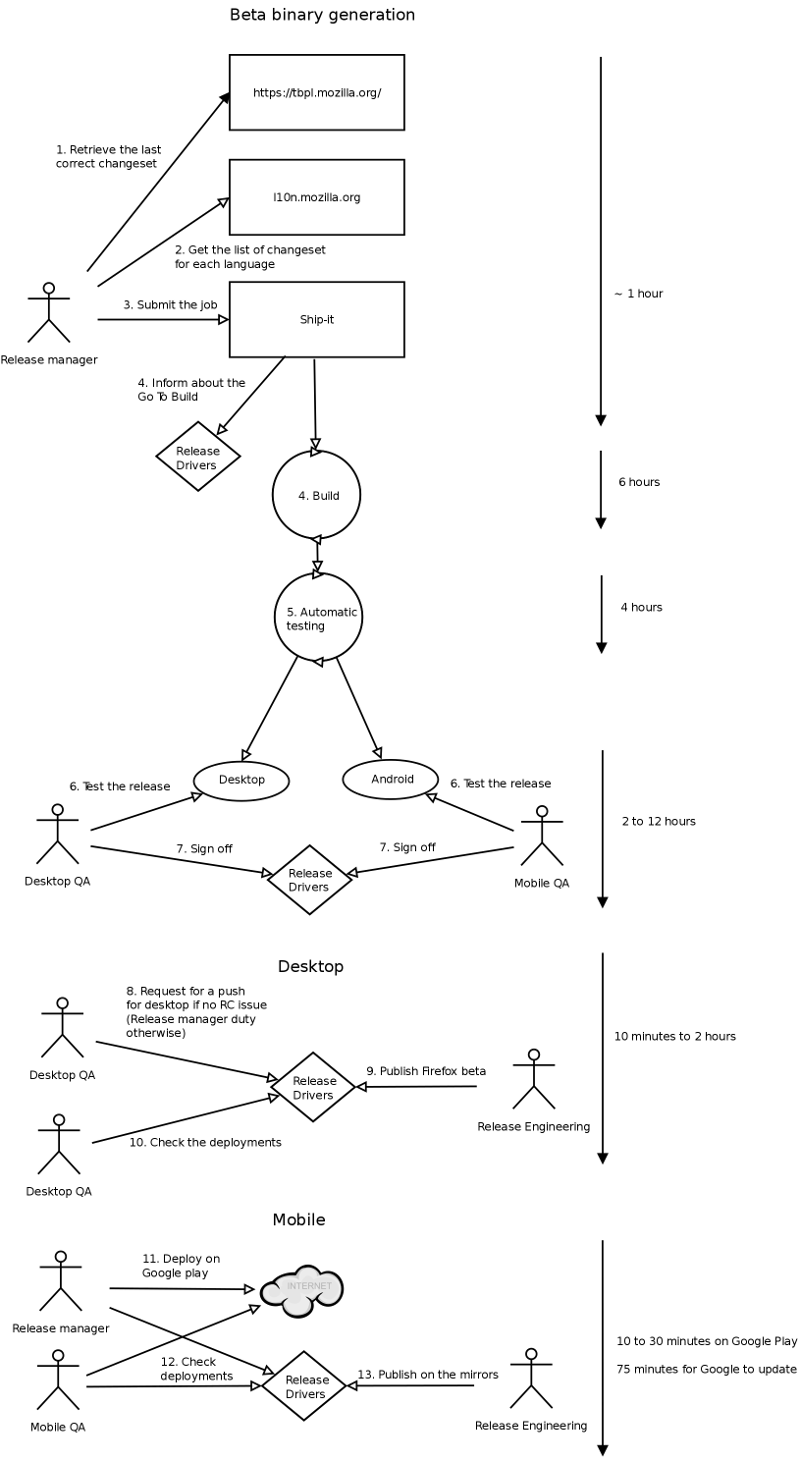
Source: File:Beta-cycle.zip
See also:
Submit to Ship It
This task is completed by Release Management
Releases are initiated through the Ship It webapp (through the Mozilla VPN). When you're ready to start a release, you can use the "Submit a new release" page to submit it. Once it's in the system you should find someone else to review it for you. They can see it and mark it as ready on the "View releases" page. If multiple releases are expected around the same time it's often best to wait until all are ready for review, so that they can be started at the same time.
Track Ship-It status on the the "View releases" page. If there are errors reported, check your email for details from "cltbld" with subject starting "[release-runner]".
Defaults
Unless otherwise stated by RelMan we stick to certain assumptions about releases:
- Firefox betas need partial updates from the previous 2 betas
- Firefox releases (that is, a release on the release channel) need partial updates from the 3 past versions with the most users. If you don't know how to get this information ask someone in RelEng or RelMan.
- A "go" for Firefox implies a "go" for Fennec, too
Paperwork
A release specific bug should be filed, except for b2 to bN (end of cycle). releaseduty is on the hook to pre-file these, but it should be done manually for chemspills. These bugs should:
- be assigned to the releng person handling the release
- ensure the relman lead is cc'd (since they start the build, and need to be aware of any infrastructure blockers)
Build notes are required for every release, located at Releases/<app>_<version>/BuildNotes (eg Releases/Firefox_34.0b4/BuildNotes, Releases/Firefox_33.0.2/BuildNotes, Releases/Thunderbird_31.2.0/BuildNotes). A copy of the Checklist should be copied in, so that work items can be marked off as they are completed. This makes handing-off releases between people more reliable.
File bugs on specific issues you hit which can be fixed by automation improvements, or for patches that require review and there is no release tracking bug.
