Sheriffing/How To/Backouts: Difference between revisions
Jump to navigation
Jump to search
(added how to get all changesets for a bug number) |
('How to test a backout on the Try server' added) |
||
| Line 10: | Line 10: | ||
* Set the NEEDINFO flag in bugzilla. This is very important! Developers get a lot of bugmail and backout comments can be missed. Please make sure that you set a NEEDINFO to the developer in the bug when doing a backout. | * Set the NEEDINFO flag in bugzilla. This is very important! Developers get a lot of bugmail and backout comments can be missed. Please make sure that you set a NEEDINFO to the developer in the bug when doing a backout. | ||
* Make sure that the failures that lead to the backout are [[Sheriffing/How:To:Treeherder#Classifying.2FStarring_jobs|starred in Treeherder]]. This helps the next sheriff on duty. | * Make sure that the failures that lead to the backout are [[Sheriffing/How:To:Treeherder#Classifying.2FStarring_jobs|starred in Treeherder]]. This helps the next sheriff on duty. | ||
= How to test a backout on the Try server = | |||
If this uncertainity if backout will fix an issue, this can be tested on the [https://wiki.mozilla.org/ReleaseEngineering/TryServer Try server] where changes are tested but never committed to production repositories. | |||
<ol> | |||
<li>First backout the changeset(s)<br/> | |||
<code>hg oops -er</code> or <code>hg oops -esr</code></li> | |||
<li>At https://mozilla-releng.net/trychooser/ choose the build types, the platforms, test suites etc. that you need to test.<br/> | |||
Example:<br/> | |||
[[File:Sheriffing-Try server config example.png]] | |||
</li> | |||
<li>For '''the backout’s commit message''', we will use what is written in the '''Computed Syntax''' command field. Example:<br/> | |||
[[File:Sheriffing-try server commit message.png]] | |||
</li> | |||
<li>To push to try, use the following command:<br/> | |||
<code>hg push -f ssh://hg.mozilla.org/try</code> | |||
</li> | |||
<li>After the backout was pushed to Try, we need to drop the commit from history, for every single changeset that was tested:<br/> | |||
'''Run hg histedit and replace pick with d.'''</li> | |||
</ol> | |||
= Useful commands = | = Useful commands = | ||
Revision as of 12:27, 27 July 2018
When a patch is landed that causes build or test failures, it must be backed out to restore the tree to a passing or green state again.
How to perform backouts
With unified repos, backouts are now easier to perform. Please follow the instructions for backing out from unified repos.
Best Practices and Communication
Based on Feedback from the Sheriff Survey, when you have to do a backout, here are some best practices:
- Ping the Developer in IRC if possible and when the developer is around, this gives the developer a chance to fix the problem and so avoid a backout. Some of the sheriffs use a 5 minute rule for the waiting of a response of the developer. Note: this is done as a courtesy to developers. You can and should backout patches if you feel it's being abused, e.g. the developer is not using the Try server
- Set the NEEDINFO flag in bugzilla. This is very important! Developers get a lot of bugmail and backout comments can be missed. Please make sure that you set a NEEDINFO to the developer in the bug when doing a backout.
- Make sure that the failures that lead to the backout are starred in Treeherder. This helps the next sheriff on duty.
How to test a backout on the Try server
If this uncertainity if backout will fix an issue, this can be tested on the Try server where changes are tested but never committed to production repositories.
- First backout the changeset(s)
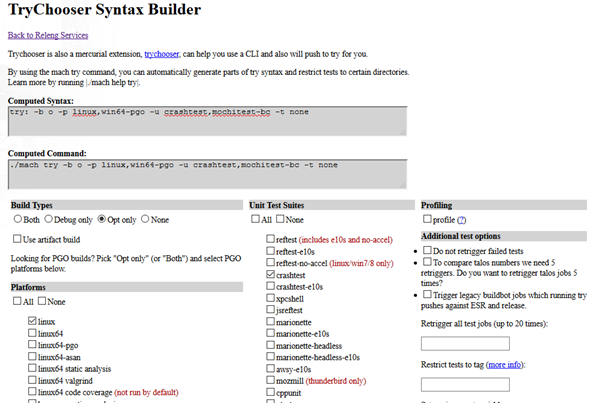
hg oops -erorhg oops -esr - At https://mozilla-releng.net/trychooser/ choose the build types, the platforms, test suites etc. that you need to test.
Example:
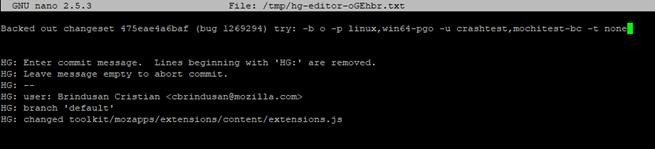
- For the backout’s commit message, we will use what is written in the Computed Syntax command field. Example:
- To push to try, use the following command:
hg push -f ssh://hg.mozilla.org/try - After the backout was pushed to Try, we need to drop the commit from history, for every single changeset that was tested:
Run hg histedit and replace pick with d.


Useful commands
If you want to find all changesets which landed for a bug number, e.g. in multiple commits:
hg log -k "bug number"
E.g.
hg log -k "1234567"