AMO:Editors/EditorGuide/AddonReviews: Difference between revisions
(Added duplicate / hidden files policy) |
(Added policy on similar names or icons) |
||
| Line 91: | Line 91: | ||
| style="padding: .5ex 1ex 1ex 0; border-bottom: 1px solid black;" | Admin Review / Notify mailing list | | style="padding: .5ex 1ex 1ex 0; border-bottom: 1px solid black;" | Admin Review / Notify mailing list | ||
| style="padding: .5ex 1ex 1ex 0; border-bottom: 1px solid black;" | These add-ons usually include some form of malicious code. | | style="padding: .5ex 1ex 1ex 0; border-bottom: 1px solid black;" | These add-ons usually include some form of malicious code. | ||
| style="padding: .5ex 1ex 1ex 0; border-bottom: 1px solid black;" | | |||
|- style="vertical-align: top;" | |||
| style="padding: .5ex 1ex 1ex 0; border-bottom: 1px solid black;" | Add-on name or icon identical or very similar to existing, active listing | |||
| style="padding: .5ex 1ex 1ex 0; border-bottom: 1px solid black;" | Admin Review | |||
| style="padding: .5ex 1ex 1ex 0; border-bottom: 1px solid black;" | We want to avoid user confusion when selecting which add-on to install. It's OK to fork, but it should be clear what are the differences between very similar offerings. | |||
|- style="vertical-align: top;" | |- style="vertical-align: top;" | ||
| style="padding: .5ex 1ex 1ex 0; border-bottom: 1px solid black;" | Other copyright suspicions | | style="padding: .5ex 1ex 1ex 0; border-bottom: 1px solid black;" | Other copyright suspicions | ||
Revision as of 22:53, 14 February 2011
Add-on Reviews
The Queues
The add-on queues are sorted by waiting time, with the longest waiting add-on at the top. They show the same information for every pending review:
- Add-on name and version. This is a link to the add-on version review page.
- Add-on type.
- Waiting time.
- Flags. At the moment the only possible flag is the Admin Review flag; it's the green add-on icon with a yellow warning sign on top. Only admin editors can review add-ons with this flag.
- Applications. Application icons of the applications this add-on supports.
- Additional information. This can indicate if the add-on is platform-specific, site-specific, or requires external software.
You should always try to review the add-ons near the top of queue. Always favor the add-ons that have been waiting for the longest time. Having said that, the few add-ons that are at the very top and have been waiting for a much longer time than the rest (sometimes multiple days more than the next one) are likely to be add-ons that require special review from an admin editor, or are awaiting a response from the developer. Try to focus on the first 10 or 15 add-ons in the queues. There should be a couple there that you can review.
Performing a Review
Before getting started, here's an important legal note: reviews should not include checking for possible copyright or trademark violations and you should not take any action on an add-on because you suspect it copies code from others without permission or may otherwise infringe someone else's copyright or trademark. The DMCA is a law that gives us legal protection from being held responsible for copyright infringement by users who post content to our site, but only if our conduct qualifies us for such protection and we follow exactly the procedures laid out in the DMCA. Determining copyright or trademark infringement is complicated and you will not have enough information to make those determinations. We have a robust DMCA process where copyright or trademark holders can contact Mozilla legal to address any potential problems. More about this in a section below.
Editor Tour: Select a review in the queue and click on its link. This will take you to the add-on review page.
Possible resolutions
The grey box near the top of the review page shows the possible resolutions for a review.

Clicking on any of them will open a form below it.
The comments textbox is where you should write all of your review notes. There's also a canned response list below it, that contains useful reusable snippets of text for your notes. Selecting any of them will just add the text to the textbox. You can use as many as you need. Take some time to familiarize yourself with the canned response list. It can give you a good idea of the issues we frequently encounter and what we have to say about it.
You should normally use one of the first three resolutions:
- Push to Public: the version doesn't have any problems and it's OK for the public.
- Grant Preliminary Review: the version has problems that prevent us from making it fully public, but it's still safe to use.
- Reject: the version has security issues and must be rejected.
The other two are for special situations:
- Request More Information: this allows you to ask the author for information necessary to perform the review, without removing the add-on from the queue. A very common case for this is when the add-on is site-specific and the author didn't provide a test account. Since we can't be registering to every site on the web just to test, we always require authors to provide the necessary information. Replies from the author will appear in the review page.
- Request Super-Review: this is for very special cases where you think an admin editor should review this add-on. It can be because you think there's some malicious intent from the author; in this case you should notify the mailing list about it. It can also be because you are aware Mozilla has received a DMCA notice about this add-on. It is critical that you do not try to resolve this issue yourself. Copyright complaints should be escalated to admins and, at most, you can point the person making the complaint to the Digital Millennium Copyright Act Notice section of our legal notices page for an explanation of the protocol to follow. The add-on will remain in the queue, and in this case the comments aren't sent to the author. They're only readable from the review page.
While you perform your review, you should be keeping notes of everything you noticed about the add-on: validator flags, errors in the error console, bugs, areas for improvement, etc. You can either use a note-taking program, or just type your notes in the comments textbox of the review page. Changing the resolution won't clear your notes. Just make sure you selected the right one when you're ready to submit!
The sections below include tables with the recommended resolution for the most common situations. If there are many policy problems in a review, you must take the strictest of all required actions.
Editor Tour: an admin editor should have given you a specific add-on to review. Also, don't submit your first review without admin approval!
Step 1: Review Add-on Info
The review page has most of the add-on metadata needed to begin the review.
Metadata
The top section displays the add-on name, version, authors, categories and compatibility information.
The middle section includes lots of information that you should always read:
- Nomination message: this is the message written by the author when the add-on was first nominated. It can contain important information about testing or source code availability.
- Notes to reviewer: also a note from the author to AMO Editors, but it can change for each version. It often contains information about the changes in this version.
- Summary, description, developer notes: the same data that appears in the public add-on page.
- Version notes: this is very important when reviewing updates. It'll help you understand what the code changes are supposed to do.
- Privacy Policy and EULA: they must clearly state what the add-on does with private user data or any usage restrictions it may have.
This should all give you a good picture of what the add-on does.
Below the descriptions you should see the add-on version review history. The review history contains all previous reviews peformed to the add-on, including the editor notes for each one of them. This is very valuable information, and you should always read at least the most recent reviews.
Editor comments are rarely used, but if there are any, you should read them. They are only used for internal communication between editors.
Policies and Actions
| Policy | Action | Notes | |
|---|---|---|---|
| Missing name in default locale | Request More Information | Reject if the name is not updated after 3 days. | |
| Missing information in descriptions, missing testing information | Request More Information | ||
| Add-on name and code copied from very popular add-on (like Firebug or AdBlock Plus) | Admin Review / Notify mailing list | These add-ons usually include some form of malicious code. | |
| Add-on name or icon identical or very similar to existing, active listing | Admin Review | We want to avoid user confusion when selecting which add-on to install. It's OK to fork, but it should be clear what are the differences between very similar offerings. | |
| Other copyright suspicions | Ignore | We have a legal obligation *not* to take action unless the author of the original code files a DMCA complaint. If you see any malicious intent in the copied add-on, follow the same Action as the previous policy. | |
| Not compatible with the latest version of the application | Add note | ||
| Missing Privacy Policy or EULA | Preliminary Review | These descriptions are necessary if the add-on handles user information remotely, or the user needs to agree to any terms in order to use the add-on. | |
| Questionable add-on relevance | Preliminary Review | Carefully read the Add-on Relevance section below. | |
| Not following previous editor requests | Preliminary Review |
Add-on Relevance
For nominations, at this point you should ask yourself if the add-on is relevant enough to be public on AMO. We have a very low admission threshold, but we don't want to publish add-ons that will get at most a couple hundred downloads and will be mostly ignored during their lifetime. In that case, the add-on should at best receive a preliminary review approval.
Add-ons that commonly fall into this category are:
- Add-ons that help access very specific webpages. For example, an add-on that makes it easier to use an internal business site or a university library.
- Add-ons targeted to a limited geographical area. For example, an add-on for a local city newspaper or radio station.
- Add-ons that only add a toolbar or menu filled with website links, similar to plain bookmarks.
- Add-ons that download video files from Flash video sites like YouTube. We already have too many add-ons like these, with little to no distinction between them. Unless the add-on provides something really innovative to video downloading, it should not get full approval.
Assessing the relevance of an add-on can be difficult. In these cases you should go to the add-on page and see how many reviews and downloads the add-on has. The add-on page is accessible using the Item Overview link near the top of the review page.

Small numbers (less than a couple hundred downloads, few or no reviews) should be an indication that the add-on should not get full approval. When in doubt, leave the review to somebody else or ask in the mailing list.
Step 2: Automatic validation
We have a extensive set of static tests that identify common bad practices and possible security problems with add-on code. You must always run the code validator and inspect the results when performing a review.
The code validation link is located near the bottom of the review page, between the add-on descriptions and the review history.

Clicking on the link will take you to the validation page, where the automatic code validator will run for that version of the add-on and then the results will be displayed.
The Validator Help Page explains in detail what every possible warning means and how serious each is. Remember that for preliminary review, only security-sensitive warnings matter, like using eval for remote JS or any other form of privilege escalation.
Policies and actions
| Policy | Action | Notes |
|---|---|---|
| Missing file / Parse error / Validation error | Reject | |
| Obfuscated, minified or binary code | Reject | |
| Obfuscated, minified or binary code, with original sources included in XPI or provided link | Admin Review | Add-ons with this type of code are not eligible for preliminary review. |
| Using eval, Function() or setTimeout on remote code | Reject | |
| Remote script insertion | Reject | |
| Unprotected browser or iframe elements | Reject | |
| Conduit add-on without CONDUIT-AMO as author | Reject | |
| Conduit add-on with CONDUIT-AMO as author | Admin Review | |
| JS Library (like jQuery) included, but not in its original file / JS Library doesn't pass checksum validation | Reject | |
| Unicode characters (e.g. \u0060) in JS code | Reject | Keep in mind these can be used inside strings. They're just not allowed to replace JS code characters, since they're usually meant to bypass the validator. |
| Using eval, Function() or setTimeout on local code | Preliminary Review | One case that we accept is when eval is used to replace existing Firefox functions. This is very common for add-ons that change bookmarking or tabbing behavior. It is also allowed in known libraries like jQuery. |
| Using the codebase_principal_support preference or enablePrivilege function | Preliminary Review | |
| Native object prototype extension / Using Prototype library | Preliminary Review | |
| Storing passwords or other sensitive user data in the preferences | Preliminary Review | |
| Changing Firefox preferences without user consent | Preliminary Review | These include: network preferences, update system preferences, homepage, User Agent string. |
| Changing security preferences, permissions, certificates (nsIX509CertDB) | Admin Review | |
| Using nsIProcess | Admin Review | |
| Using JS c-types | Admin Review | |
| Theme includes JS code | Admin Review | |
| Using Geolocation | Test | Give Preliminary Review if the add-on doesn't ask the user before getting geolocation data. Approve if it does. |
| Localization errors | Ignore |
Most of the other validator flags are not that important, but they should still be fully read and understood. When in doubt, check the help page or ask in the mailing list.
Step 3: Code Review
Every line of add-on code must be reviewed. The code validator can't detect all possible security or code quality issues, so we must always be in the lookout for bad code. For versions in the Preliminary Review queue, the code review should be shallow and just ensure the add-on's safety.
All review pages have a View Contents link that take you to the code browser page. Pending updates also have a Compare with Public Version link next to it, which will show you the code with the changed sections highlighted. These links appear near the top of the review page.

For updates, the compare link should be used. It can sometimes fail to work for very large add-ons. In that case, you can either review the full source code, or download the new and public files to your system and compare them using tools like xpidiff.sh or WinMerge.

The box on the top left allows you to browse through the add-on code. You can drag this box from the title bar to any part of the page. Folders and JAR files appear highlighted in bold, and can be expanded by clicking on them. If a JAR file fails to expand, please notify it on the mailing list.
In the case of comparing updates, the files and folders that have had any changes will have their names in italics. The image above shows changes in all files and folders.
Policies and Actions
| Policy | Action | Notes |
|---|---|---|
| Remote code download or execution, custom updates | Reject | Add-ons should not download remote code in any way. They are free to interact with web APIs as long as all that is being transmitted is data, not code. Add-ons are allowed to insert local scripts into webpages (within reason), but are not allowed to insert remote scripts. |
| Security violations | Reject |
Sending passwords over unprotected HTTP if there's a secure alternative. Sending passwords in the URL or other headers than POSTDATA. Performing any security-sensitive operations over HTTP where there's a secure alternative. |
| Bad or no namespacing | Preliminary Review | All scripts that are included in the main window overlay should have proper namespacing to avoid name conflicts with other add-ons. The name should normally correspond to the add-on name in order to guarantee its uniqueness. |
| Preference names without "extensions." prefix" | Preliminary Review | Add-on preferences should use the "extensions." prefix, and should also have a reasonable namespace. |
| Privacy issues | Preliminary Review | An add-on can claim to work with a popular website like Twitter, but then send the user data through some other site, most likely owned by the developer. There needs to be a justified reason to handle user data in this manner, and the privacy policy and add-on descriptions need to be very clear about this. Passwords should never be handled in this way, and they should only be transmitted directly to the original API provider. |
| Performance problems | Preliminary Review | Synchronous requests, inefficient code, multiple overlay scripts with lots of code. |
| Not using prefwindow for preferences | Add Note | If an add-on has a preferences window, we recommend that authors do 2 things: 1) use the prefwindow element, 2) add the line in install.rdf that enables this window to be opened from the Add-ons Manager window. |
| Duplicate / hidden files or folders | Add Note | |
| Bootstrapped Add-on doesn't clean up after itself | Preliminary Review | See section on Bootstrapped Add-on policies. |
In general you should apply your judgement and try to identify code that may appear suspicious or out of place. Try to understand what everything does and how it all fits together.
By the end of the code review, you may have a series of notes that will require the add-on to be significantly rewritten. If you think that's the case, it's OK to resolve the review without proceeding with the next step. If the add-on needs work but is safe to use, it can be given a preliminary review approval without performing any testing.
Step 4: Feature Review
The last step in a review is to install and test the add-on.
Testing setup
These are a few settings and tools you should use or consider using when setting up your add-on testing environment:
- Always use a separate profile for testing, never your main profile. See Setting up an extension development environment.
- Ideally you should perform your tests in a virtual machine. It is always useful in case you need to test in multiple platforms. VirtualBox is free and supports most platforms.
- Enable full Error Console reporting, as described in the Development Preferences section.
- These add-ons help you inspect add-on behavior and find possible solutions for problems:
- DOM Inspector. Analyze XUL and HTML layout, CSS and even JS objects.
- Console2 for detailed Console logging.
- Tamper Data or Live HTTP Headers for HTTP traffic analysis.
- Leak Monitor to detect some types of memory leak. See Leak Gauge for a more general solution.
- To test Fennec add-ons, you'll need to install Fennec. It is preferred that you test in a supported mobile device. If a Fennec nomination has been waiting for long, it's OK to test with the desktop XULRunner application.
- For online malware scanning, you can use Virus Total, Kaspersky online scan and Jotti online scan. AMO performs virus checks, and binary add-ons should be admin-reviewed anyway, but if you suspect anything, those are good places to use.
Installing and testing
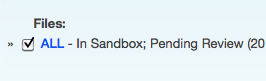
Add-ons are normally cross-platform, so there will only be a single file to review, linked with the name ALL (as in all platforms). If the add-on is offered for a limited number of platforms, there will be individual links for each one of them. In this case all supported platforms should be tested.
Regarding applications, you don't need to test the add-on for all applications it supports. If the add-on supports Firefox and others, it's OK to only test on Firefox. If, however, an add-on update introduces Fennec or other application support, the add-on should be tested on it. The applications we support for reviews are listed on this page.
The link points directly to the add-on file.
 Policies and actions

| Policy | Action | Notes |
|---|---|---|
| Security violations | Reject | Adding HTTP content to secure pages. Visit HTTPS sites like addons.mozilla.org and make sure the identity button is unchanged. This is specially important for add-on that insert scripts into sites.
 |
| No Surprises violation | Preliminary Review | Changing homepage, default search provider, including unexpected ads or content changes without explicit user opt-in. |
| Privacy violations | Preliminary Review | Incorrect or insufficient privacy policies, not respecting Private Mode. |
| Showing a modal dialog at startup | Preliminary Review | Many add-ons open dialogs or new tabs at startup, mostly offering information on getting started. This is useful, but it shouldn't block the user from using the browser. Opening modal (blocking) dialogs at startup is not allowed. Non-modal dialogs, separate windows or new tabs are allowed. |
| Errors in the Error Console | Preliminary Review | |
| Add-on is very hard to use without instructions | Preliminary Review | If the add-on is difficult to use, there should be instructions included in the add-on descriptions, or in a startup page or window. |
| Toolbar buttons are not customizable | Preliminary Review | |
| Affiliate linking | Preliminary Review | See details below. |
| Uses Geolocation without asking the user | Preliminary Review | |
| Requires third party software or paid registration | Admin Review |
Other tests to perform:
- Visit a very simple website like example.org and inspect its DOM, looking for any changes. Again, this is particularly important for extensions that insert scripts or make DOM changes.
- Open the add-on's preferences window, from the Add-ons Manager and elsewhere, and verify that preference changes apply properly. Make sure the window fits all of its contents (a common problem in Mac OS).
- Test all add-on features, within reason. If there too many, focus on the main features.
- Affiliate linking. Some add-ons add affiliate codes to Amazon links (or similar) in order to make money. At the moment we allow this as long as (1) the add-on follows the No Surprises policy, (2) the feature doesn't replace or remove any existing affiliate codes, (3) the affiliate codes aren't inserted in the merchant website's links (inserting Amazon affiliate codes in Amazon.com pages).
Step 5: Resolution
Choose the appropriate resolution and include all of your notes. Make sure you use a corteous and professional tone, and be as helpful as you can when pointing out problems or areas for improvement. If you are pushing the add-on public, thank the author for the time and effort they have put in. Once you're ready, click the Process Action button.
The submission of the review form can fail for a number of reasons, so it is highly recommended that you copy of your notes to the clipboard before you click on the submit button. You can also use add-ons like Textarea Cache for this.
Editor tour: remember to ask the admin editor to review your response before sending it.