Firefox/Onboarding: Difference between revisions
Michaelverdi (talk | contribs) m (→Download Page) |
Michaelverdi (talk | contribs) m (Working on the current experience section) |
||
| (27 intermediate revisions by the same user not shown) | |||
| Line 1: | Line 1: | ||
Our onboarding flow has always been mainly a "default" experience — the result of many small decisions instead of a comprehensive plan. Largely that's a result of how we’re organized internally. If you look at onboarding from the user’s point of view, you’ll see the work of many individual teams with their own agendas and goals (e.g., Product, User Experience, Creative, Mozilla.org, Legal, Marketing, etc.). To address this, we’re taking a user-centric approach, working together as a cross-functional team to build a new onboarding experience in a holistic and systematic way. | |||
== Current Work == | |||
=== MVP Test=== | |||
[[File:Onboarding-flowsQ4-2016.jpg|link=https://wiki.mozilla.org/images/1/13/Onboarding-flowsQ4-2016.jpg|thumb|300px|Flowchart]] | |||
We are preparing a Funnelcake test for mid-February 2017 ([https://bugzilla.mozilla.org/show_bug.cgi?id=1322718 Bug 1322718]). This focuses on creating a simple, consistent, beautiful install experience with minimal friction. It will also debut the automigration feature (automatically importing data from the default browser) and a redesigned New Tab page in place of the default home page. | |||
== Current Onboarding Flow == | |||
Here's a breakdown of what currently happens and some of the issues. | |||
*'''Search Results:''' | |||
*'''Download Page:''' | |||
*'''User Account Control:''' | |||
*'''Stub Installer:''' | |||
*'''Import Wizard:''' | |||
To address this, we’re | *'''Default Browser prompt:''' For Windows XP, Vista and 7 we have an opt-out checkbox in the stub installer. This is effective in making Firefox the default browser but it's seen as "sneaky" by people. Beginning with Windows 8, this method is no longer available and so we rely on a modal dialog on startup. This is | ||
*'''Almost Done page:''' About 8% - 9% of people sign up for an account here. The problem is that this is not the right context for this ask - new users haven't had a chance to use the browser yet. In testing, about half of the participants assumed that creating an account was a requirement for using Firefox, and they expressed clear frustration with this perceived requirement and the sign-up process. In addition, none of the participants, whether they thought an account was required or not, understood the purpose of accounts. Additionally, accounts created via this page have a number of other issues: | |||
==The Plan== | **They are 2.7X more likely to enter a fake email address. | ||
[https://invis.io/ZQ5EC58VA This is the plan] - it’s an invision document which you can comment on. | **They are 38% more likely to use a known bad password. | ||
**They are 41% more likely to use an all number or all letter password. | |||
*'''Data Choices infobar:''' This pops up 60 seconds into the first session, distracting from the current task. It also links directly to the Data Choices section of the Firefox Options where no context is given and where there is no clear way to return. | |||
*'''New User experience:''' We don't have one in particular right now. After the Import Wizard and Almost Done page, people are on their own to figure things out. | |||
*'''Returning User experience:''' We don't have one in particular right now. After Firefox opens people are on their own to figure what, if anything, is new or changed. If it's been more than 60 days since Firefox was used or if Firefox was reinstalled we show an infobar at the bottom of the window prompting the user to Refresh Firefox. | |||
<!-- | |||
==The Plan *DRAFT*== | |||
[https://invis.io/ZQ5EC58VA This is a draft of the plan] we're working on in 2016 - it’s an invision document which you can comment on. It's based on learning and research conducted between 2012 and 2015. This is meant to be a starting place for experimentation. This plan will evolve and change as we build and test. | |||
[[image:Onboarding-plan.jpg|link=https://invis.io/ZQ5EC58VA|none|500px]] | [[image:Onboarding-plan.jpg|link=https://invis.io/ZQ5EC58VA|none|500px]] | ||
The plan has three main parts. | The plan has three main parts. | ||
===Download Page=== | ===Download Page=== | ||
| Line 36: | Line 34: | ||
===Stub Installer=== | ===Stub Installer=== | ||
[[File:Install.png|none|500px]] | |||
The stub installer doesn’t have anything to distract you from the task of installing. You’ve already confirmed multiple times that you want to install Firefox so no need to make you confirm again. | |||
===Account Sign In=== | ===Account Sign In=== | ||
[[File:Sign In.png|none|500px]] | |||
The account sign in form is mainly designed for existing users. It allows them to quickly set up a new device and not have to see new user content. For new users, this serves as an introduction to the idea of an account (they can still create one here if they wish to). | |||
===First Run Page=== | ===First Run Page=== | ||
[[File:Set up.png|none|500px]] | |||
New users see the first onboarding page which is focused on making it easy to open Firefox a second time. Additional pages will be displayed over a number of days and weeks. | |||
===New Tab Page=== | ===New Tab Page=== | ||
[[File:New Tab.png|none|500px]] | |||
Browsing starts on the new tab page (which replaces the home page). New users see tiles and snippets tailored specifically to them. | |||
==="Later Run" Page=== | ==="Later Run" Page=== | ||
[[File:Mobile and Accounts.png|none|500px]] | |||
Over the course of the first month we’ll trigger[1] additional onboarding pages for new users. | |||
*Get Firefox everywhere - download on mobile and connect with an account. | |||
*Tracking Protection - Firefox only feature | |||
*Feature recommendations - add-ons, themes, customizations | |||
[1]We can open additional onboarding pages programmatically or in response to user interacting with a tile, snippet or email. | |||
===Returning Users=== | ===Returning Users=== | ||
[[File:Returning-users.png|none|500px]] | |||
The goal: Give people who have uninstalled Firefox or haven’t used it in a long time, a “like new” experience. | |||
*If there is no existing Firefox installation, we’ll refresh the profile to fix hijacking and performance problems. Their bookmarks, history and passwords will be saved and we’ll treat them as if they are a brand new user. | |||
== | *If there is an existing Firefox installation and it hasn’t been opened in more than 60 days and Firefox is not the default browser, we’ll refresh the profile to fix hijacking and performance problems. Their bookmarks, history and passwords will be saved and we’ll treat them as if they’ve just performed a major update. | ||
--> | |||
* Onboarding | == Completed Work == | ||
[[File:Recent-bm-in-menu.png|link=https://wiki.mozilla.org/images/d/d3/Recent-bm-in-menu.png|thumb|200px]] | |||
== | *'''Make bookmarks easier to understand (Fx 47 - 49):''' Research showed that many users were confused when they created a bookmark by clicking the star and they didn't see it visible in the top level of the the bookmarks menu (the animation having given them the impression that their bookmark "went in there"). One user spent 1:50 looking for her just saved bookmark. We identified a few improvements that we thought would fix this, including displaying the 5 most recent bookmarks in the top level of the menu. Subsequent testing confirmed that this did indeed solve the problem. [https://bugzilla.mozilla.org/show_bug.cgi?id=1219810 Meta Bug 1219810] | ||
*'''Various quality improvements (Fx 46 - 52):''' We identified a number of smaller quality issues during our Onboarding Summit in Oct. 2015 that we also worked on in 2016. | |||
**[https://bugzilla.mozilla.org/show_bug.cgi?id=1041514 Bug 1041514] - Don't show default browser prompt on first run if a user opts out in the installer | |||
* | **[https://bugzilla.mozilla.org/show_bug.cgi?id=384336 Bug 384336] - Firefox window should start up maximized on first run on small screens | ||
* | **[https://bugzilla.mozilla.org/show_bug.cgi?id=1229614 Bug 1229614] - Make the firstrun page responsive | ||
** [https:// | **[https://bugzilla.mozilla.org/show_bug.cgi?id=1274633 Bug 1274633] - Remove additional first run pages | ||
**[https://bugzilla.mozilla.org/show_bug.cgi?id=1229636 Bug 1229636] - Remove new tab first time use message | |||
**[https://bugzilla.mozilla.org/show_bug.cgi?id=1229626 Bug 1229626] - Firefox is not pinned to the taskbar when using the stub installer and not making it the default browser | |||
**[https://bugzilla.mozilla.org/show_bug.cgi?id=1189038 Bug 1189038] - When Firefox is the default browser you shouldn't be able to uncheck the check on startup setting | |||
**[https://bugzilla.mozilla.org/show_bug.cgi?id=1232679 Bug 1232679] - Improve the Firefox start menu tile on Windows 8/10 | |||
[[File:Downloadpageupdate.jpg|link=https://wiki.mozilla.org/images/8/81/Downloadpageupdate.jpg|thumb|300px]] | |||
*'''Art and Copy updates to the Download Page (Early 2016):''' In user testing, people said our download page was clean, simple and professional. But they were sometimes confused by the browser window without content that sat at the bottom of the page and they generally agreed that it didn't provide any real reason to download Firefox. It worked well if you were already convinced to try Firefox - all you had to do was click the big download button. If you needed more information, you couldn't get it without clicking though to secondary links. In addition the page was missing "Firefox's personality" which was something we identified in the Onboarding Summit. So beginning in early 2016, we developed new artwork and added copy explaining why you should choose Firefox. The initial test is here in [https://bugzilla.mozilla.org/show_bug.cgi?id=1256241 Bug 1256241]. There were further revisions that resulted in the page we use today. | |||
[[File:Search-results.jpg|link=https://wiki.mozilla.org/images/a/ae/Search-results.jpg|thumb|300px]] | |||
*'''Search Engine Marketing (2014 - ongoing):''' 90% of people who end up on our download page get there from a web search. Research showed that a large number of people click on search ads knowing full well that they are ads but expecting, through experience, that companies buy the ads for their own products so this link should take them to the right place. The problem with Firefox is that we had ruled this out as cost prohibitive. In our absence, third-parties bought ads against our brand terms (e.g. "firefox", "download firefox", "mozilla"). This resulted in having the majority of test participants end up on third-party sites where Firefox was used as a lure to install crapware (and worse) on their computers. It was a horrible experience. We’ve fixed this problem with an ongoing SEM campaign. So now we have an ad followed by our #1 organic result. This has resulted in millions more finding the correct download page and has also increased our organic downloads. | |||
*'''Allow for a "like-new" experience for Returning Users (Fx 25 & 49):''' Firefox stores the user's data in the profile folder which persists across updates and reinstallations. Normally, this is great. The issue is that most problems manifest as something wrong in the profile folder. This sometimes results in a user who either stops using Firefox for a long time or who uninstalls it. Then at some later time, they update or reinstall Firefox resulting in an updated copy with the same old profile and thus the same old problems. To address this we've build two extensions of the [https://bugzilla.mozilla.org/show_bug.cgi?id=851364 Refresh feature] that prompt people with a Refresh command when they haven't used Firefox for more than 60 days or after a reinstallation. To be truly effective, we think we'll need to make this process automatic in the future. | |||
**[https://bugzilla.mozilla.org/show_bug.cgi?id=498181 Bug 498181] - Offer to reset a user's profile if it's gone unused for months | |||
**[https://bugzilla.mozilla.org/show_bug.cgi?id=1095739 Bug 1095739] - Allow a "new user" experience to happen subsequent to Firefox being uninstalled | |||
[[File:Fx29tour.png|link=https://wiki.mozilla.org/images/6/60/Fx29tour.png|thumb|200px]] | |||
*'''Updating, Returning and New user tours for Australis (Fx 29 - Now Decommissioned):''' Australis was the codename for the Firefox UI update released with Firefox 29. We created a tour for Returning and Updating Firefox users to explain what was new. [https://mozilla.michaelverdi.com/building-a-new-firefox-update-experience/ Read more about that here.] We also repurposed this for New Firefox users for a number of releases before moving it to the help menu. [https://bugzilla.mozilla.org/show_bug.cgi?id=1293539 It was finally decommissioned] in September 2016. | |||
== Links == | |||
* [https://bugzilla.mozilla.org/show_bug.cgi?id=1322718 Meta bug for our MVP] (planned mid-Feb. funnelcake test) | |||
! | * Google group: [https://groups.google.com/a/mozilla.com/forum/#!aboutgroup/desktop-onboarding desktop-onboarding]. | ||
* Email: desktop-onboarding at mozilla dot com | |||
* #onboarding in irc or #onboardingux on Slack | |||
Latest revision as of 17:16, 20 December 2016
Our onboarding flow has always been mainly a "default" experience — the result of many small decisions instead of a comprehensive plan. Largely that's a result of how we’re organized internally. If you look at onboarding from the user’s point of view, you’ll see the work of many individual teams with their own agendas and goals (e.g., Product, User Experience, Creative, Mozilla.org, Legal, Marketing, etc.). To address this, we’re taking a user-centric approach, working together as a cross-functional team to build a new onboarding experience in a holistic and systematic way.
Current Work
MVP Test
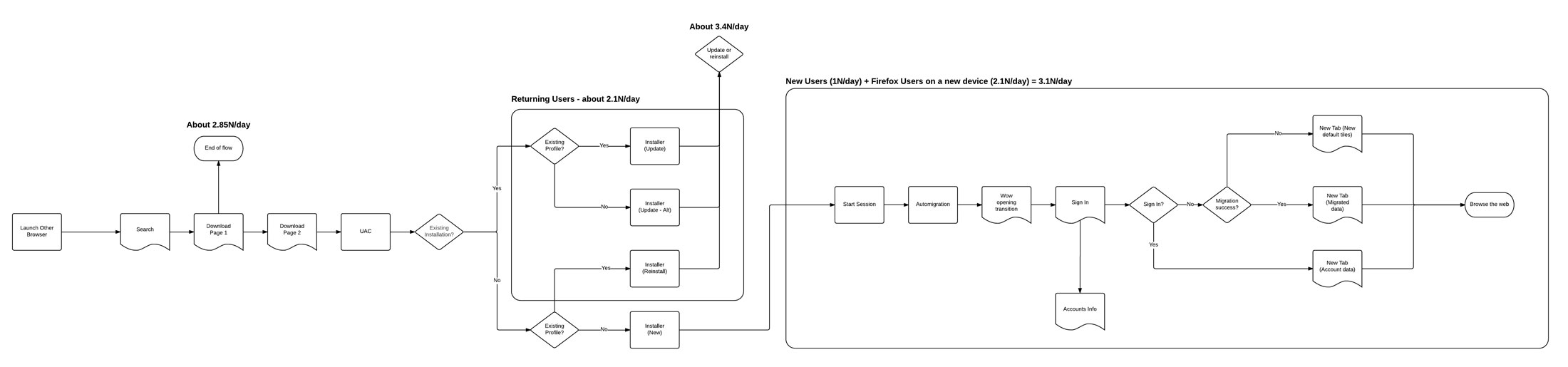
We are preparing a Funnelcake test for mid-February 2017 (Bug 1322718). This focuses on creating a simple, consistent, beautiful install experience with minimal friction. It will also debut the automigration feature (automatically importing data from the default browser) and a redesigned New Tab page in place of the default home page.
Current Onboarding Flow
Here's a breakdown of what currently happens and some of the issues.
- Search Results:
- Download Page:
- User Account Control:
- Stub Installer:
- Import Wizard:
- Default Browser prompt: For Windows XP, Vista and 7 we have an opt-out checkbox in the stub installer. This is effective in making Firefox the default browser but it's seen as "sneaky" by people. Beginning with Windows 8, this method is no longer available and so we rely on a modal dialog on startup. This is
- Almost Done page: About 8% - 9% of people sign up for an account here. The problem is that this is not the right context for this ask - new users haven't had a chance to use the browser yet. In testing, about half of the participants assumed that creating an account was a requirement for using Firefox, and they expressed clear frustration with this perceived requirement and the sign-up process. In addition, none of the participants, whether they thought an account was required or not, understood the purpose of accounts. Additionally, accounts created via this page have a number of other issues:
- They are 2.7X more likely to enter a fake email address.
- They are 38% more likely to use a known bad password.
- They are 41% more likely to use an all number or all letter password.
- Data Choices infobar: This pops up 60 seconds into the first session, distracting from the current task. It also links directly to the Data Choices section of the Firefox Options where no context is given and where there is no clear way to return.
- New User experience: We don't have one in particular right now. After the Import Wizard and Almost Done page, people are on their own to figure things out.
- Returning User experience: We don't have one in particular right now. After Firefox opens people are on their own to figure what, if anything, is new or changed. If it's been more than 60 days since Firefox was used or if Firefox was reinstalled we show an infobar at the bottom of the window prompting the user to Refresh Firefox.
Completed Work
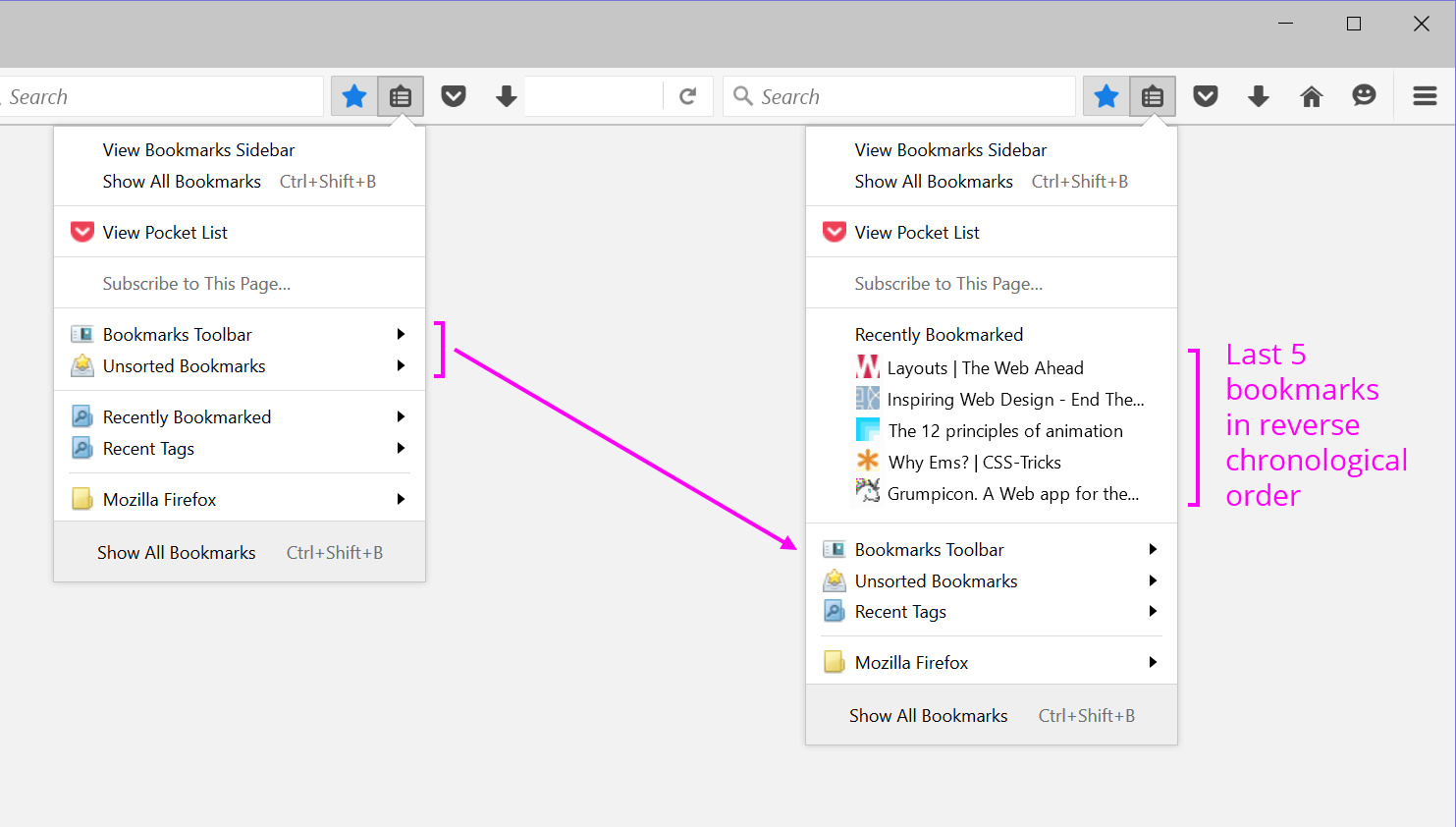
- Make bookmarks easier to understand (Fx 47 - 49): Research showed that many users were confused when they created a bookmark by clicking the star and they didn't see it visible in the top level of the the bookmarks menu (the animation having given them the impression that their bookmark "went in there"). One user spent 1:50 looking for her just saved bookmark. We identified a few improvements that we thought would fix this, including displaying the 5 most recent bookmarks in the top level of the menu. Subsequent testing confirmed that this did indeed solve the problem. Meta Bug 1219810
- Various quality improvements (Fx 46 - 52): We identified a number of smaller quality issues during our Onboarding Summit in Oct. 2015 that we also worked on in 2016.
- Bug 1041514 - Don't show default browser prompt on first run if a user opts out in the installer
- Bug 384336 - Firefox window should start up maximized on first run on small screens
- Bug 1229614 - Make the firstrun page responsive
- Bug 1274633 - Remove additional first run pages
- Bug 1229636 - Remove new tab first time use message
- Bug 1229626 - Firefox is not pinned to the taskbar when using the stub installer and not making it the default browser
- Bug 1189038 - When Firefox is the default browser you shouldn't be able to uncheck the check on startup setting
- Bug 1232679 - Improve the Firefox start menu tile on Windows 8/10
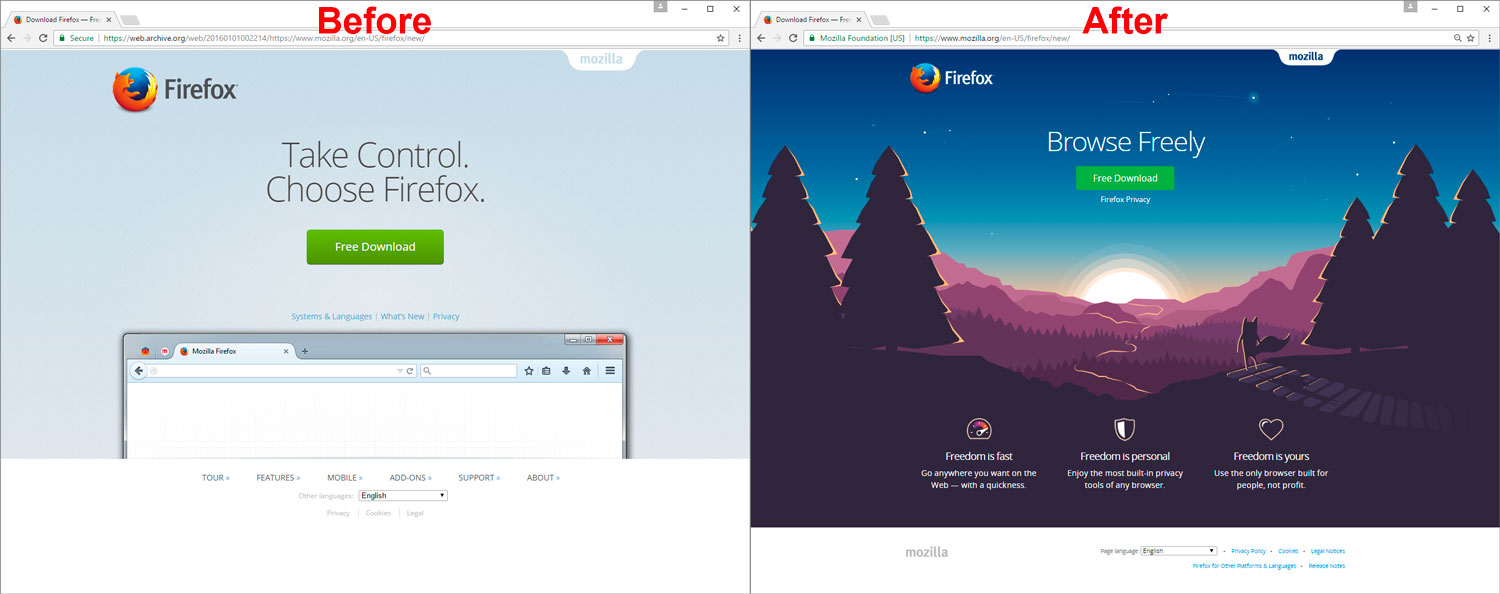
- Art and Copy updates to the Download Page (Early 2016): In user testing, people said our download page was clean, simple and professional. But they were sometimes confused by the browser window without content that sat at the bottom of the page and they generally agreed that it didn't provide any real reason to download Firefox. It worked well if you were already convinced to try Firefox - all you had to do was click the big download button. If you needed more information, you couldn't get it without clicking though to secondary links. In addition the page was missing "Firefox's personality" which was something we identified in the Onboarding Summit. So beginning in early 2016, we developed new artwork and added copy explaining why you should choose Firefox. The initial test is here in Bug 1256241. There were further revisions that resulted in the page we use today.
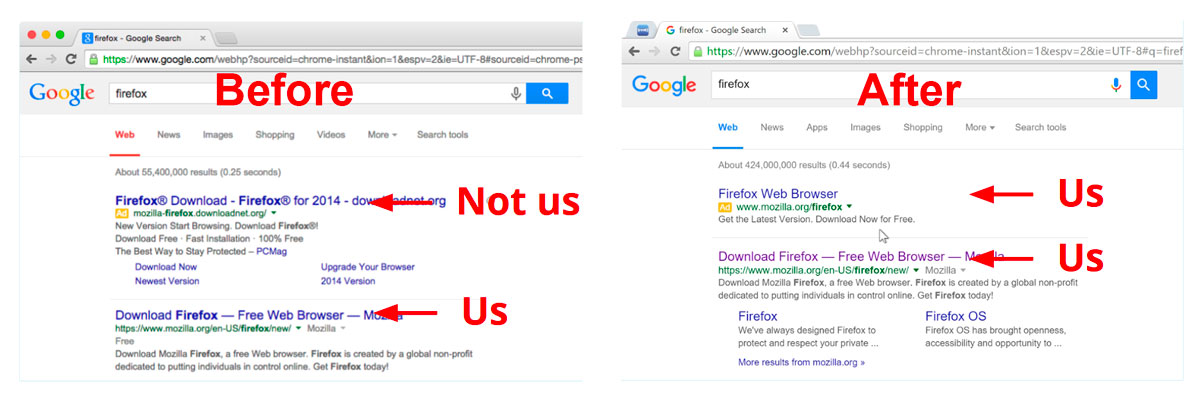
- Search Engine Marketing (2014 - ongoing): 90% of people who end up on our download page get there from a web search. Research showed that a large number of people click on search ads knowing full well that they are ads but expecting, through experience, that companies buy the ads for their own products so this link should take them to the right place. The problem with Firefox is that we had ruled this out as cost prohibitive. In our absence, third-parties bought ads against our brand terms (e.g. "firefox", "download firefox", "mozilla"). This resulted in having the majority of test participants end up on third-party sites where Firefox was used as a lure to install crapware (and worse) on their computers. It was a horrible experience. We’ve fixed this problem with an ongoing SEM campaign. So now we have an ad followed by our #1 organic result. This has resulted in millions more finding the correct download page and has also increased our organic downloads.
- Allow for a "like-new" experience for Returning Users (Fx 25 & 49): Firefox stores the user's data in the profile folder which persists across updates and reinstallations. Normally, this is great. The issue is that most problems manifest as something wrong in the profile folder. This sometimes results in a user who either stops using Firefox for a long time or who uninstalls it. Then at some later time, they update or reinstall Firefox resulting in an updated copy with the same old profile and thus the same old problems. To address this we've build two extensions of the Refresh feature that prompt people with a Refresh command when they haven't used Firefox for more than 60 days or after a reinstallation. To be truly effective, we think we'll need to make this process automatic in the future.
- Bug 498181 - Offer to reset a user's profile if it's gone unused for months
- Bug 1095739 - Allow a "new user" experience to happen subsequent to Firefox being uninstalled
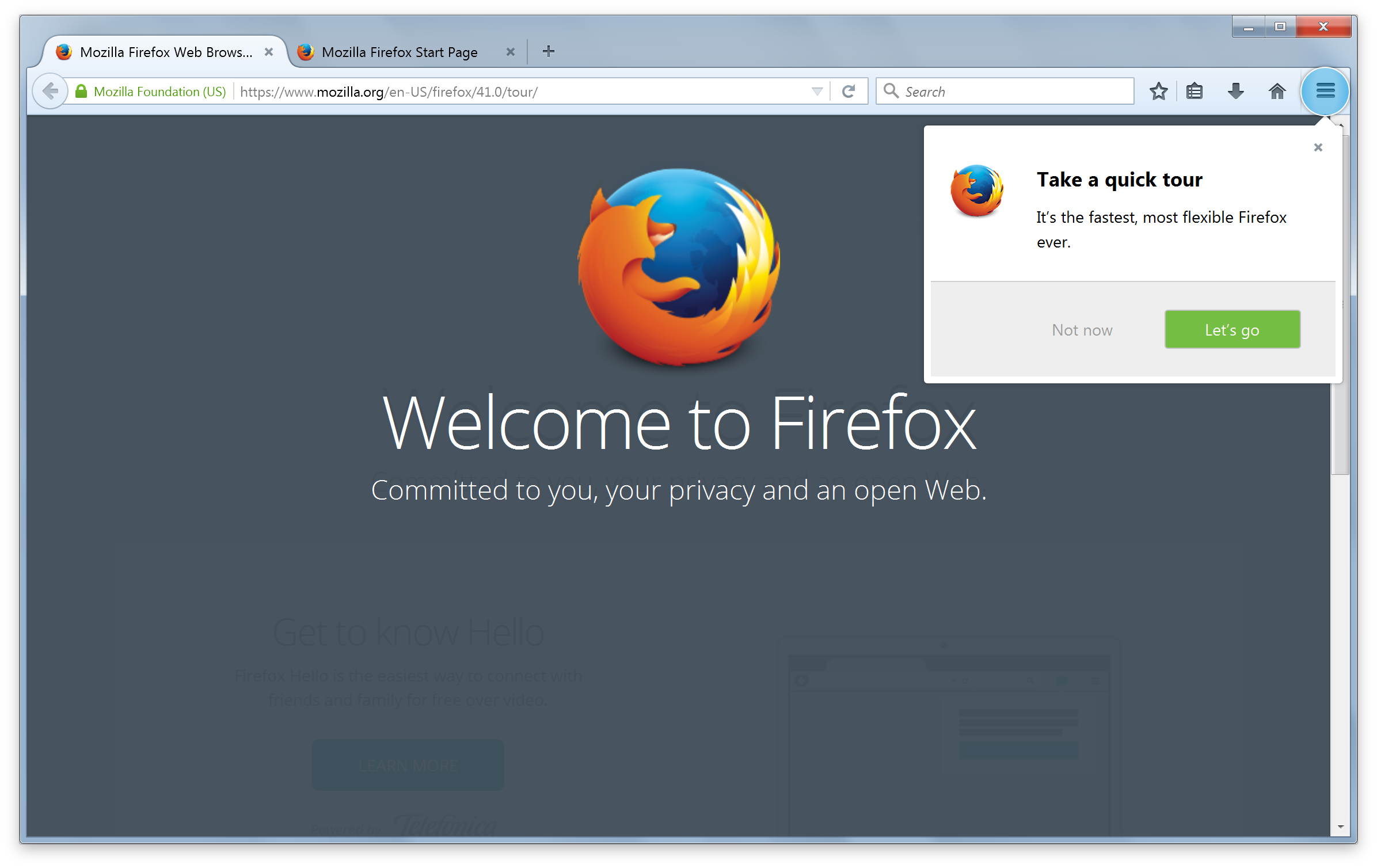


- Updating, Returning and New user tours for Australis (Fx 29 - Now Decommissioned): Australis was the codename for the Firefox UI update released with Firefox 29. We created a tour for Returning and Updating Firefox users to explain what was new. Read more about that here. We also repurposed this for New Firefox users for a number of releases before moving it to the help menu. It was finally decommissioned in September 2016.
Links
- Meta bug for our MVP (planned mid-Feb. funnelcake test)
- Google group: desktop-onboarding.
- Email: desktop-onboarding at mozilla dot com
- #onboarding in irc or #onboardingux on Slack