Mobile/Fennec/Extensions/UserInterface/Site Menu: Difference between revisions
(document the new PageActions.register API) |
m (→Adding to the Site Menu: fix typo) |
||
| (3 intermediate revisions by the same user not shown) | |||
| Line 1: | Line 1: | ||
[http://www.flickr.com/photos/madhava_work/4521940382/ http://farm3.static.flickr.com/2708/4521940382_8c2f403cd5_m.jpg] | [http://www.flickr.com/photos/madhava_work/4521940382/ http://farm3.static.flickr.com/2708/4521940382_8c2f403cd5_m.jpg] | ||
| Line 7: | Line 5: | ||
By default it shows security information, controls to add a search providers and clear site-specific preferences, and commands to share, save, or find within the page. | By default it shows security information, controls to add a search providers and clear site-specific preferences, and commands to share, save, or find within the page. | ||
== Adding to the Site Menu == | |||
Add-ons can use the site panel to display additional information or actions related to the current page. | |||
To add a command to the site menu, add a ''pageaction'' element to the ''#pageactions-container'' box. For example, in a [https://developer.mozilla.org/en/XUL_Overlays XUL overlay] you could write: | To add a command to the site menu, add a ''pageaction'' element to the '''#pageactions-container''' box. For example, in a [https://developer.mozilla.org/en/XUL_Overlays XUL overlay] you could write: | ||
<hbox id="pageactions-container"> | <hbox id="pageactions-container"> | ||
<pageaction id="sayhello-action" | <pageaction id="sayhello-action" | ||
title="Say Hello" | title="Say Hello" | ||
description="Display a greeting" | description="Display a greeting" <!-- Description is optional --> | ||
onclick="alert('Hello!');"/> | onclick="alert('Hello!');"/> | ||
</hbox> | </hbox> | ||
| Line 22: | Line 20: | ||
== Changing Site Menu items == | == Changing Site Menu items == | ||
If you want to enable, disable, or change your pageaction, you can register a method to be called each time the menu appears. Use the ''PageActions.register'' function | '''New in Fennec 2.0:''' If you want to enable, disable, or change your pageaction, you can register a method to be called each time the menu appears. Use the '''PageActions.register''' function: | ||
PageActions.register(id, callback, thisObject); | PageActions.register(id, callback, thisObject); // Requires Fennec 2.0a1 or higher. | ||
; id: The ID of your pageaction element. (Remember, your IDs should include a string that is unique to your add-on, to avoid conflicting with Fennec code or other add-ons.) | ; id: The ID of your pageaction element. (Remember, your IDs should include a string that is unique to your add-on, to avoid conflicting with Fennec code or other add-ons.) | ||
| Line 32: | Line 28: | ||
; thisObject: (optional) An object to use as "this" in the callback function. | ; thisObject: (optional) An object to use as "this" in the callback function. | ||
'''Example''' | |||
PageActions.register("sayhello-action", function(element) { | PageActions.register("sayhello-action", function(element) { | ||
| Line 45: | Line 41: | ||
}); | }); | ||
== | == Sample Code == | ||
* For a basic XUL example, see the [http://bitbucket.org/mbrubeck/readlater/src/tip/content/overlay.xul Read Later source code]. | * For a basic XUL example, see the [http://bitbucket.org/mbrubeck/readlater/src/tip/content/overlay.xul Read Later source code]. | ||
* See the [http://hg.mozilla.org/users/mfinkle_mozilla.com/mobiletools/file/9eaf872b5184/content/overlay.js Mobile Tools source code] for an add-on that inserts a new pageaction using JavaScript. | * See the [http://hg.mozilla.org/users/mfinkle_mozilla.com/mobiletools/file/9eaf872b5184/content/overlay.js Mobile Tools source code] for an add-on that inserts a new pageaction using JavaScript. | ||
* See the PageActions.init function in [http://mxr.mozilla.org/mobile-browser/source/chrome/content/browser-ui.js Fennec's browser-ui.js] for examples using the PageActions.register API. | * See the PageActions.init function in [http://mxr.mozilla.org/mobile-browser/source/chrome/content/browser-ui.js Fennec's browser-ui.js] for examples using the PageActions.register API. | ||
Latest revision as of 20:19, 2 September 2010
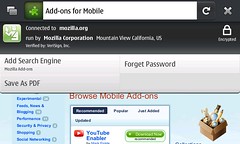
The site menu is displayed when a user taps on the favicon (or Site Identity button) next the address bar. It's purpose is to provide more detail and options related to the page the user is viewing.
By default it shows security information, controls to add a search providers and clear site-specific preferences, and commands to share, save, or find within the page.
Adding to the Site Menu
Add-ons can use the site panel to display additional information or actions related to the current page.
To add a command to the site menu, add a pageaction element to the #pageactions-container box. For example, in a XUL overlay you could write:
 <hbox id="pageactions-container">
   <pageaction id="sayhello-action"
     title="Say Hello"
     description="Display a greeting" <!-- Description is optional -->
     onclick="alert('Hello!');"/>
 </hbox>
Changing Site Menu items
New in Fennec 2.0: If you want to enable, disable, or change your pageaction, you can register a method to be called each time the menu appears. Use the PageActions.register function:
PageActions.register(id, callback, thisObject); // Requires Fennec 2.0a1 or higher.
- id
- The ID of your pageaction element. (Remember, your IDs should include a string that is unique to your add-on, to avoid conflicting with Fennec code or other add-ons.)
- callback
- A function that takes a pageaction element and returns a boolean: true if the pageaction should be visible, false if it should be hidden.
- thisObject
- (optional) An object to use as "this" in the callback function.
Example
PageActions.register("sayhello-action", function(element) {
  // Hide the menu item if we're in a blank tab.
  if (getBrowser().currentURI == "about:blank")
    return false;

  // Change the pageaction title.
  element.setAttribute("title", "Say hello to " + getBrowser().contentTitle);

  return true;
});
Sample Code
- For a basic XUL example, see the Read Later source code.
- See the Mobile Tools source code for an add-on that inserts a new pageaction using JavaScript.
- See the PageActions.init function in Fennec's browser-ui.js for examples using the PageActions.register API.