Fennec/NativeUI/UserExperience/ReaderMode: Difference between revisions
No edit summary |
No edit summary |
||
| Line 9: | Line 9: | ||
<b>2. Proposed Interactions</b><br> | <b>2. Proposed Interactions</b><br> | ||
<b>Problem:</b> Add functionality to the reader mode while still maintaining a chromeless, reading focused layout.<br> | <b>Problem:</b> Add functionality to the reader mode while still maintaining a chromeless, reading focused layout.<br> | ||
<b>Solution:</b> Introduce off screen menus rendered visible with swiping gestures. | <b>Solution:</b> Introduce off screen menus rendered visible with swiping gestures.<br><br> | ||
http://farm8.staticflickr.com/7008/6517216455_d480da0ea1_b.jpg<br> | http://farm8.staticflickr.com/7008/6517216455_d480da0ea1_b.jpg<br> | ||
[http://www.flickr.com/photos/patrykdesign/6517216455/in/set-72157628389027877 Sample Interaction Flow]<br><br> | [http://www.flickr.com/photos/patrykdesign/6517216455/in/set-72157628389027877 Sample Interaction Flow]<br><br> | ||
| Line 20: | Line 20: | ||
<b>3. The Toolbar</b><br> | <b>3. The Toolbar</b><br> | ||
<b>Problem:</b> How do we access / display the various options without intruding on the reading experience<br> | <b>Problem:</b> How do we access / display the various options without intruding on the reading experience<br> | ||
<b>Solution:</b> On tapping of the screen a translucent tool bar appears, further options can be invoked by pressing the menu icon in the bar, or the hardware menu key. | <b>Solution:</b> On tapping of the screen a translucent tool bar appears, further options can be invoked by pressing the menu icon in the bar, or the hardware menu key.<br><br> | ||
http://farm8.staticflickr.com/7202/6964642207_bdcff2b041_b.jpg<br> | http://farm8.staticflickr.com/7202/6964642207_bdcff2b041_b.jpg<br> | ||
[http://www.flickr.com/photos/patrykdesign/6964642207/in/photostream Proposed Visual Design Mock Up] | [http://www.flickr.com/photos/patrykdesign/6964642207/in/photostream Proposed Visual Design Mock Up] | ||
<br><br> | <br><br> | ||
<b>4. | <b>4. Visual Variations</b><br> | ||
Various Examples:<br> | Various Examples:<br><br> | ||
[http://www.flickr.com/photos/patrykdesign/6560944301/in/photostream/ Overall Layout & Typography]<br> | http://farm8.staticflickr.com/7149/6560944301_67bccaaee8_b.jpg<br> | ||
[http://www.flickr.com/photos/patrykdesign/6560942271/in/photostream/ Colour Themes] | [http://www.flickr.com/photos/patrykdesign/6560944301/in/photostream/ Overall Layout & Typography, Sans Serifs will likely be Open Sans as seen in the later mock ups]<br><br> | ||
[http://www.flickr.com/photos/patrykdesign/6560945017/in/photostream/ Image Treatement] | http://farm8.staticflickr.com/7147/6560942271_dd0e2d08fe_b.jpg<br> | ||
[http://www.flickr.com/photos/patrykdesign/6560942271/in/photostream/ Colour Themes]<br><br> | |||
http://farm8.staticflickr.com/7145/6560945017_c71c0b0b7b_b.jpg<br> | |||
[http://www.flickr.com/photos/patrykdesign/6560945017/in/photostream/ Image Treatement, ideally if we could aim for the right example, flush layout] | |||
<br><br> | <br><br> | ||
Revision as of 23:35, 9 March 2012
Below is the proposed first version of a reader mode for mobile Firefox. All the mockups (some old) can found in this flickr folder.
1. How to Access Reader Mode from the Browser?
Problem: The new browser design is heading towards a chromeless / buttonless aesthetic, how do we introduce the reader mode?
Solution: The reader mode can hidden the the menu invoked by pressing the hardware/software menu button or with an icon which appears in the URL bar.
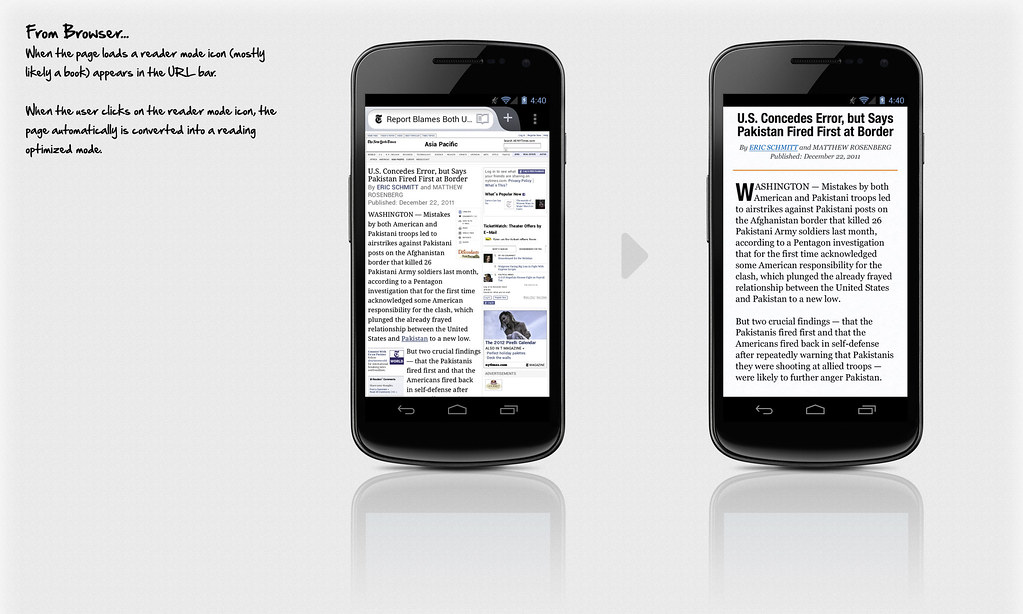
Proposed Visual Design Mock Up
2. Proposed Interactions
Problem: Add functionality to the reader mode while still maintaining a chromeless, reading focused layout.
Solution: Introduce off screen menus rendered visible with swiping gestures.
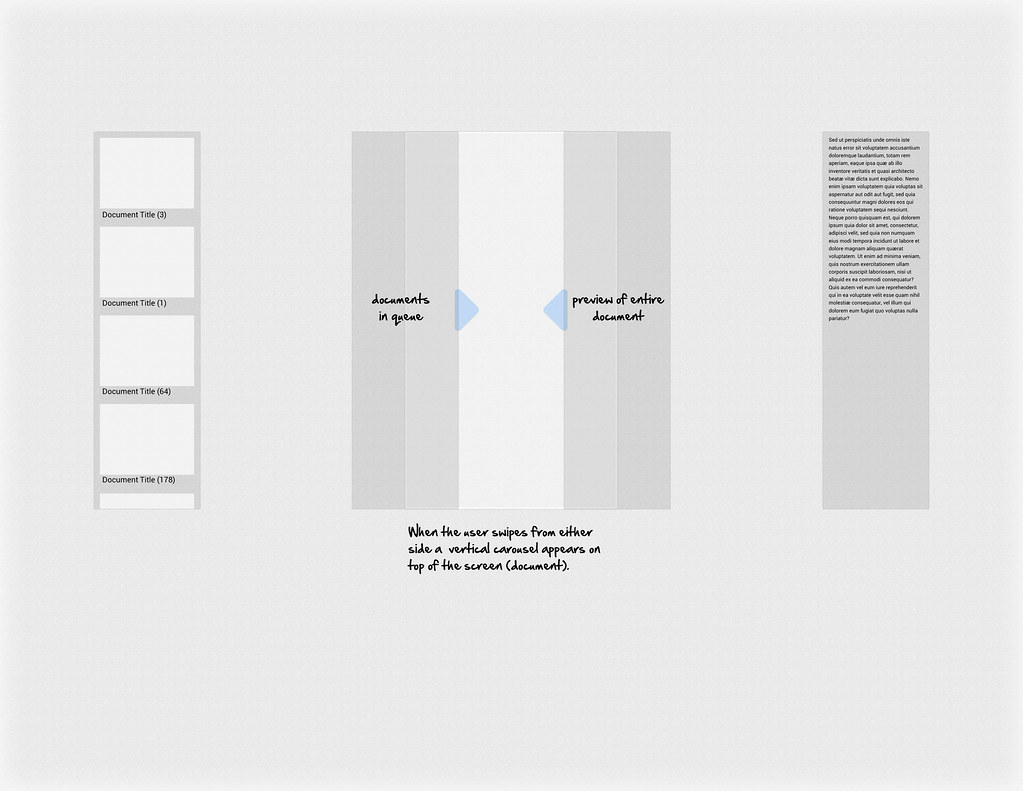
Sample Interaction Flow
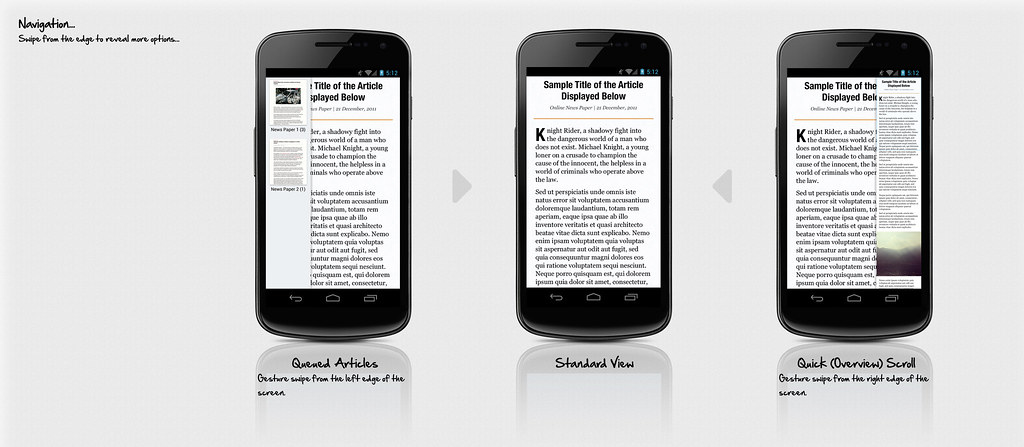
Proposed Visual Design Mock Up
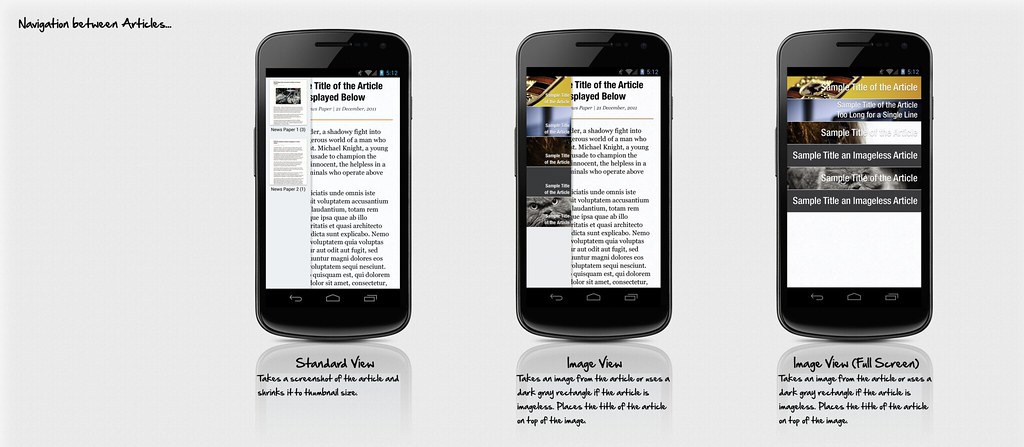
Examples of Article Navigation (Potentially for a future release)
3. The Toolbar
Problem: How do we access / display the various options without intruding on the reading experience
Solution: On tapping of the screen a translucent tool bar appears, further options can be invoked by pressing the menu icon in the bar, or the hardware menu key.
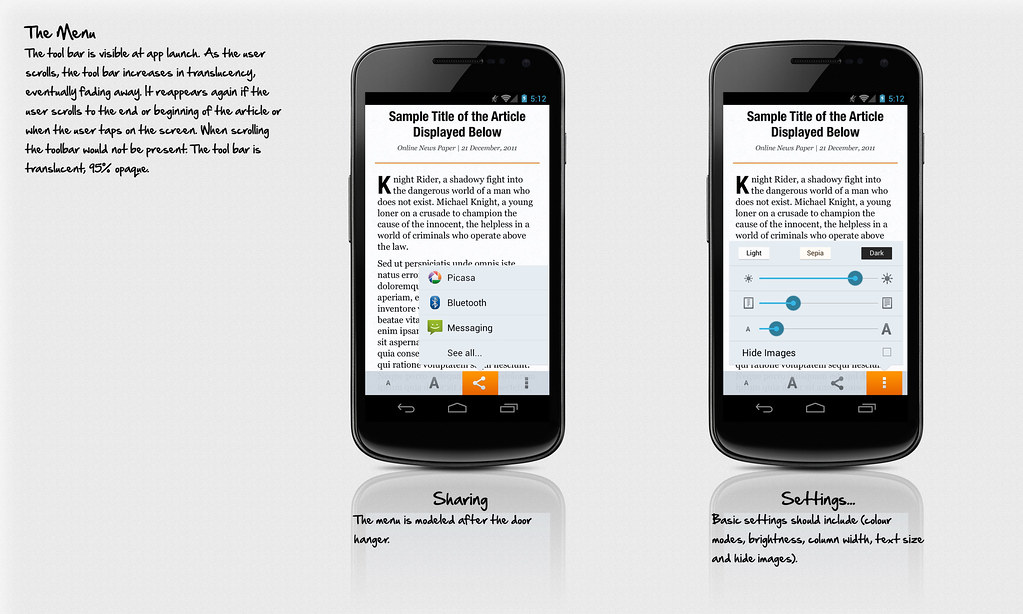
Proposed Visual Design Mock Up
4. Visual Variations
Various Examples:
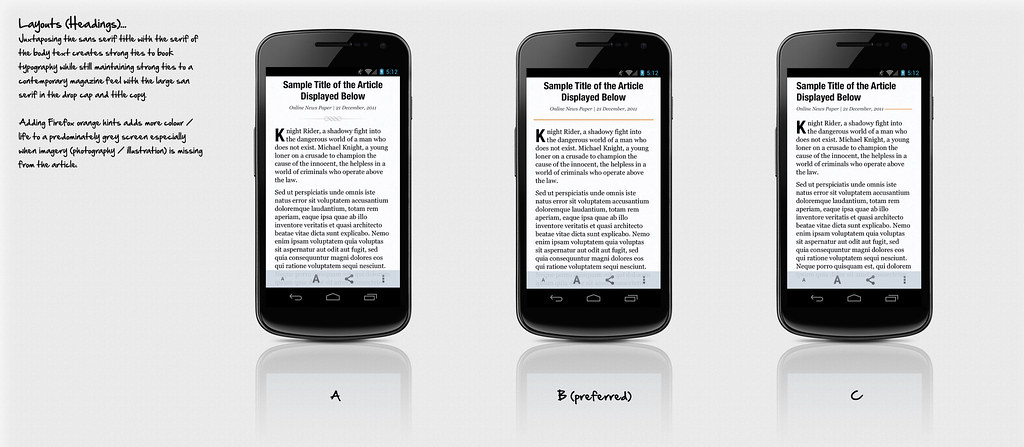
Overall Layout & Typography, Sans Serifs will likely be Open Sans as seen in the later mock ups
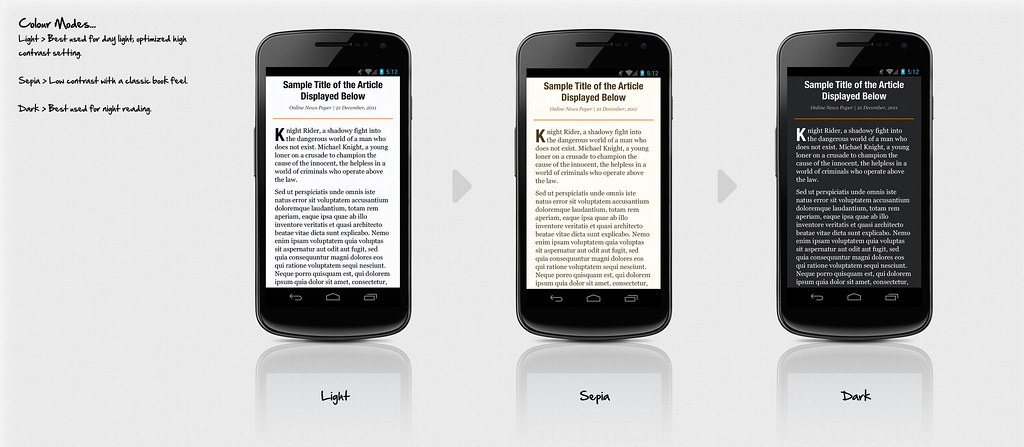
Colour Themes
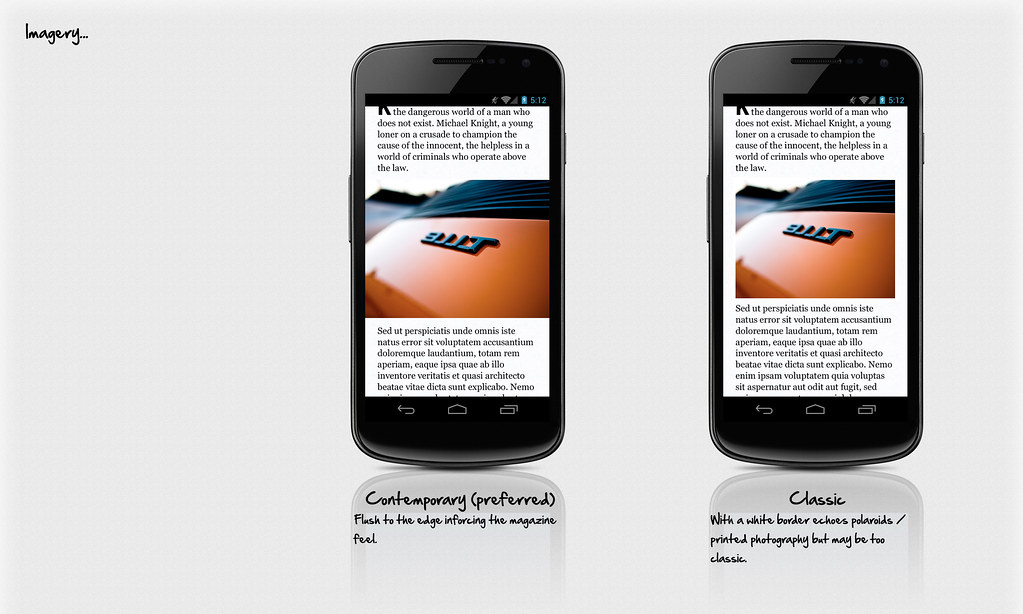
Image Treatement, ideally if we could aim for the right example, flush layout
5. Scalability
Typography size scaling ratio pairs
Handheld vs Tablet
[:Image: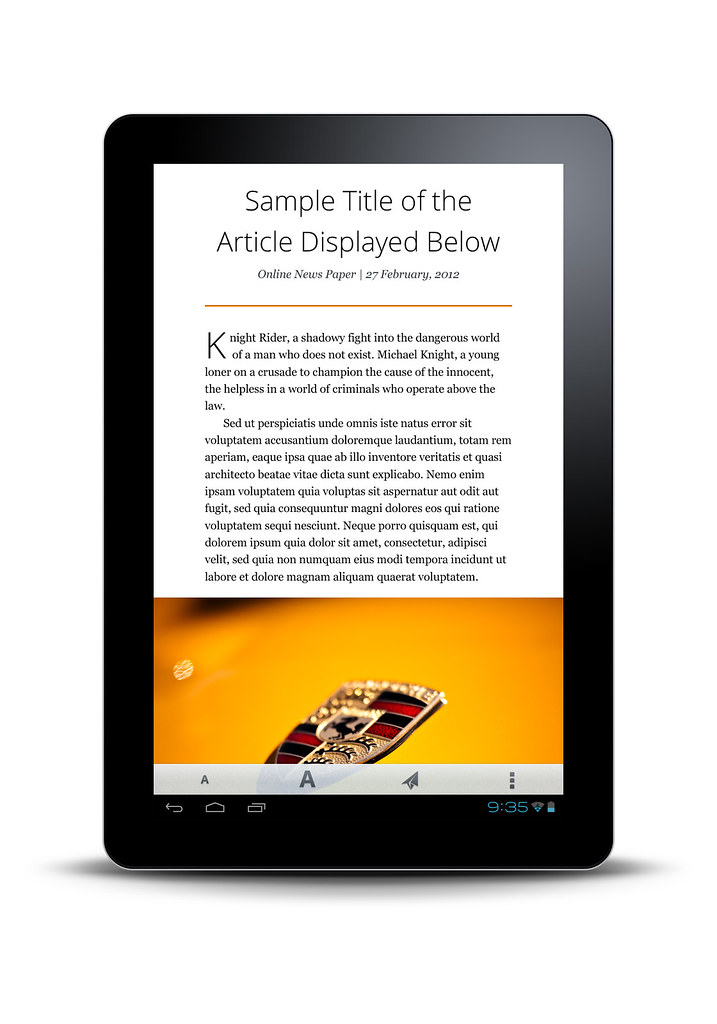 ]
]