Drumbeat/StoneSoup/Virtual walkshop
 |
StoneSoup > Activity: Virtual walkshop | |
| Owner: Enric | Updated: 2011-03-2 | |
| Walk around different cities in the world, and take pictures of you there | ||
View the video demo here
Summary
Do a magic walk, look around the streets of the world. Look for nice views or rare things and take a picture of you there. Try also to imagine how's does his/her daily life look like.
Skills to develop: orientation | empathy | image editing
Activity goals
// The activity tries to stimulate this kind of knowledge and skills:
- Motivate participants to learn about different cultures
- Develop awareness of the importance of personal data
- Activate skills for urban orientation
- Activate skills for producing ready-to print images
- Think about the potential (good and bad) uses of street public pictures
Previous skills
// Participants just need to have minimum notions about:
- Web browsing
- Web searching
Stuff needed
// Make sure you have all this installed/near/working prior to the session:
- Internet connection
- One laptop for every pair of learners
- Chromakey
Steps during the session
// Recommended sequence for replicating the activity:
1. Brief presentation about Google Street View (eliciting about the tool, and about cars with cameras)
2. Show one live example close to the session (eliciting about the places there) ideally pointing to people on the street and some of the most funny 9 eyes images
3. Brief technical presentation of Google Street View commands
4. (In pairs) find someone or something close to your home or school street and ask yourself questions about what's he/she/that doing there
5. Share information about your thoughts with the rest related to the finding
6. Jump to another city and look for a nice spot where to take a picture of you
7. Capture a cool picture and share it online if you like
8. Final reflections about the activity
Questions to ask
// Try to open these questions at the beginning of the session, or when the participants are doing mechanic tasks like pasting or cutting:
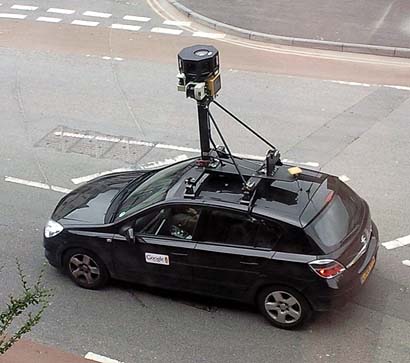
- What's that car with the big camera? Did you see it before? How does it work?
- How much world surface have those cars covered?
- How does your street look like? Do you recognise anyone there in the picture?
- How would it be if you could visit another city right now? Where will you walk around?
- Which good or bad things can be done with all this detailed satellite information? By whom?
Samples you can use
// You can use these images and links as examples for your explanations:
Google car image
Google Street View example
Curious images
Addon outputs
Artistic application
World coverage
Addon output example
http://imm.io/3DBT vs Cophenagen guy
Next steps
// Ideas and possibilities for continuing the activity, or homework for passionate participants :)
- In a second session learners could go and create captions themselves, by detecting places that look like letters (close to their homes or hometowns) and following the easy technical process for contributing to the project as described here
- Create a t-shirt with your name using the world. A different process that involves using a machine for printing clothes or a fine and fair online t-shirt shop, so participants can create some fashion with geoglyphs
ToDo
- Get academic feedback
- Improve synchronization with the video
- Test with 8-10 years old partcipants