B2G/QA/Bluetooth PTS: Difference between revisions
Jump to navigation
Jump to search
No edit summary |
|||
| (37 intermediate revisions by 2 users not shown) | |||
| Line 1: | Line 1: | ||
* What is [https://www.bluetooth.org/en-us/test-qualification/test-tools-overview/profile-tuning-suite/pts-in-depth Bluetooth Profile Tuning Suite (PTS)]? | * What is [https://www.bluetooth.org/en-us/test-qualification/test-tools-overview/profile-tuning-suite/pts-in-depth Bluetooth Profile Tuning Suite (PTS)]? | ||
== Run tests at == | |||
* [https://docs.google.com/a/mozilla.com/file/d/0B6kijnluCiEsbHNwcXgwZ2htN2M/edit FL] | |||
* [https://docs.google.com/a/mozilla.com/file/d/0B6kijnluCiEsbHNwcXgwZ2htN2M/edit FC] | |||
== You will need == | == You will need == | ||
* A computer with Windows 7 installed(either x64 or x86). | * A computer with Windows 7 installed(either x64 or x86). | ||
* A [https://www.bluetooth.org/ bluetooth.org] account. | * A [https://www.bluetooth.org/ bluetooth.org] account(use your mozilla.com to register). | ||
* Download & install PTS [https://www.bluetooth.org/en-us/test-qualification/test-tools-overview/profile-tuning-suite Login or Register here]. | * Download & install PTS [https://www.bluetooth.org/en-us/test-qualification/test-tools-overview/profile-tuning-suite Login or Register here]. | ||
* A [http://www.gvinedesigns.com/shopping/bluetooth/ Bluetooth PTS Radio Module]. | * A [http://www.gvinedesigns.com/shopping/bluetooth/ Bluetooth PTS Radio Module]. | ||
* A device with Firefox OS that needs to be tested. | * A device with Firefox OS that needs to be tested. | ||
* A SIM card - ability to make conference call for some cases. | |||
* A bluetooth headset | |||
== Driver installation for PTS dongle == | == Driver installation for PTS dongle == | ||
* Disable bluetooth on your laptop to avoid confusion. | * Disable bluetooth on your laptop to avoid confusion. | ||
* How to stop Windows 7 automatically installing drivers http://support.microsoft.com/kb/2500967 | * How to stop Windows 7 automatically installing drivers [http://support.microsoft.com/kb/2500967 | MS KB2500967] | ||
* Specify driver for the unknown device in '''C:\Program Files(x86)\Bluetooth SIG\Bluetooth PTS\PTS Driver''', DO NOT let Windows install driver by itself. | * Specify driver for the unknown device in '''C:\Program Files(x86)\Bluetooth SIG\Bluetooth PTS\PTS Driver''', DO NOT let Windows install driver by itself. | ||
* If '''CSR BlueCoreBluetooth''' shown, you are good to go. | * If '''CSR BlueCoreBluetooth''' shown, you are good to go. | ||
| Line 26: | Line 33: | ||
[[File:PIXIT.png]] | [[File:PIXIT.png]] | ||
* '''NEW in PTS 6.3.0''' | |||
* There are 3 areas to update | |||
1. Replace A2DP.ets file with new file from https://www.bluetooth.org/pts/issues/view_issue.cfm?id=14189. | |||
Download 14189a.zip file and replace C:\Program Files (x86)\Bluetooth SIG\Bluetooth PTS\bin\Bluetooth\Ets\A2DP.ets | |||
2. Enter value for A2DP profile IXIT: TSPX_SRC_sdp_supported_features -> 0001 | |||
3. Enter value for A2DP profile IXIT: TSPX_SRC_sdp_service_name -> Advanced Audio | |||
[[File:PTS 6.3 update.png]] | |||
* In PTS 6.0.1 | |||
* If you copy workspace file to replace the existing one, you need to update bluetooth mac address to your IUT again for each profile. | |||
[[File:Bluetooth-6.0.1-IXIT.png]] | |||
== Testing == | == Testing == | ||
| Line 46: | Line 63: | ||
== PTS Test Cases == | == PTS Test Cases == | ||
* HFP TC_AG_TRS_BV_01_I - The test case requires to turn off cellular network but keeps BT on. Our current UI doesn't support such action so this case is unable to test. | N.B. You can search through bugzilla to see test case related bugs. | ||
* | |||
* | * A2DP | ||
* | ** '''TC_SRC_AS_BV_01_I''' - Remember to turn on the speaker of your Windows, music played through it. | ||
* | ** '''TC_SRC_SDP_BV_01_I''' - See New in PTS 6.3.0 in Setup for testing section or https://www.bluetooth.org/pts/issues/view_issue.cfm?id=14189 | ||
* | |||
* | * AVRCP | ||
* | ** '''TC_TG_MDI_BV_02_C''' - Try to pause the music, rewind it and ff it. | ||
* HSP TC_AG_OAC_BV_01_I - | ** '''TC_TG_MDI_BV_04_C''' - ?? | ||
* OPP TC_CLIENT_OPH_BV_01_I - Turn on Bluetooth, send a photo from Gallery. | ** '''TC_TG_NFY_BV_02_C''' - ?? | ||
* OPP TC_CLIENT_OPH_BV_02_I - Turn on Bluetooth, send a photo from Gallery. | ** '''TC_TG_NFY_BV_04_C''' - Stop the music, not just pause it. ([https://bugzilla.mozilla.org/show_bug.cgi?id=924775 bug 924775], [https://bugzilla.mozilla.org/show_bug.cgi?id=953034 bug 953034]) | ||
* OPP TC_CLIENT_OPH_BV_34_I - Turn on Bluetooth, send a photo from Gallery. | ** '''TC_TG_RCR_BV_02_C''' - Playing music with [https://drive.google.com/a/mozilla.com/#folders/0BwgJXAu4xYVHNG5yOFA1dXFNTzA >512kb metadata] | ||
** '''TC_TG_RCR_BV_04_C''' - Playing music with [https://drive.google.com/a/mozilla.com/#folders/0BwgJXAu4xYVHNG5yOFA1dXFNTzA >512kb metadata] | |||
* HFP | |||
** '''TC_AG_TRS_BV_01_I''' - The test case requires to turn off cellular network but keeps BT on. Our current UI doesn't support such action so this case is unable to test. | |||
** '''TC_AG_PSI_BV_01_I''' - Impair cellular signal but keep the BT connected. | |||
** https://wiki.mozilla.org/images/thumb/9/90/P5252789.JPG/800px-P5252789.JPG | |||
** '''TC_AG_PSI_BV_03_I''' - Unable to change battery level - skipping. | |||
** '''TC_AG_TWC_BV_04_I''' - SIM of IUT should have 3 way calling enabled. | |||
** '''TC_AG_TWC_BV_05_I''' - 主動連線的TWC | |||
** '''TC_AG_RSV_BV_01_I''' - Set volume greater then default, set it >= 12. Set to default, set it to 7, 8 or 9. | |||
** '''TC_AG_IIA_BV_01_I''' - Currently no way to de-register a phone from cell network. | |||
** '''TC_AG_IIA_BV_02_I''' - Unable to change battery level - skipping. | |||
** '''TC_AG_IIA_BV_05_I''' - Unable to change battery level - skipping. | |||
** '''TC_AG_IID_BV_03_I''' - Unable to change battery level - skipping. | |||
** '''TC_AG_IID_BV_04_I''' - Unable to change battery level - skipping. | |||
** '''TC_AG_IIC_BV_02_I''' - Unable to change battery level - skipping. | |||
** '''TC_AG_IIC_BV_03_I''' - Currently no way to de-register a phone from cell network. | |||
* HSP | |||
*https://wiki.mozilla.org/images/0/08/Screenshot-hsp.PNG | |||
** '''HSP TC_AG_IAC_BV_01_I''' | |||
***1. Connect BT | |||
***2. Click OK | |||
***3. Make a call to device | |||
***4. Disconnect headset - receiver | |||
***5. Disconnect BT | |||
** '''HSP TC_AG_OAC_BV_01_I''' - Disregard note in the picture below, and click OK, have an entry in outgoing call log, let PTS do the redial. | |||
** https://wiki.mozilla.org/images/d/dd/Screenshot-hsp1.png | |||
* OPP | |||
** OPP '''TC_CLIENT_OPH_BV_01_I''' - Turn on Bluetooth, send a photo from Gallery. | |||
** OPP '''TC_CLIENT_OPH_BV_02_I''' - Turn on Bluetooth, send a photo from Gallery. | |||
** OPP '''TC_CLIENT_OPH_BV_34_I''' - Turn on Bluetooth, send a photo from Gallery. | |||
== Reference == | |||
* [[B2G/Bluetooth#In-house_Scheduled_PTS.28Profile_Tuning_Suite.29_Test|PTS information on B2G/Bluetooth]] | |||
* [https://docs.google.com/a/mozilla.com/spreadsheet/ccc?key=0Ar-CFe1k_BSndHR4RnMxWnd6YUxJb0toakdsd1Yydnc&usp=sharing Gonk version & bluetooth] | |||
Latest revision as of 10:15, 11 November 2015
- What is Bluetooth Profile Tuning Suite (PTS)?
Run tests at
You will need
- A computer with Windows 7 installed(either x64 or x86).
- A bluetooth.org account(use your mozilla.com to register).
- Download & install PTS Login or Register here.
- A Bluetooth PTS Radio Module.
- A device with Firefox OS that needs to be tested.
- A SIM card - ability to make conference call for some cases.
- A bluetooth headset
Driver installation for PTS dongle
- Disable bluetooth on your laptop to avoid confusion.
- How to stop Windows 7 automatically installing drivers | MS KB2500967
- Specify driver for the unknown device in C:\Program Files(x86)\Bluetooth SIG\Bluetooth PTS\PTS Driver, DO NOT let Windows install driver by itself.
- If CSR BlueCoreBluetooth shown, you are good to go.

Setup before testing
- Create a new Workspace
- Add mac address of testing device(IUT) to workspace, you can turn on bluetooth and let PTS find it.

- Select the profiles you need to test to the right column, then save the workspace and quit if you have specific .PICSX to use for testing.

- (optional) Put specific <profile>.PICSX files to correspong C:\Program Files(x86)\Bluetooth SIG\Bluetooth PTS\My Workspace\<workspace name>\<profile>\, then launch the PTS and open your workspace.
- Set the profile active and modify PIXIT as needed, for HFP, we need 3 phones for testing, PIXIT needs to have the other 2 extra phones' number in it. Your testing device is IUT(Implementation Under Test).

- NEW in PTS 6.3.0
- There are 3 areas to update
    1. Replace A2DP.ets file with new file from https://www.bluetooth.org/pts/issues/view_issue.cfm?id=14189.
       Download 14189a.zip file and replace C:\Program Files (x86)\Bluetooth SIG\Bluetooth PTS\bin\Bluetooth\Ets\A2DP.ets
    2. Enter value for A2DP profile IXIT: TSPX_SRC_sdp_supported_features -> 0001
    3. Enter value for A2DP profile IXIT: TSPX_SRC_sdp_service_name -> Advanced Audio

- In PTS 6.0.1
- If you copy workspace file to replace the existing one, you need to update bluetooth mac address to your IUT again for each profile.

Testing
- You need to follow direction shown on the pop up exactly in order to pass a test.
- Choose a small set to run it.

Reference
Terminology
- TG: Target
- CT: Controller
- AG: Audio Gateway
- SCO: Synchronous Connection Oriented Link (For audio transfer, disconnect/connect to bluetooth headset)
- ACL: Asynchronous Connectionless Link (For data transfer)
- IUT: Implementation Under Test
- SLC: Service Link Connection
PTS Test Cases
N.B. You can search through bugzilla to see test case related bugs.
- A2DP
- TC_SRC_AS_BV_01_I - Remember to turn on the speaker of your Windows, music played through it.
- TC_SRC_SDP_BV_01_I - See New in PTS 6.3.0 in Setup for testing section or https://www.bluetooth.org/pts/issues/view_issue.cfm?id=14189
- AVRCP
- TC_TG_MDI_BV_02_C - Try to pause the music, rewind it and ff it.
- TC_TG_MDI_BV_04_C - ??
- TC_TG_NFY_BV_02_C - ??
- TC_TG_NFY_BV_04_C - Stop the music, not just pause it. (bug 924775, bug 953034)
- TC_TG_RCR_BV_02_C - Playing music with >512kb metadata
- TC_TG_RCR_BV_04_C - Playing music with >512kb metadata
- HFP
- TC_AG_TRS_BV_01_I - The test case requires to turn off cellular network but keeps BT on. Our current UI doesn't support such action so this case is unable to test.
- TC_AG_PSI_BV_01_I - Impair cellular signal but keep the BT connected.
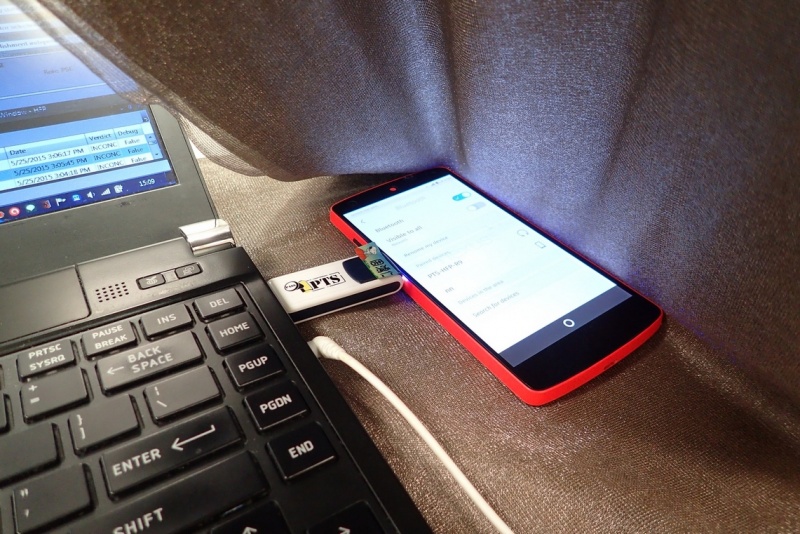
- TC_AG_PSI_BV_03_I - Unable to change battery level - skipping.
- TC_AG_TWC_BV_04_I - SIM of IUT should have 3 way calling enabled.
- TC_AG_TWC_BV_05_I - 主動連線的TWC
- TC_AG_RSV_BV_01_I - Set volume greater then default, set it >= 12. Set to default, set it to 7, 8 or 9.
- TC_AG_IIA_BV_01_I - Currently no way to de-register a phone from cell network.
- TC_AG_IIA_BV_02_I - Unable to change battery level - skipping.
- TC_AG_IIA_BV_05_I - Unable to change battery level - skipping.
- TC_AG_IID_BV_03_I - Unable to change battery level - skipping.
- TC_AG_IID_BV_04_I - Unable to change battery level - skipping.
- TC_AG_IIC_BV_02_I - Unable to change battery level - skipping.
- TC_AG_IIC_BV_03_I - Currently no way to de-register a phone from cell network.
- HSP
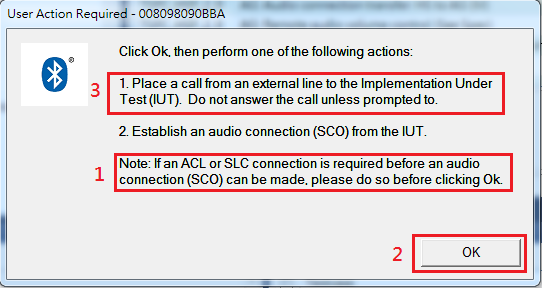
- HSP TC_AG_IAC_BV_01_I
- 1. Connect BT
- 2. Click OK
- 3. Make a call to device
- 4. Disconnect headset - receiver
- 5. Disconnect BT
- HSP TC_AG_OAC_BV_01_I - Disregard note in the picture below, and click OK, have an entry in outgoing call log, let PTS do the redial.
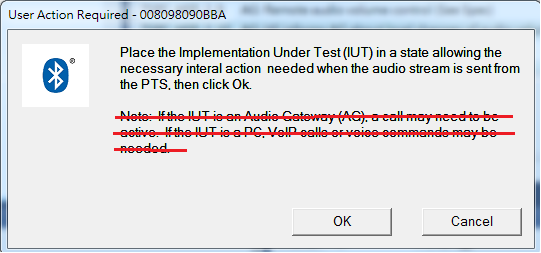
- HSP TC_AG_IAC_BV_01_I
- OPP
- OPP TC_CLIENT_OPH_BV_01_I - Turn on Bluetooth, send a photo from Gallery.
- OPP TC_CLIENT_OPH_BV_02_I - Turn on Bluetooth, send a photo from Gallery.
- OPP TC_CLIENT_OPH_BV_34_I - Turn on Bluetooth, send a photo from Gallery.