Webmaker/WebLiteracyMap/Align: Difference between revisions
Dajbelshaw (talk | contribs) No edit summary |
Dajbelshaw (talk | contribs) (Started to change things around based on feedback from Laura Hilliger) |
||
| Line 3: | Line 3: | ||
<div style="background:yellow;padding:5px;text-align:center;margin-bottom:20px;">'''This is still a draft at the moment so please don't cite it yet!'''</div> | <div style="background:yellow;padding:5px;text-align:center;margin-bottom:20px;">'''This is still a draft at the moment so please don't cite it yet!'''</div> | ||
= | =How to align with the Web Literacy Map= | ||
==Introduction== | ==Introduction== | ||
<div style="float:right;margin-left:10px; border-top:5px grey solid; border-left:5px grey solid; border-right:5px grey solid; background: grey;">http://media.giphy.com/media/M7CjyRSfZ5bt6/giphy.gif</div> | <div style="float:right;margin-left:10px; border-top:5px grey solid; border-left:5px grey solid; border-right:5px grey solid; background: grey;">http://media.giphy.com/media/M7CjyRSfZ5bt6/giphy.gif</div> | ||
The aim of this resource is to help you take the first steps on the journey to using the [https://webmaker.org/literacy Web Literacy Map] in practice. It will help you contextualise the 'raw material' of the Web Literacy Map to be something that you can use to help teach the web to your target audience. | |||
<div style="background:#ccc; border:3px grey solid; padding:15px; width:50%; margin-bottom:20px;">Accompanying this resource is a '''Web Literacy Canvas''' ''(forthcoming)'' that helps you plan the ways in which you and/or your organisation can align with the Web Literacy Map. If you are planning to align using [https://openbadges.org Open Badges] then you may also find the [http://digitalme.co.uk/badgecanvas Badge Canvas] from Digital Me useful.</div> | |||
We will begin with an overview of the Web Literacy Map, before asking some questions about you and your context. These are structured using the approach taken in David Perkins' Harvard class ''Inquiry''. It will be useful if you take your time to answer the questions with (a) someone else from your organization, and (b) any relevant documentation (e.g. curricula, policies, mission statements) to hand. | We will begin with an overview of the Web Literacy Map, before asking some questions about you and your context. These are structured using the approach taken in David Perkins' Harvard class ''Inquiry''. It will be useful if you take your time to answer the questions with (a) someone else from your organization, and (b) any relevant documentation (e.g. curricula, policies, mission statements) to hand. | ||
| Line 35: | Line 27: | ||
Just like the web, the Web Literacy Map aims to be a universal resource that can work across contexts. However, it's important for ''you'' to ensure that your resources, activities and curricula are highly contextualized and relevant to learners. The following questions will help guide you pick some areas to focus on. It might be worth doing this with other people - including the learners themselves. | Just like the web, the Web Literacy Map aims to be a universal resource that can work across contexts. However, it's important for ''you'' to ensure that your resources, activities and curricula are highly contextualized and relevant to learners. The following questions will help guide you pick some areas to focus on. It might be worth doing this with other people - including the learners themselves. | ||
<div style="background:#ffffcc; border:1px #333 solid; padding:10px; margin-bottom:10px;"> | |||
===1. What's worth learning?=== | ===1. What's worth learning?=== | ||
Which competencies on the Web Literacy Map is it very important / useful / not important for your target audience to learn in your context? | Which competencies on the Web Literacy Map is it very important / useful / not important for your target audience to learn in your context? | ||
<div style="background:#f0f0f0; border: 1px #333 solid; padding:10px; margin-bottom:10px;"> | |||
'''Example:''' Raj is setting up a non-profit to introduce the web to community leaders. He decides to focus on the competencies of Navigation, Web Mechanics and Search for his first series of workshops as he believe these will help the confidence of community leaders. | |||
</div> | |||
</div> | |||
<div style="background:#ccffff; border:1px #333 solid; padding:10px; margin-bottom:10px;"> | |||
===2. How is it best learned?=== | ===2. How is it best learned?=== | ||
Is there anything else that your target audience need to learn ''alongside'' these competencies to help make them relevant / make sense? What kinds of activities do you currently have on offer that could help scaffold learning for your target audience? | Is there anything else that your target audience need to learn ''alongside'' these competencies to help make them relevant / make sense? What kinds of activities do you currently have on offer that could help scaffold learning for your target audience? | ||
</div> | |||
<div style="background:#ffcc99; border:1px #333 solid; padding:10px; margin-bottom:10px;"> | |||
===3. How can we get it taught that way?=== | ===3. How can we get it taught that way?=== | ||
Could you get additional help in facilitating learning for your target audience in these areas? Where from? | Could you get additional help in facilitating learning for your target audience in these areas? Where from? | ||
</div> | |||
<div style="background:#ccff99; border:1px #333 solid; padding:10px; margin-bottom:10px;"> | |||
===4. How do you know it's been learned?=== | ===4. How do you know it's been learned?=== | ||
How will you acknowledge / credential things like attendance, attitude and achievement? What would be appropriate for your target audience in this particular context? | How will you acknowledge / credential things like attendance, attitude and achievement? What would be appropriate for your target audience in this particular context? | ||
</div> | |||
==Appendix 1: Case Study== | ==Appendix 1: Case Study== | ||
| Line 52: | Line 55: | ||
==Appendix 2: Further Mozilla resources== | ==Appendix 2: Further Mozilla resources== | ||
Mozilla has the tools, resources and community to help teach the web. Here are some to help you get started. | |||
===Webmaker=== | ===Webmaker=== | ||
Revision as of 10:30, 2 April 2014
How to align with the Web Literacy Map
Introduction
The aim of this resource is to help you take the first steps on the journey to using the Web Literacy Map in practice. It will help you contextualise the 'raw material' of the Web Literacy Map to be something that you can use to help teach the web to your target audience.
We will begin with an overview of the Web Literacy Map, before asking some questions about you and your context. These are structured using the approach taken in David Perkins' Harvard class Inquiry. It will be useful if you take your time to answer the questions with (a) someone else from your organization, and (b) any relevant documentation (e.g. curricula, policies, mission statements) to hand.
The Web Literacy Map
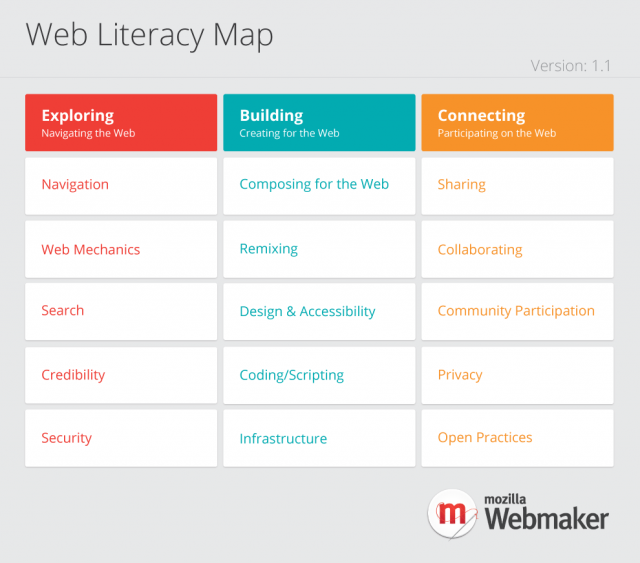
The Web Literacy Map is a map of the territory of web literacy. It constitutes the raw material from which people like you can make resources, curricula and activities to help teach the web. Our working definition of 'web literacy' is purposely inclusive and wide: the skills and competencies required to read, write and participate effectively on the web.
It's also important to note what the Web Literacy Map is not. It is not prescriptive. We're not saying that there is one way to learn these skills and competencies. There is also (intentionally) no mention of the level at which one should align with the Web Literacy Map. We see this as something that can be aligned with by n00b and ninja alike!
Finally, it's important to say that the Web Literacy Map is in perpetual beta. By that we mean that it will change as the web itself changes: if there's something you think needs changing, get involved and tell us!
Contextualizing for your target audience
Just like the web, the Web Literacy Map aims to be a universal resource that can work across contexts. However, it's important for you to ensure that your resources, activities and curricula are highly contextualized and relevant to learners. The following questions will help guide you pick some areas to focus on. It might be worth doing this with other people - including the learners themselves.
1. What's worth learning?
Which competencies on the Web Literacy Map is it very important / useful / not important for your target audience to learn in your context?
Example: Raj is setting up a non-profit to introduce the web to community leaders. He decides to focus on the competencies of Navigation, Web Mechanics and Search for his first series of workshops as he believe these will help the confidence of community leaders.
2. How is it best learned?
Is there anything else that your target audience need to learn alongside these competencies to help make them relevant / make sense? What kinds of activities do you currently have on offer that could help scaffold learning for your target audience?
3. How can we get it taught that way?
Could you get additional help in facilitating learning for your target audience in these areas? Where from?
4. How do you know it's been learned?
How will you acknowledge / credential things like attendance, attitude and achievement? What would be appropriate for your target audience in this particular context?
Appendix 1: Case Study
Perhaps BCGA if Dave Crusoe has time to write 500 words or so?
Appendix 2: Further Mozilla resources
Mozilla has the tools, resources and community to help teach the web. Here are some to help you get started.
Webmaker
- Webmaker tools - the landing page for the three Webmaker tools
- X-Ray Goggles - remix any web page using a bookmarklet.
- Thimble - learn HTML, CSS and JavaScript through fun activities.
- PopcornMaker - remix web video.
- Webmaker.org/teach - lots of teaching kits and resources.
- Webmaker Events - attend or host a Maker Party / event.
Open Badges
- Open Badges - an open infrastructure for credential learning.
- BadgeKit - a platform for issuing badges (currently in private beta)
- DigitalMe's Badge Canvas - a simple way to design badges for your organization.
Other
- Mozilla Developer Network (MDN) - a knowledge base relating to the Open Web.