Support/Live Chat/Engineering Plan
Jump to navigation
Jump to search
This document is geared towards the developers and designers for this project (present and future)
Summary
Security
What authentication / authorization concerns are there for the various user stories?
Browser support
is there an existing browser support spec for mozilla projects?
Performance Expectations
Fast response time, able to handle 30+ chatrooms with 50+ total people
How do we load test in a repeatable fashion?
Milestones
0.1.0
Goal: Implement minimal feature set to demonstrate proof of concept and spot technical and UX issues.
Features:
- Supports generic chat features that are expected from a chat client
- Roster to show logged in users, plus users in each chatroom
- Flexible notifications for invitations (new chat request alerts with an accept/cancel response and have a countdown timer)
- Tab-based interface for chats, with a flexible sidebar for showing status information
- hyperlinking of URLs in messages
- Primary User Stories
- Live Chat helper workflow
- Firefox user workflow
- Room monitor/admin workflow
- Features For Helper
- Canned responses sorted by category %%sam Global canned or per user (or both) %%
- Inviting both individuals and entire workgroups into chatrooms
- Viewing archived logs
- Viewing "more details" on each chat (user-agent, installed plugins,
0.2.0
Goal Implement the minimum set of features required for a release candidate
Features
- Ability to recover from browser crashes and accidental tab closings
- Formatting for messages (buttons for b, em, etc)
- Visual tab indicators so that helpers can quickly identify chats that need immediate action (color coded tabs in PRD)
- Audio indicators for helpers and users
- Integration with SUMO/Kitsune search, for quickly finding and linking KB articles without going to another window
- Integrated "follow up in the forum" button to send the user to create a new forum thread that is linked to the chat.
- We are already doing this with the SUMO forum, but it needs to be re-implemented to support Kitsune and be more user-friendly.
User Stories
User Login (u.1)
see: mockup

- user with an issue goes to http://support.mozilla.com/en-US/kb/Live+Chat and clicks login link
- dialog appears to allow them to provide username and pw and submit. Also there is a create account link if they do not have an account.
- once they have a valid account and submit the correct username and pw they are taken to u.2
User Ask a New Question (u.2)
see: mockup

- User is presented with a New Question form.
- top of the form shows the live chat status, if status in one of these states: _______ the form is enabled. Else copy shows ______________
- Form fields are
- Question (required)
- Nickname (required)
- AddOns (optional)
- Browser Version (pre-filled but editable, required)
- OS version (pre-filled but editable, required)
- "Did you search the Knowledge Base first?" y/n question (required)
- The user fills in the form (makes corrections if validation does not pass) and submits
- User is taken to u.3
User Waiting in Queue (u.3)
User Talking to Helper (u.4)
User Transferred back to Queue by helper (u.5)
User Ends chat (u.6)
see: mockup

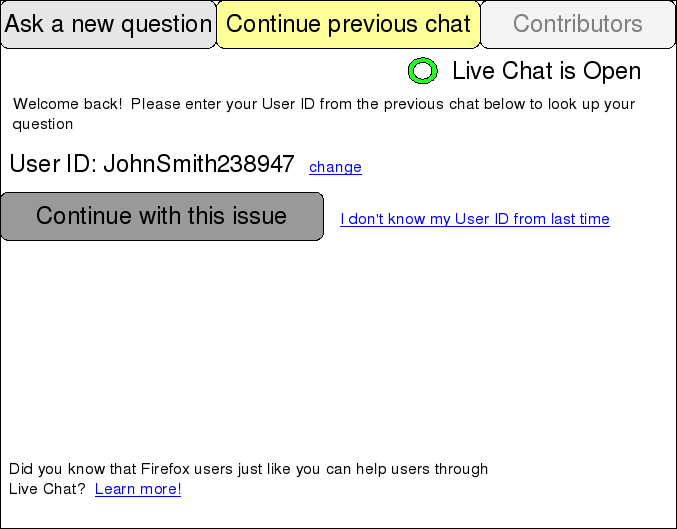
User Continues a previous chat (u.7)
see: mockup