ReleaseEngineering/Day 1 Checklist
Welcome to Release Engineering!
This page is meant to get new hires, interns, or interested community members up to speed with the right software, configurations, and communication channels to contribute effectively to the release engineering pipeline.
Video Introductions
- Release Engineering as a Force Multiplier by John O'Duinn (former director) about how Mozilla Release Engineering handles our business and how we work to improve each and every day.
- This crowd-sourced video list contains other videos about various aspects of working at Mozilla, including important information such as how to operate the espresso machine.
Development Best Practices
- Read and keep up to date with: Development Best Practices
- Read and keep up to date with: http://moz-releng-docs.readthedocs.org/en/latest/
- Please fix any issues you find: https://github.com/mozilla/build-relengdocs As someone new to the project, your fresh perspective helps shine a light on missing information or assumptions we take for granted.
Single Sign-On (SSO)
Many Mozilla services use SSO now, including Gmail, Drive, and ServiceNow. The Single Sign-On homepage has a list of the available services.
NOTE: SSO requires that LDAP be setup first.
Mozilla mail is handled by Gmail now.
You should automatically be added to the release@mozilla.com alias as a new hire/intern. Send a test message to release@m.c to verify that your address has been added/subscribed. Open a ticket in ServiceNow if it isn't working.
WARNING: release@m.c can contain security-sensitive information. Do not automatically forward your email to a system that is not under Mozilla's control.
Mailing lists
You'll need to manually subscribe to:
- release-engineering public mailing list
- release-drivers mailing list
- mozilla.dev.planning
- mozilla.dev.tree-management
These are available as newsgroups, google groups, and Mailman lists
Mail Filtering
With all that new email, you will want to set up some filters in Gmail (https://mail.google.com/mail/u/0/#settings/filters) to filter some of the higher-volume automated mail into a folder. You may eventually want to handle this information, but on day one hundreds of nagios notifications are not going to be educational.
Here is an imperfect set of Gmail filters that you can import to get you started.
A list of new (and some older) automated emails are indexed by subject, along with relevant actions, here.
If you are going to working on puppet, you should also look at this page on how to read releng shared emails.
Calendar
Like mail, we now use Google calendar.
You'll want to subscribe to the following public calendars:
Talk to your manager/mentor to get added to the various other private calendars as appropriate.
Access
Bugzilla
Almost everything at Mozilla goes through Bugzilla. Create a Bugzilla account if you have not already.
You'll need a few tweaks to your account to get access to everything releng-related:
- Add privileges for bugzilla group "build" (Mozilla Build Team) (Can be done by coop, catlee, hwine, or bugzilla admin.)
- Add your irc nickname & ldap username as "aliases" for your account
- log into bugzilla & follow links "Preferences" -> "Account Information"
- append the aliases, with a leading ':' and enclosed in brackets ('[]') to the "Real Name" field
- e.g.: "Hal Wine [:hwine]"
- Excellent video showing how to do power searches: Bugzilla Quick Search (5 minutes you NEED to give yourself)
Filing bugs against Release Engineering
The product to use is, unsurprisingly, "Release Engineering." There are multiple possible components under that product, so take your best guess or ask for guidance in IRC.
LDAP, SSH, VPN
This is mostly applicable only to employees and interns, although it *is* possible for other contributors to acquire some limited LDAP access. Speak to someone you work with on the releng team if you would like to investigate this.
SSH keys are used for access to most machines, and some of them are stored in your LDAP record:
- Add your SSH public key to your LDAP account, this will get you your people account and will be needed for access to various machines. You can do the following:
- Go to ServiceNow.
- 'Update Something?' > 'Accounts' > 'SSH'> 'Add SSH Key' && follow on-screen instructions
You'll need a number of other bits set in your LDAP object to access releng networks and systems via the VPN. This means filing more ServiceNow requests for VPN Access:
- 'Update Something?' > 'Accounts' > 'VPN Access Request'> 'Both' &&
- Mention your manager will vouch for you in the comments
- Mention the machines you need access to && follow on-screen
- Full instructions for accessing the VPN are on mana.
- If you're on MacOSX or Windows, you might want to request a license for Viscosity (A VPN client). To do so from service-now.
- 'Order Stuff' > 'Software Applications' > 'Viscosity VPN' > 'Buisness Support && follow onscreen instructions
Common Machines
Once your SSH public key is associated with your LDAP record, you should have access a number of shared Mozilla hosts:
- people.mozilla.org
- hg.mozilla.org (use full email address as username)
Build Machines
Releng runs many, many machines, including:
- staging and production buildbot masters
- staging and production slaves
- servers hosting a variety of services
- a handful of shared releng machines for development
We access these machines via SSH (all), VNC (all), or remote desktop (Windows), depending on the context of the activity we're performing.
To add your SSH key to the buildslaves, you'll need to do something like bug 899315.
- File a bug in "Release Engineering: Platform Support"
- Checkout the puppet repo and create a patch
- Ask for a reviewer. Your mentor/manager are good options here.
If you need an account on cruncher (shared releng machine), ask catlee, and send him your SSH public key. (If you aren't sure you need the account, you probably do not for now.)
SSH Config
You'll want to update your ~/.ssh/config accordingly:
Host hg.mozilla.org git.mozilla.org
    User <short-ldap-name-here>@mozilla.com
    Compression yes
    ServerAliveInterval 300

Host *.mozilla.com
    User <short-ldap-name-here>
    Compression yes
    ServerAliveInterval 300

Host *.build.mozilla.org
    Compression yes
    User cltbld
    ServerAliveInterval 300
Mercurial (hg)
Most development in releng (and at Mozilla writ-large) is stored in version control using hg.
There is an excellent step-by-step guide for setting up and using hg: Mercurial for Mozillians
You need to file an IT bug to get hg commit access, although you're probably not quite ready for this on day one. For commit, follow this procedure, and specify you need access to (at least) hg.mozilla.org/build/* (Product/Component: mozilla.org/Repository Account Requests). [example: bug 703351]
- if you are an intern request level 1 (user and try repos)
- if you are full timer request level 2 (build and project repos)
Your manager/mentor can land patches for you until your access is enabled.
Most releng code lives in repos under https://hg.mozilla.org/build
Git & Github
There are git mirrors of many popular Mozilla repositories. One of the Mozilla github admins (catlee, coop) can add you to the Mozilla organization on github.
There are also a handful of git repos hosted directly by Mozilla. Your manager/mentor will let you know if you need access to one of these.
PGP
PGP keys are used for encrypting sensitive data - you are responsible for generating and managing you own keys. A quick, Mac-focused primer is available on the intranet or you can use the The GNU Privacy Handbook for reference. After you have created your keys, do try to get your key signed by other team members, and uploaded to gpg.mozilla.org.
Other Services
For access to other services, you'll need file a couple of bugs:
- Access to Nagios
- File a bug in bugzilla under 'Infrastructure & Operations::WebOps: Other'
- Access to build.mozilla.org
- File a bug in bugzilla under 'Infrastructure & Operations::WebOps: Other'
- Access to inventory
- File a bug under 'Infrastructure & Operations::WebOps: Inventory'
Communication
IRC
The majority of day-to-day communication in releng happens on IRC:
- https://wiki.mozilla.org/IRC irc://irc.mozilla.org
- irc.mozilla.org:6697 #mozbuild (use SSL, ask for the channel key; your nick needs to be registered)
- private team channel
- irc.mozilla.org #releng
- public channel for discussion with sherrifs, and continuous integration bot
- keywords to hilite on:
- "!squirrel" is "I need eyes on this now" keyword in #mozbuild & #releng- please set your client to alert on it.
- "r?" - team member looking for a review, perhaps not in but (irc/pastebin)
 * /attach ircs://irc.mozilla.org:6697/?pass=[your_irc_pass]
 * /join #mozbuild [access_key]
- also useful to join
- #developers, #airmozilla, #sf, #mobile, #planning, #release-drivers, #ateam,
- #infra #sysadmins access_key is here https://mana.mozilla.org/wiki/display/SYSADMIN/IRC+use+within+IT
- #moco [access_key is here [n]]
- #firebot for hiliting when you're mentioned in a bug, review request, etc.
Many folks run a BNC (an IRC bouncer) (e.g. znc) and/or irssi under screen to get continuous view of traffic. Ask around. (some good irssi notes)
See below for a local pastebin install, so you don't paste huge amounts in channel.
IT now also provides a hosted IRCCloud cloud instance you can partake of.
Wiki
If you're reading this now, you found the wiki! ;)
Don't be shy about making improvements to releng pages based on your experiences. Getting someone in releng to review your changes first is good practice. Just ask in #releng.
- Useful templates (aka "macros")
- for releng, use bug 999 for bugzilla references; 6e453b4f7056 for hg revisions is also quite nice.
Etherpad
There are 2 etherpad setups available at Mozilla:
- https://etherpad.mozilla.org/ for general use
- https://releng.etherpad.mozilla.org/ for "sensitive" items - use LDAP credentials, and ask a team member if your account isn't set up.
Tips:
- create a pad with a meaningful name by manually specifying it in the URL (you'll be asked to create if it doesn't exist).
- https://etherpad.mozilla.org/your-name-here
- https://releng.etherpad.mozilla.org/your-name-here
- Clear the authorship colors at signifigant points (rainbow-in-a-not-circle icon next to undo/redo icons).
- especially when you first "move" a document to a pad for collaborative editing
- useful at "stages" of a meeting to identify subsequent additions
- undoes color of selected text only (or whole doc after confirmation if no selection)
Pastebin
There's a local pastebin instance at http://pastebin.mozilla.org/, so you don't need to paste multi-lines into a channel. You'll find a helper script in the braindump repo at utils/pastebin.
- it creates a new page from stdin, and outputs the url to stdout
- an argument will be interpretted as the syntax highlighting format to use
- sample usage: hg diff | pastebin python | pbcopy (last part mac specific)
- set & export PASTEBIN_NAME if you don't want to post as anonymous.
Google Drive
Google Drive (formerly Google docs) is a preferred way to share things that don't lend themselves well to etherpad, i.e. spreadsheets, documents that will change a great deal over time.
Google Drive access should be enabled with your email account when you start. If you need access to a particular document, talk to the document owner or your manager/mentor.
Mana
Some internal Mozilla systems (IT, HR) are documented on mana]. File a ServiceNow ticket if you don't have access when you start.
Other Resources
Short-term
- RelEng crowd-sourced Glossary of Terms
- Join https://mozillians.org/ (public, and yet-another-set-of-credentials)
- join the "release engineering" group
- Mozilla intranet
- https://mana.mozilla.org/wiki/display/RelEng/Release+Engineering+Home (for sensitive information only) (LDAP Note: Req attribute RelEng)
- https://trello.com/b/KwwYSXE1/release-engineering-status-board (Projects and deliverables status)
- Sign up for O'Reilly's online library of their boooks - a great resource
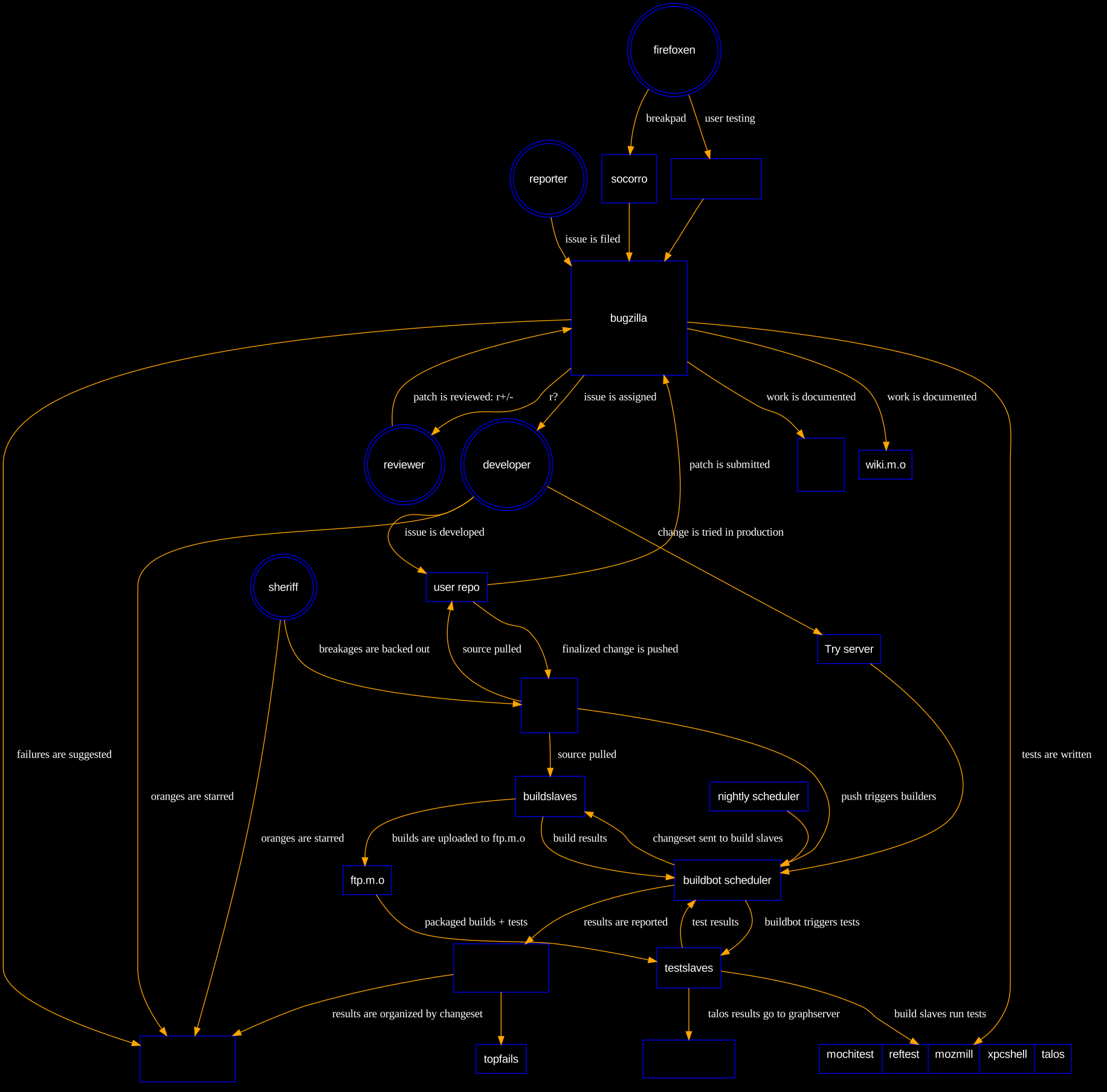
- Overview of dev cycle: http://k0s.org/mozilla/workflow.svg (slightly dated). And browse http://k0s.org/mozilla
Longer-term
Talk to your mentor/manager to see which of these make sense.
- https://build.inventory.mozilla.org/build
- https://nagios.mozilla.org/nagios/
- https://metrics.mozilla.com/
- background for starting to understand buildbot releases (stale until bug 724574 fixed, but s/b roughly accurate): Beta schedulers

Firefox Desktop + Firefox Mobile release process docs:
- Egencia account: this should be accessible via SSO