Webmaker/Teach: Difference between revisions

From MozillaWiki
Jump to navigation Jump to search
 
(94 intermediate revisions by 5 users not shown)
Line 1: Line 1:
__NOTOC__
<div style="text-align:justify">
<div style="display:block;padding-left:20px;padding-right:20px;">
<div style="clear:both; margin-bottom:20px;">
<div style=" float: left; width:27%; margin-right: 50px;">
<div style="width:152px; height:152px; float:left; padding: 2px; border: 4px dashed rgb(40, 40, 40); background: #ffffff; border-radius: 10px; text-align:center; margin-top:15px;margin-left:15px;margin-bottom:15px;">
https://webmaker.org/media/img/header_logo.png
[[Image:MozMentors.png|150px]]
<div>
=== Table of Contents ===
* [[Webmaker/Teach/Hacktivated | Get Involved]]
* [[Webmaker/Teach#Resources| Resources]]
**[[Webmaker/Teach/WebmakingResources | Webmaking Resources]]
**[[Webmaker/Teach/LiteracyResources |Digital/Web Literacy]]
**[[Webmaker/Teach/BestPractices |Youth and Participant Development]]
**[[Webmaker/Teach/MakeCreativity |Creativity/Production]]
* [[Webmaker/Teach#How_can_I_contribute?| How can I contribute?]]
* [[Webmaker/Teach#Relevant_Blog_Posts| Relevant Blog Posts]]
 
</div>
</div>
</div>
<div style="width:54%; display:block;margin:1.5%;text-align:left;padding:1.5%;>
<h1 style="border:0px;">Hacktivate Learning! </h1>
'''Interested in helping others make things on the web?'''


<b>You're in the right place. </b> We are so excited about what we've learned and experienced over the last 18 months of launching and building Mozilla Webmaker. We developed new webmaking tools (play with them [https://webmaker.org/en-US/tools/ here]) and shared our [http://commonspace.wordpress.com/2012/09/25/explaining-crisply/ thinking] throughout the process. We launched the 2012 Summer Code Party campaign and further engaged our Hive Learning Network to activate 600 educators across the globe to use, test, improve and teach others using our tools. Through this, it has become clear that what we need for Webmaker to continue to prosper is '''YOU!'''
<div style="width:70%; float:left; padding: 11px; background: #ffffff;  -moz-border-radius: 10px; margin-top:15px;margin-left:15px;">
<b>Let's teach the web</b>! Everything you need to get started is at <b>[https://webmaker.org/en-US/teach/ webmaker.org/teach]</b>


==Who should get involved?==
This wiki includes:
* <b>Additional resources</b>: To help educators teach digital literacy and webmaking.
* <b>Easy ways to contribute</b>: [https://wiki.mozilla.org/Webmaker/Teach/Help:AddtoMozTeachWiki Share and contribute] your own resources.
The emphasis is on making and learning the web together, with learners in both formal and informal learning environments. </div>


<div style="clear:both; margin-top:20px;">
== How to Contribute ==
Here are three easy ways to share your own resources for teaching digital literacy and webmaking:
<div style="margin-left:5px;margin-right:10px;">
# [https://wiki.mozilla.org/Webmaker/Teach/Help:AddtoMozTeachWiki Add them to this wiki],
# Post them to our [http://mzl.la/gpluswebmaker Webmaker G+ community], or
# Tweet us @MozTeach with #teachtheweb.


If you are motivated to teach something to others or help them learn, <b>you are an educator.</b> We're creating a big tent for parents, librarians, engineers, after-school coordinators, artists, young people and teachers of all stripes and disciplines, from all over the world. Just like the people who took pride in loading Firefox onto the computers of their friends and families, we invite you to help others create on the web.  
[http://slidespeech.com/s/k4JHQFSqen/?autoplay=true http://hivenyc.org/teachtheweb/wp-content/uploads/2013/04/engagementdiagram.png]


'''If this sounds like you,  [[Webmaker/Teach/Hacktivated | get involved!]]'''
[http://slidespeech.com/s/k4JHQFSqen/?autoplay=true Introduction to Engagement] (12 talking slides)


==What are we building?==
We invite you to hack and remix any of the existing resources, curriculum and presentations in this wiki, then share them!


==Resources==
<div style="margin-left:5px;margin-right:10px;">


'''We're in the early stages of building a Mozilla Webmaker program for educators called Hacktivate Learning.''' This is our siren call to educators who are motivated by the concept of the "4th R," web literacy, an open ethos and the Webmaker mission. "Hack" with us and help get others "activated" to learn by making. Let's take inspiration from the Summer Code Party and make it happen 365 days a year in classrooms, coffee shops, museums, libraries and parks, in cities and towns around the globe.
<!--Bullet Point: Webmaking-->
<div style="background-color: #FFFFFF; box-shadow: 0px 2px 4px rgba(0, 0, 0,0.25); border-top: 20px; border-radius: 5px;  color: grey; float:left; font-family:'Open Sans Light','Open Sans',sans-serif; font-size: 14px; height:420px; line-height: 20px; margin:20px; overflow:hidden; padding-top: 10px; padding-left: 20px; padding-right: 20px; padding-bottom: 10px; position:relative; text-align:justify; width:328px;">


'''Specifically, what we'd like to build together:'''
<div style="font-size: 28px; letter-spacing: -1px; line-height: 100%; color: #53535B; text-align:center;">[[Webmaker/Teach/WebmakingResources | Webmaking]]</div>


* A grassroots network of educators who are teaching others how to make things on the web, advancing the success of Hive Learning Networks that serve as labs where people co-create and test learning innovations.  
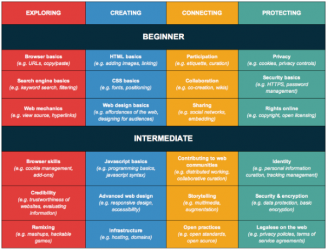
<div style="box-shadow:rgba(0, 0, 0, 0.25) 0px 2px 4px 0px; position:center;">[[Image:Webmaking.png|328px|link=Webmaker/Teach/WebmakingResources]]</div>


* A dynamic platform for educators to learn, explore, iterate and design learning materials via sites like P2PU and massive open online  courses (MOOCs).
<br>Learning by making and building. These resources leverage remix, webmaking or coding as a teaching goal. <br>
</div>
<!--End Bullet Point: Webmaking-->


* A user-driven Open Education Resource with tools to support production-based learning and examples of how to integrate web literacy thinking into practice.
<!--Bullet Point: Webliteracy -->
<div style="background-color: #FFFFFF; box-shadow: 0px 2px 4px rgba(0, 0, 0,0.25); border-top: 20px; border-radius: 5px;  color: grey; float:left; font-family:'Open Sans Light','Open Sans',sans-serif; font-size: 14px; height:420px; line-height: 20px; margin:20px; overflow:hidden; padding-top: 10px; padding-left: 20px; padding-right: 20px; padding-bottom: 10px; position:relative; text-align:justify; width:328px;">


* Partnerships with like-minded organizations, foundations, governments and other networks who share in the collective Webmaker vision
<div style="font-size: 28px; letter-spacing: -1px; line-height: 100%; color: #53535B; text-align:center;">[[Webmaker/Teach/LiteracyResources |Digital Literacy]]</div>


'''If this sounds interesting, [[Webmaker/Teach/Hacktivated | get involved!]]'''
<div style="box-shadow:rgba(0, 0, 0, 0.25) 0px 2px 4px 0px; position:center;">[[Image:WebLiteracy.png|328px|link=Webmaker/Teach/LiteracyResources]]</div>


<br>Teaching the components of digital literacy -- from browser basics, to copy and paste, to web mechanics and beyond. Or teaching digital skills in a project-based context that serves other learning objectives.<br>
</div>
<!--End Bullet Point: Webliteracy-->


</div>
<!--Bullet Point: Youth and Participant Development-->
</div>
<div style="background-color: #FFFFFF; box-shadow: 0px 2px 4px rgba(0, 0, 0,0.25); border-top: 20px; border-radius: 5px;  color: grey; float:left; font-family:'Open Sans Light','Open Sans',sans-serif; font-size: 14px; height:475px; line-height: 20px; margin:20px; overflow:hidden; padding-top: 10px; padding-left: 20px; padding-right: 20px; padding-bottom: 10px; position:relative; text-align:justify; width:328px;">
<div style="-moz-border-radius: 10px;width:27%;height:auto;background-color:#25AAE1;float:left;display:block;margin:1.5%;border: 1px solid #C4C295;text-align:left;padding:1.5%;padding-top:0px"><h3>Already teaching webmaking?</h3>
 
''Brian runs an organization that teaches web skills to senior citizens so they can stay in touch with their families more easily. His organization holds events in over 10 cities worldwide. Most of his '''instructors  are volunteers''' so he's looking for help figuring out '''lesson  plans''' that are easy for volunteers to pick up.''
<div style="font-size: 28px; letter-spacing: -1px; line-height: 100%; color: #53535B; text-align:center;">[[Webmaker/Teach/BestPractices |Youth and Participant Development]]</div>
 
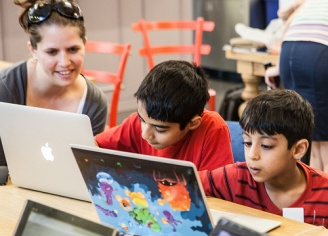
<div style="box-shadow:rgba(0, 0, 0, 0.25) 0px 2px 4px 0px; position:center;">[[Image:MozPartyYouth.jpg|328px|link=Webmaker/Teach/BestPractices]]</div>


[[Webmaker/Teach/WebmakingResources | Webmaking Resources]] | [[Webmaker/Teach/Hacktivated | Help Out]]
<br>Best practices and techniques for working with youth and other learning audiences and participants.<br>
</div>
</div>
<div style="-moz-border-radius: 10px;width:27%;height:auto;background-color:#F7941E;float:left;display:block;margin:1.5%;border: 1px solid #C4C295;text-align:left;padding:1.5%;padding-top:0px"><h3>Teaching, but not yet teaching webmaking?</h3>
<!--End Bullet Point: Youth and Participant Development-->
''Chantal leads an '''after school program for girls''' ages 8-10 and wants to get her kids interested in technology.  She's looking  for '''cool, accessible tools''' that kids can use to build fun things and '''learn about the web''' in the process.''


[[Webmaker/Teach/WebmakingResources | Webmaking Resources]] | [[Webmaker/Teach/Inspiration | Learn More]]
<!--Bullet Point: Creativity/Production -->
<div style="background-color: #FFFFFF; box-shadow: 0px 2px 4px rgba(0, 0, 0,0.25); border-top: 20px; border-radius: 5px;  color: grey; float:left; font-family:'Open Sans Light','Open Sans',sans-serif; font-size: 14px; height:475px; line-height: 20px; margin:20px; overflow:hidden; padding-top: 10px; padding-left: 20px; padding-right: 20px; padding-bottom: 10px; position:relative; text-align:justify; width:328px;">


</div>
<div style="font-size: 28px; letter-spacing: -1px; line-height: 100%; color: #53535B; text-align:center;">[[Webmaker/Teach/MakeCreativity |Creativity and Production]]</div>
<div style="-moz-border-radius: 10px;width:27%;height:auto;background-color:#8DC63F;float:left;display:block;margin:1.5%;margin-bottom:4.5%;border: 1px solid #C4C295;text-align:left;padding:1.5%;padding-top:0px"><h3>Tinkering in tech, thinking about teaching?</h3>
''Aliyah  '''teaches filmmaking''' at a local community college. One of her colleagues sends her a Popcorn demo. She decides to teach her students about the web because she believes that web-native movies are the next frontier in movie-making. She wants to '''become web savvy''' alongside her students.''


[[Webmaker/Teach/WebmakingResources | Webmaking Resources]] | [[Webmaker/Teach/LevelUp | Level Up]]
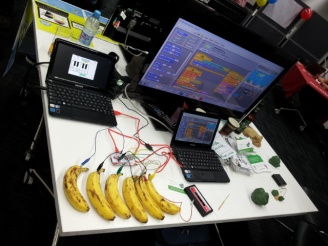
<div style="box-shadow:rgba(0, 0, 0, 0.25) 0px 2px 4px 0px; position:center;">[[Image:MozFestCreativity.jpg|328px|link=Webmaker/Teach/MakeCreativity]]</div>


<br>Teaching participants how to build, create and produce things. Basic ideation and design skills, video- making, and resources that fall under a broader "maker" umbrella -- media-making, physical computing, games, electronics and more.<br>
</div>
</div>
<!--End Bullet Point: Creativity/Production-->


'''If any of these sounds like you,  [[Webmaker/Teach/Hacktivated | get involved!]]'''
</div>


== Resources ==
<br><br><br><br><br><br><br><br><br><br><br><br><br><br><br><br><br><br><br><br><br><br><br><br><br><br><br><br><br><br><br><br><br><br><br><br><br><br><br><br><br><br><br><br><br><br><br><br><br><br>
*[[Webmaker/Teach/WebmakingResources | Webmaking Resources]]: Explicit resources that leverage webmaking/code as a teaching goal.
*[[Webmaker/Teach/LiteracyResources |Web Literacy]]: Resources that either leverage webmaking skills in a project-based context to teach other learning objectives or resources that teach various aspects of digital literacy (good search, copy paste, etc.)
*[[Webmaker/Teach/BestPractices |Youth and Participant Development]]: Resources that catalogue best practices, techniques, etc. that demonstrate how to work with youth or other specific target groups. Participant management, digital citizenship, best practices, etc.
*[[Webmaker/Teach/MakeCreativity |Creativity/Production]]: Resources and materials that guide in teaching participants how to build, develop skills, ability and desire to create/produce things. Example: It is hard to build a webpage without basic ideation and design skills. It is hard to make a good Popcorn piece without some skills in video making. This is basically a catch-all for resources that fall under a broader "making" moniker: Media-making, physical computing, games, electronics...


== How can I contribute? ==
<br/>
Everyone can pitch in! We're always looking for innovative ways to teach web literacies. There are a ton of ways to contribute, and all of them are super valuable for this budding community:
===Get more involved ===
<div style="margin-left:5px;margin-right:10px;">


*Use your powers for good and teach webmaking at every opportunity
*Join the [https://webmaker.org/en-US/teach/ Webmaker Mentor] community at webmaker.org/teach
*[https://wiki.mozilla.org/Webmaker/Code File bugs on Webmaker software]
*Follow [https://twitter.com/MozTeach  Webmaker Mentors] on Twitter through @mozteach
*Write a blog post that helps people teach a specific aspect of webmaking or your reflections on Hacktivation as a concept
*Join [http://mzl.la/gpluswebmaker  Mozilla Webmakers] on G+
*Shoot some video of learning in action
*[https://wiki.mozilla.org/Webmaker/Teach/Help:AddtoMozTeachWiki Contribute to this wiki]
*Pitch in and help a project embed learning into their tool/web presence/strategy
*Ask questions, get support or join the conversation using #teachtheweb.
*Help us create new [https://wiki.mozilla.org/Webmaker/Submit_your_project learning projects], resources, publish your own learning materials and resources here on the wiki.
*[https://wiki.mozilla.org/Webmaker/Testing Become a tester]
*[https://wiki.mozilla.org/Webmaker/Localization Help us localize and translate]
*Share your ideas, successes, failures.
*Share with each other and with Mozilla as a whole.
*Contribute to the conversation of Making Webmakers.


== Relevant Blog Posts ==
</div>
*[http://commonspace.wordpress.com/2012/09/25/explaining-crisply/ Explaining Crisply]
*[http://explorecreateshare.org/2012/09/27/seeking-educators-that-get-the-web/ Seeking Educators that get the Web]
*[http://zythepsary.com/techie/hacktivating-educators/ Hacktivating Educators]
*[http://erinknight.com/post/32404487485/introducing-webmaker-the-product Introducing Webmaker the Product]


--
</div>
 
''We're still working on this wiki! Please give us your feedback, use the discussion pages, edit, add resources, etc.''

Latest revision as of 21:08, 14 May 2013

MozMentors.png

Let's teach the web! Everything you need to get started is at webmaker.org/teach

This wiki includes:

  • Additional resources: To help educators teach digital literacy and webmaking.
  • Easy ways to contribute: Share and contribute your own resources.
The emphasis is on making and learning the web together, with learners in both formal and informal learning environments.

How to Contribute

Here are three easy ways to share your own resources for teaching digital literacy and webmaking:

  1. Add them to this wiki,
  2. Post them to our Webmaker G+ community, or
  3. Tweet us @MozTeach with #teachtheweb.

engagementdiagram.png

Introduction to Engagement (12 talking slides)

We invite you to hack and remix any of the existing resources, curriculum and presentations in this wiki, then share them!

Resources

Webmaking.png


Learning by making and building. These resources leverage remix, webmaking or coding as a teaching goal.

WebLiteracy.png


Teaching the components of digital literacy -- from browser basics, to copy and paste, to web mechanics and beyond. Or teaching digital skills in a project-based context that serves other learning objectives.

MozPartyYouth.jpg


Best practices and techniques for working with youth and other learning audiences and participants.

MozFestCreativity.jpg


Teaching participants how to build, create and produce things. Basic ideation and design skills, video- making, and resources that fall under a broader "maker" umbrella -- media-making, physical computing, games, electronics and more.


Get more involved