Webmaker/Teach: Difference between revisions
< Webmaker
Jump to navigation
Jump to search
mNo edit summary |
|||
| (44 intermediate revisions by 4 users not shown) | |||
| Line 1: | Line 1: | ||
== | <div style="text-align:justify"> | ||
<div style="clear:both; margin-bottom:20px;"> | |||
<div style="width:152px; height:152px; float:left; padding: 2px; border: 4px dashed rgb(40, 40, 40); background: #ffffff; border-radius: 10px; text-align:center; margin-top:15px;margin-left:15px;margin-bottom:15px;"> | |||
[[Image:MozMentors.png|150px]] | |||
</div> | |||
< | <div style="width:70%; float:left; padding: 11px; background: #ffffff; -moz-border-radius: 10px; margin-top:15px;margin-left:15px;"> | ||
< | <b>Let's teach the web</b>! Everything you need to get started is at <b>[https://webmaker.org/en-US/teach/ webmaker.org/teach]</b> | ||
: | This wiki includes: | ||
* <b>Additional resources</b>: To help educators teach digital literacy and webmaking. | |||
* <b>Easy ways to contribute</b>: [https://wiki.mozilla.org/Webmaker/Teach/Help:AddtoMozTeachWiki Share and contribute] your own resources. | |||
The emphasis is on making and learning the web together, with learners in both formal and informal learning environments. </div> | |||
: | <div style="clear:both; margin-top:20px;"> | ||
== How to Contribute == | |||
Here are three easy ways to share your own resources for teaching digital literacy and webmaking: | |||
<div style="margin-left:5px;margin-right:10px;"> | |||
# [https://wiki.mozilla.org/Webmaker/Teach/Help:AddtoMozTeachWiki Add them to this wiki], | |||
# Post them to our [http://mzl.la/gpluswebmaker Webmaker G+ community], or | |||
# Tweet us @MozTeach with #teachtheweb. | |||
[http://slidespeech.com/s/k4JHQFSqen/?autoplay=true http://hivenyc.org/teachtheweb/wp-content/uploads/2013/04/engagementdiagram.png] | |||
[http://slidespeech.com/s/k4JHQFSqen/?autoplay=true Introduction to Engagement] (12 talking slides) | |||
We invite you to hack and remix any of the existing resources, curriculum and presentations in this wiki, then share them! | |||
==Resources== | |||
<div style="margin-left:5px;margin-right:10px;"> | |||
<!--Bullet Point: Webmaking--> | |||
<div style="background-color: #FFFFFF; box-shadow: 0px 2px 4px rgba(0, 0, 0,0.25); border-top: 20px; border-radius: 5px; color: grey; float:left; font-family:'Open Sans Light','Open Sans',sans-serif; font-size: 14px; height:420px; line-height: 20px; margin:20px; overflow:hidden; padding-top: 10px; padding-left: 20px; padding-right: 20px; padding-bottom: 10px; position:relative; text-align:justify; width:328px;"> | |||
<div style="font-size: 28px; letter-spacing: -1px; line-height: 100%; color: #53535B; text-align:center;">[[Webmaker/Teach/WebmakingResources | Webmaking]]</div> | |||
<div style="box-shadow:rgba(0, 0, 0, 0.25) 0px 2px 4px 0px; position:center;">[[Image:Webmaking.png|328px|link=Webmaker/Teach/WebmakingResources]]</div> | |||
<br>Learning by making and building. These resources leverage remix, webmaking or coding as a teaching goal. <br> | |||
</div> | |||
<!--End Bullet Point: Webmaking--> | |||
<!--Bullet Point: Webliteracy --> | |||
<div style="background-color: #FFFFFF; box-shadow: 0px 2px 4px rgba(0, 0, 0,0.25); border-top: 20px; border-radius: 5px; color: grey; float:left; font-family:'Open Sans Light','Open Sans',sans-serif; font-size: 14px; height:420px; line-height: 20px; margin:20px; overflow:hidden; padding-top: 10px; padding-left: 20px; padding-right: 20px; padding-bottom: 10px; position:relative; text-align:justify; width:328px;"> | |||
<div style="font-size: 28px; letter-spacing: -1px; line-height: 100%; color: #53535B; text-align:center;">[[Webmaker/Teach/LiteracyResources |Digital Literacy]]</div> | |||
<div style="box-shadow:rgba(0, 0, 0, 0.25) 0px 2px 4px 0px; position:center;">[[Image:WebLiteracy.png|328px|link=Webmaker/Teach/LiteracyResources]]</div> | |||
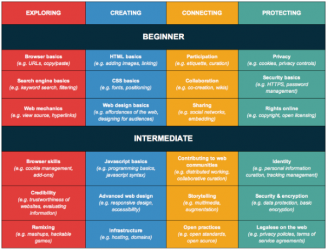
<br>Teaching the components of digital literacy -- from browser basics, to copy and paste, to web mechanics and beyond. Or teaching digital skills in a project-based context that serves other learning objectives.<br> | |||
</div> | |||
<!--End Bullet Point: Webliteracy--> | |||
<!--Bullet Point: Youth and Participant Development--> | |||
<div style="background-color: #FFFFFF; box-shadow: 0px 2px 4px rgba(0, 0, 0,0.25); border-top: 20px; border-radius: 5px; color: grey; float:left; font-family:'Open Sans Light','Open Sans',sans-serif; font-size: 14px; height:475px; line-height: 20px; margin:20px; overflow:hidden; padding-top: 10px; padding-left: 20px; padding-right: 20px; padding-bottom: 10px; position:relative; text-align:justify; width:328px;"> | |||
<div style="font-size: 28px; letter-spacing: -1px; line-height: 100%; color: #53535B; text-align:center;">[[Webmaker/Teach/BestPractices |Youth and Participant Development]]</div> | |||
<div style="box-shadow:rgba(0, 0, 0, 0.25) 0px 2px 4px 0px; position:center;">[[Image:MozPartyYouth.jpg|328px|link=Webmaker/Teach/BestPractices]]</div> | |||
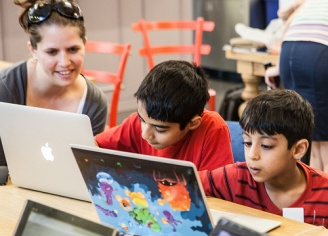
<br>Best practices and techniques for working with youth and other learning audiences and participants.<br> | |||
</div> | |||
<!--End Bullet Point: Youth and Participant Development--> | |||
<!--Bullet Point: Creativity/Production --> | |||
<div style="background-color: #FFFFFF; box-shadow: 0px 2px 4px rgba(0, 0, 0,0.25); border-top: 20px; border-radius: 5px; color: grey; float:left; font-family:'Open Sans Light','Open Sans',sans-serif; font-size: 14px; height:475px; line-height: 20px; margin:20px; overflow:hidden; padding-top: 10px; padding-left: 20px; padding-right: 20px; padding-bottom: 10px; position:relative; text-align:justify; width:328px;"> | |||
<div style="font-size: 28px; letter-spacing: -1px; line-height: 100%; color: #53535B; text-align:center;">[[Webmaker/Teach/MakeCreativity |Creativity and Production]]</div> | |||
<div style="box-shadow:rgba(0, 0, 0, 0.25) 0px 2px 4px 0px; position:center;">[[Image:MozFestCreativity.jpg|328px|link=Webmaker/Teach/MakeCreativity]]</div> | |||
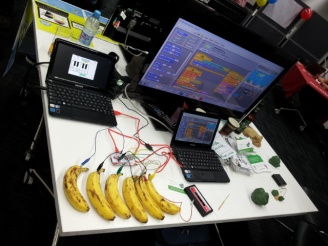
<br>Teaching participants how to build, create and produce things. Basic ideation and design skills, video- making, and resources that fall under a broader "maker" umbrella -- media-making, physical computing, games, electronics and more.<br> | |||
</div> | |||
<!--End Bullet Point: Creativity/Production--> | |||
</div> | |||
<br><br><br><br><br><br><br><br><br><br><br><br><br><br><br><br><br><br><br><br><br><br><br><br><br><br><br><br><br><br><br><br><br><br><br><br><br><br><br><br><br><br><br><br><br><br><br><br><br><br> | |||
<br/> | |||
===Get more involved === | |||
<div style="margin-left:5px;margin-right:10px;"> | |||
*Join the [https://webmaker.org/en-US/teach/ Webmaker Mentor] community at webmaker.org/teach | |||
*Follow [https://twitter.com/MozTeach Webmaker Mentors] on Twitter through @mozteach | |||
*Join [http://mzl.la/gpluswebmaker Mozilla Webmakers] on G+ | |||
*[https://wiki.mozilla.org/Webmaker/Teach/Help:AddtoMozTeachWiki Contribute to this wiki] | |||
*Ask questions, get support or join the conversation using #teachtheweb. | |||
</div> | |||
</div> | |||
Latest revision as of 21:08, 14 May 2013

Let's teach the web! Everything you need to get started is at webmaker.org/teach
This wiki includes:
- Additional resources: To help educators teach digital literacy and webmaking.
- Easy ways to contribute: Share and contribute your own resources.
How to Contribute
Here are three easy ways to share your own resources for teaching digital literacy and webmaking:
- Add them to this wiki,
- Post them to our Webmaker G+ community, or
- Tweet us @MozTeach with #teachtheweb.

Introduction to Engagement (12 talking slides)
We invite you to hack and remix any of the existing resources, curriculum and presentations in this wiki, then share them!
Resources

Get more involved
- Join the Webmaker Mentor community at webmaker.org/teach
- Follow Webmaker Mentors on Twitter through @mozteach
- Join Mozilla Webmakers on G+
- Contribute to this wiki
- Ask questions, get support or join the conversation using #teachtheweb.