Performance/Triage: Difference between revisions
Jump to navigation
Jump to search
No edit summary |
No edit summary |
||
| Line 2: | Line 2: | ||
__FORCETOC__ | __FORCETOC__ | ||
= Resources = | = Resources = | ||
* [[../Bugzilla]] | |||
* Triage query: https://mzl.la/perf-triage-query | * Triage query: https://mzl.la/perf-triage-query | ||
* Priority calculator: https://codepen.io/mstange/pen/eYeWrGr | * Priority calculator: https://codepen.io/mstange/pen/eYeWrGr | ||
| Line 7: | Line 8: | ||
= Nomination = | = Nomination = | ||
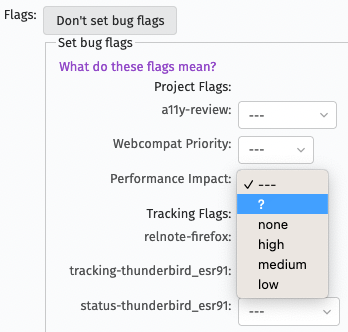
To nominate a bug for triage, set the | To nominate a bug for triage, set the [[../Bugzilla|Performance flag]] in Bugzilla to <code>?</code> | ||
This can be found by clicking '''Show Advanced Fields''' followed by '''Set bug flags''' when entering a new bug: | This can be found by clicking '''Show Advanced Fields''' followed by '''Set bug flags''' when entering a new bug: | ||
Revision as of 20:10, 1 March 2022
Resources
- Performance/Bugzilla
- Triage query: https://mzl.la/perf-triage-query
- Priority calculator: https://codepen.io/mstange/pen/eYeWrGr
- Triage rotation: https://mozilla.github.io/perf-triage/
Nomination
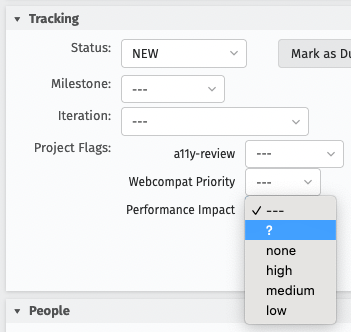
To nominate a bug for triage, set the Performance flag in Bugzilla to ?
This can be found by clicking Show Advanced Fields followed by Set bug flags when entering a new bug:

Or by expanding the Tracking section when editing an existing bug:

Triage Process
The goals of the triage process are:
- assign a priority (related to performance)
- assign a category
- possibly change the component
The calculator is a good way to find the right priority.
Sometimes the information isn't enough to make a decision, in that case we can "need info" the reporter asking for more data, for example an export of `about:support` or a performance profile, or simply more information about the steps to reproduce.